Remove someone who has left once, and they leave every SkedX app.
In review: written from the product, not yet walked through live.
1Find the person under Members
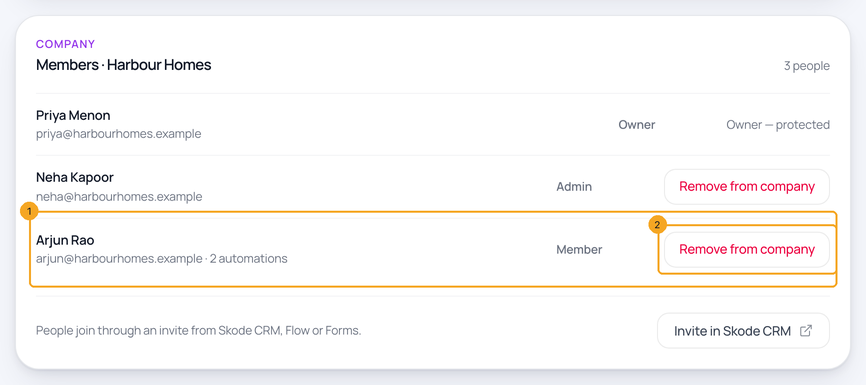
In SkedX Automate, open Settings. Under Members, find the person (1) and click Remove from company (2).
2Confirm
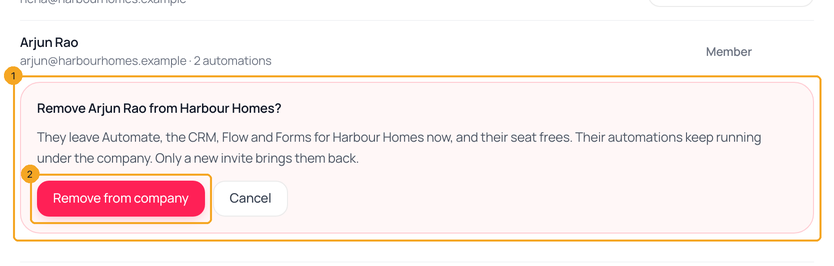
The confirm (1) opens under the row and says what happens: they leave Automate, the CRM, Flow and Forms for your company, and their automations keep running. Click Remove from company (2).
3They are out, and the seat is free
A line (1) confirms it: removed from your company in every SkedX app, one seat free. Only a new invite brings them back.

© 2026 SkedX · Sample data only · Share and link freely · Copying the product or its design is not allowed · Terms
Common questions
What happens to their automations?
They keep running under your company. The list shows how many each person owns.
How do I add someone?
Invite them from SkedX CRM, Flow or Forms. They appear here once they join.
It says “SkedX sign-in didn’t answer”.
Nothing changed. Click Try again in a minute.
Can I remove the owner?
No. The company owner can’t be removed.
How do they come back?
Only with a new invite.
Did this guide help?
Still stuck?Chat with support →


