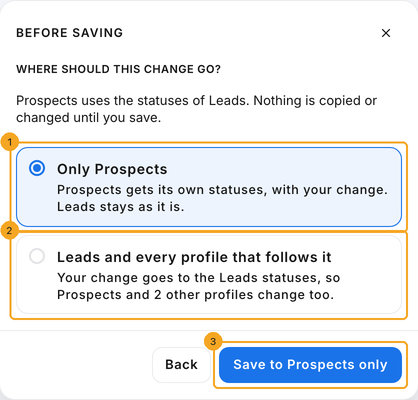
When you edit them, SkedX asks whether the change is for this profile only or for everyone who shares the list — and says exactly what each choice does.
In review: written from the product, not yet walked through live.
1Open Edit layout on a record in the profile
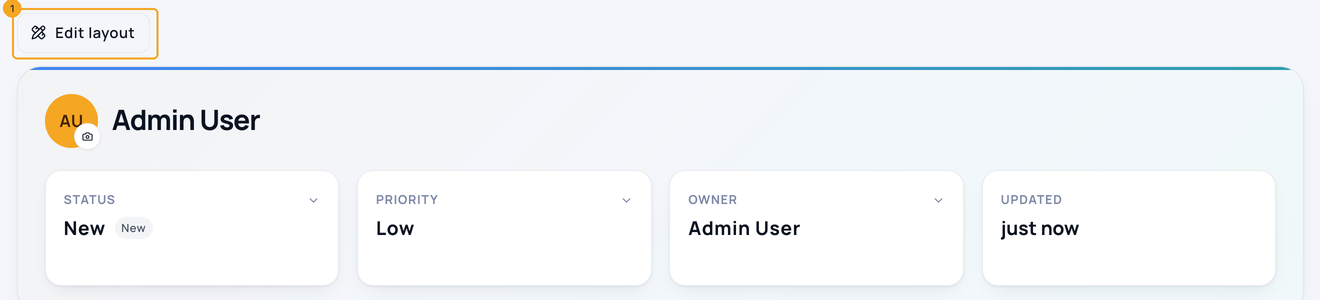
Open any record in the profile — or its sample record if it has none yet — and click Edit layout (1).
2Edit the Status options
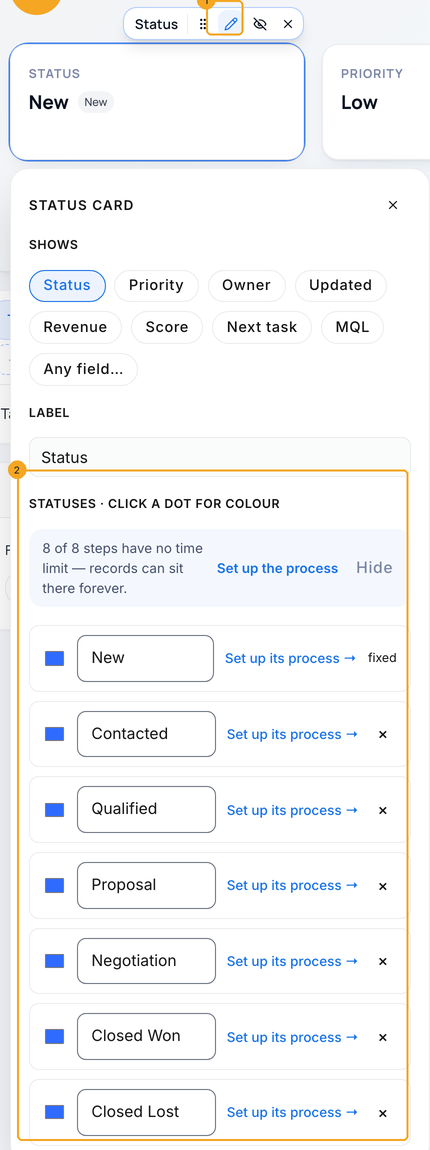
Click the Status card, then its pencil (1). Under Statuses (2) type over a name to rename it, click × to remove one, or click + Status at the end of the list to add one. If records are still in a status you remove, SkedX asks where to move them when you save. Then click Save at the top right of the page.
3Choose where the change goes
If the profile follows another list, Before saving asks where the change should go. Only Prospects (1) gives the profile its own statuses with your change and leaves the other list as it is. Leads and every profile that follows it (2) changes the shared list, so every profile that follows it changes too. The button says what will happen — Save to Prospects only (3) — and nothing is copied or changed until you press it.
4Choose the status people get when they enter the profile
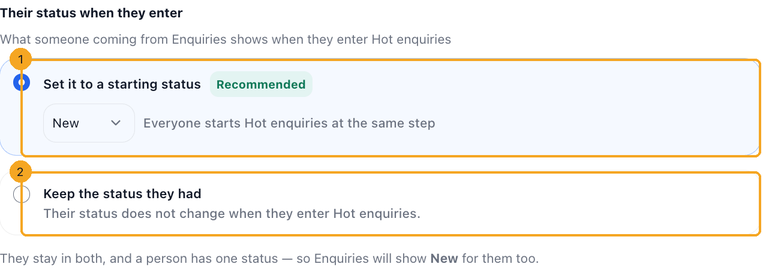
Open the profile’s Profile settings and click Who enters. Under Their status when they enter, choose Set it to a starting status (1) and pick the status everyone starts on, or Keep the status they had (2) so entering the profile never changes it. The change saves at once. If the profile’s rule looks at Status, only Keep is offered — setting a status would make people stop matching and leave again.
© 2026 SkedX · Sample data only · Share and link freely · Copying the product or its design is not allowed · Terms
Common questions
What happens if I remove a status some enquiries are still on?
It stays, archived. The enquiries on it keep showing its name, nobody can pick it for a new enquiry, and the save tells you which statuses stayed and how many records are on them. Move those records to another status first if you want it gone for good.
What happens to records if I give a profile its own statuses?
They keep their status. The profile simply starts from a copy of the shared list, with your change in it.
Does a lost status move the record on the stage rail?
Yes, when the profile’s stages include a Lost stage — for example Closed Lost. Marking someone with a lost status moves them there (only forward, like every automatic move). In Edit layout the status list says so: “Lost · moves to Closed Lost”. Without a Lost stage, a lost status leaves the record where it is.
Can a stage reached through a deal have its own time limit?
Yes. On the profile’s stages page, the stages no status leads to — Proposal, Pilot, Paid Customer and the like — appear after the statuses. Open one to give it a time limit, a next action and warnings. They apply while a record is on that stage, even though its status stays the same; while it sits at the stage its status leads to, the status’s own time limit applies.
How do I move many records to one stage at once?
In the list, tick the records, then click Stage in the bar at the bottom and choose the stage. Each record moves as if you had moved it on its own rail, and its status does not change. A record with a deal that would move back past the DEAL line is left where it is — the result says how many, so you can open each one and move it there.
A customer’s status went back to New when they entered a profile — why?
That profile is set to give everyone a starting status when they enter, and New is its starting status. A new profile starts that way. Open the profile’s settings, click Who enters, and under Their status when they enter choose Keep the status they had.
Can a profile follow the shared list again later?
Yes, in two steps. Open the profile’s settings and, on its Process card, click Turn staging off. Then, under Or use an existing process, choose the process it followed before, for example The Leads process. SkedX asks before it switches anything.
Next in ProfilesCreate a profile →
Previous: Set up a profile for a team: its own, or synced · All Profiles guides
Did this guide help?
Still stuck?Chat with support →


