Here’s the map.
In review: written from the product, not yet walked through live.
1The header — who and what state
Name, how to reach them, their tags, and who owns the profile. The action buttons (edit, message, more) live here too.
2The details panel
Their standard fields plus every custom field your org has added. Click a value to edit it in place.
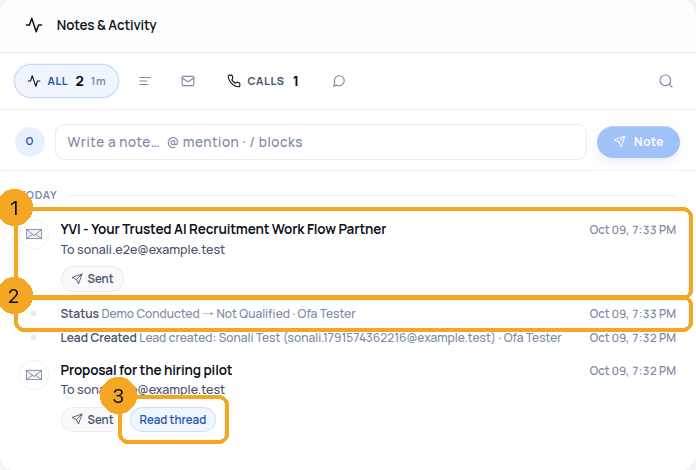
3The timeline
Everything that happened, newest first — messages, notes, calls, emails, status changes, tasks. This is the answer to “what’s the story with this person?” An email whose text was never kept (one sent before your history came into SkedX, for example) shows its subject, who it went to and whether it was sent or opened (1) — there is no thread to open. A status change reads by your own status names, from the old one to the new one (2) — “Demo Conducted → Not Qualified” — so renaming a status renames every line that used it. An email SkedX sent or received opens its thread with Read thread (3). Pick Calls above the timeline for the calls alone, with how many were answered and how long you talked — in seconds when it was under a minute.
4Conversations, deals and tasks
Tabs for each. A conversation opened from here shows the same thread your team sees in SkedX Flow.
© 2026 SkedX · Sample data only · Share and link freely · Copying the product or its design is not allowed · Terms
Common questions
A status line shows a code like “status_muu50wf6” instead of a name
That was a fault, fixed on 9 Oct 2026: every status line now reads by the name in your statuses list. If a line still shows a code, that value is no longer in your list — add it back to your statuses list — see Change the statuses of a profile below.
An email line will not open
Its text was never kept — only that it was sent, opened or not delivered. The line is the whole record. Emails sent or received in SkedX always open their thread.
Next in ProfilesThe classic Enquiries page is retired: where everything is now →
Previous: Fill any field in the import sheet · All Profiles guides
Did this guide help?
Still stuck?Chat with support →


