2 min readFor all rolesUpdated 6 Nov 2026In review
Without one you can see everything and change nothing — until an admin gives you one.
In review: written from the product, not yet walked through live.
Transcript · 1:05
In SkedX Form, a seat is what lets you make changes. Here is what you see without one, and how an admin gives it. Without a seat, try to make or change something, like New form, and a bubble says: View only. No seat in Form, you can view, not change. Every form, response and lead stays open to read. Click Ask an admin for a seat. An email opens to your workspace's owners and admins, with the link to where they give it. Opening a new form from a link says No seat in Form too, with the same button, and Back to your forms. An owner or admin without a seat sees Give a seat instead. It opens Settings, Users and Teams. In the Seat column, click Activate on the person's row. The meter counts the seat at once, and they can make changes after a reload. When every seat is in use, the row and the meter say Buy seats. It opens your company's SkedX account to add a seat. Come back and click Activate.
1Without a seat, you can view, not change
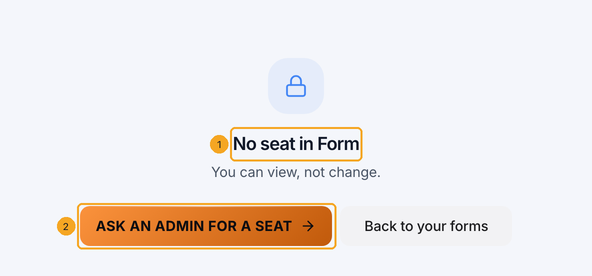
Try to make or change something — New form, Publish, a lead — and a bubble says No seat in Form — you can view, not change. (1) Every form, response and lead stays open to read.
The same bubble shows on New form, on Publish and when a save is refused.
Click Ask an admin for a seat (1). An email opens to your workspace’s owners and admins, with the link to the page where they give it. Once they have, reload the page.
One button: it writes the email for you.
3New form says it too
Opening a new form straight from a link shows No seat in Form (1) with the same button (2), and Back to your forms.
Nothing is created, and nothing is lost.
4An admin gives the seat
An owner or admin without a seat sees Give a seat (1) instead. It opens Settings → Users & Teams, where seats are given.
Someone who can manage users goes straight to the fix.
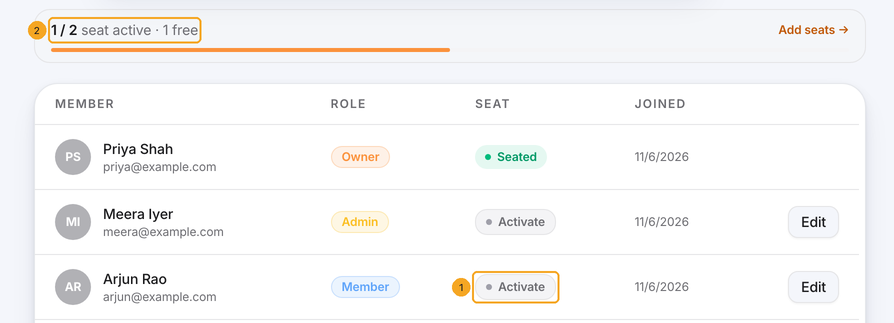
In the Seat column, click Activate (1) on the person’s row. The meter (2) counts the seat at once, and they can make changes after a reload.
Owners and admins see the Seat column’s buttons.
6Every seat in use? Buy seats
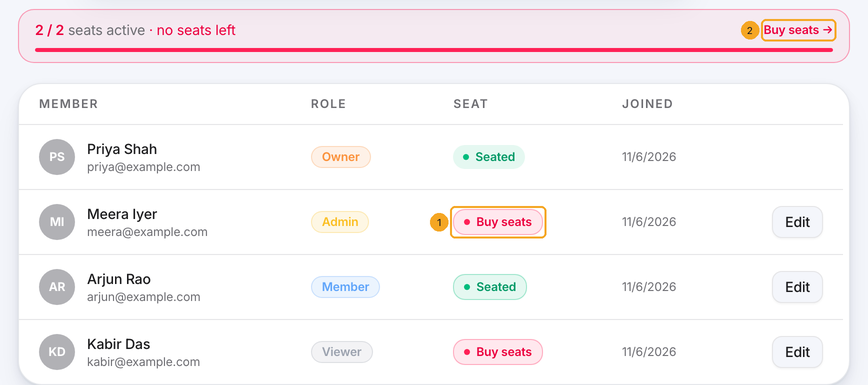
When every seat is taken, the row says Buy seats (1) and so does the meter (2). It opens your company’s SkedX account to add a seat — see Buy a plan or add seats. Come back and click Activate.