Here you set them for every page, see each day which pages need attention, and can ask for a suggestion — without touching your website’s code.
In review: written from the product, not yet walked through live.
1Open SEO and switch page tags on
On accounts.skode.ai, open SEO in the sidebar, under Signal. The switch at the top (1) says whether page tags reach your website. While it is off you can write and save; nothing changes on your website until you switch it on.

2See every page and what it says now
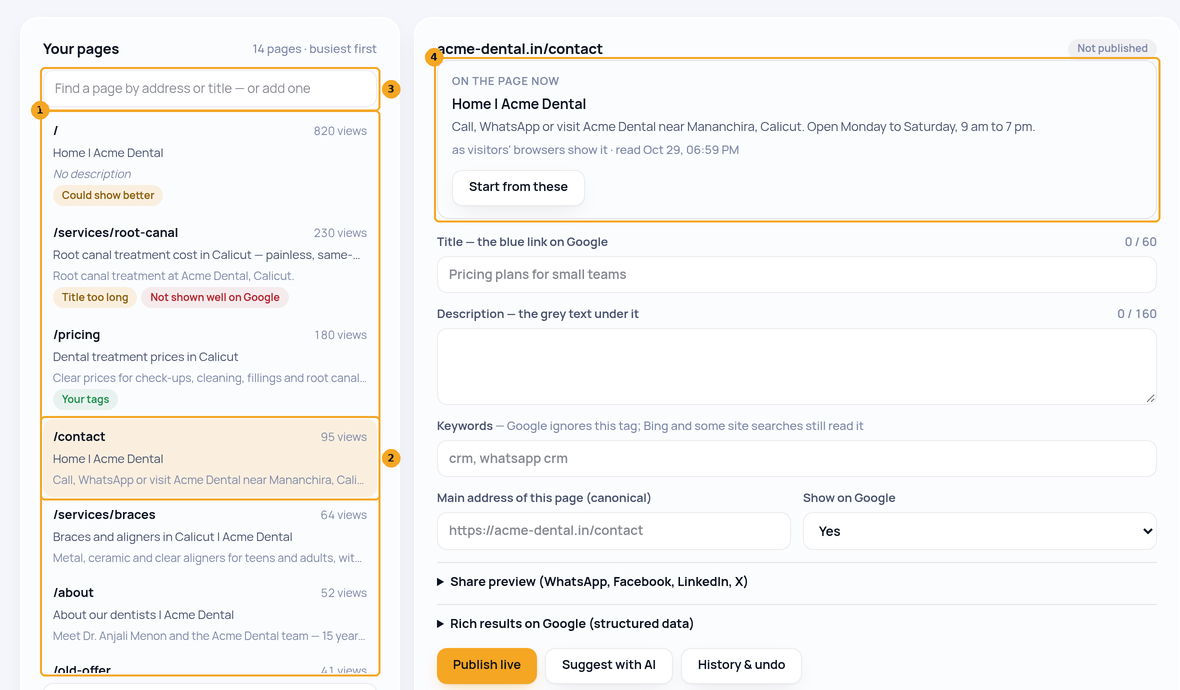
Your pages lists every page of your website — the ones visitors opened, the ones in your sitemap and the ones you wrote tags for — busiest first (1). Each row shows the title and description the page shows today (2), and chips for your tags or a problem the check found. Find a page by its address or title in the box above the list (3). Click a page: its editor starts with On the page now (4); Start from these copies them into the boxes to change.
3See which pages need attention
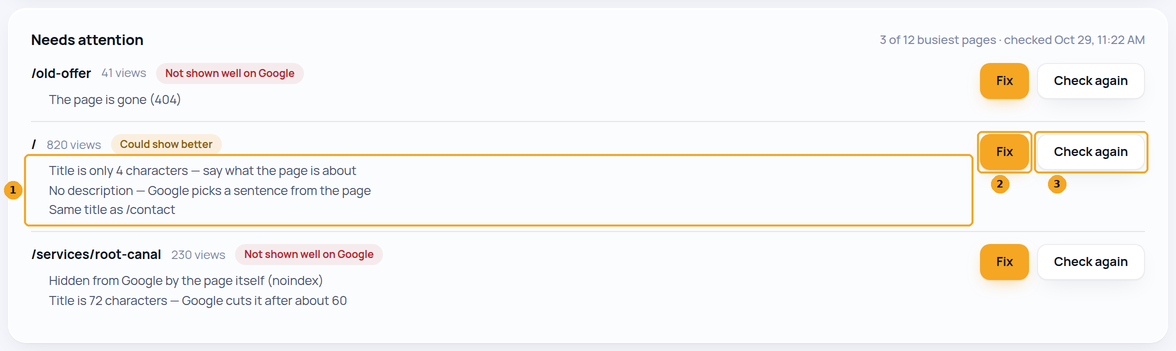
Needs attention lists your busiest pages that have a problem, worst first, each in plain words (1) — for example Title is 72 characters — Google cuts it after about 60 or Hidden from Google by the page itself. Beside each page are Fix (2) and Check again (3). It is checked every night while page tags are on; if your site has not been checked yet, click Check my pages.
4Fix a page
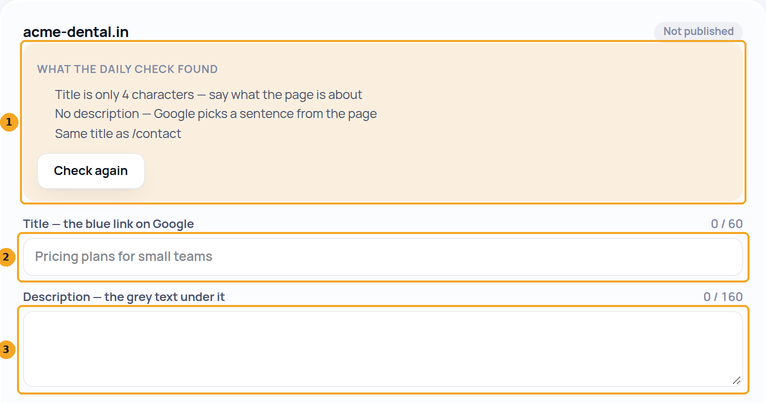
Click Fix beside a page. Its editor opens with What the daily check found at the top (1). Write the Title (2) and Description (3) — the counters show Google’s limits — and watch the On Google preview below them. Press Publish live: visitors see it within 5 minutes, and Google on its next visit. Then click Check again.
5Ask for a suggestion
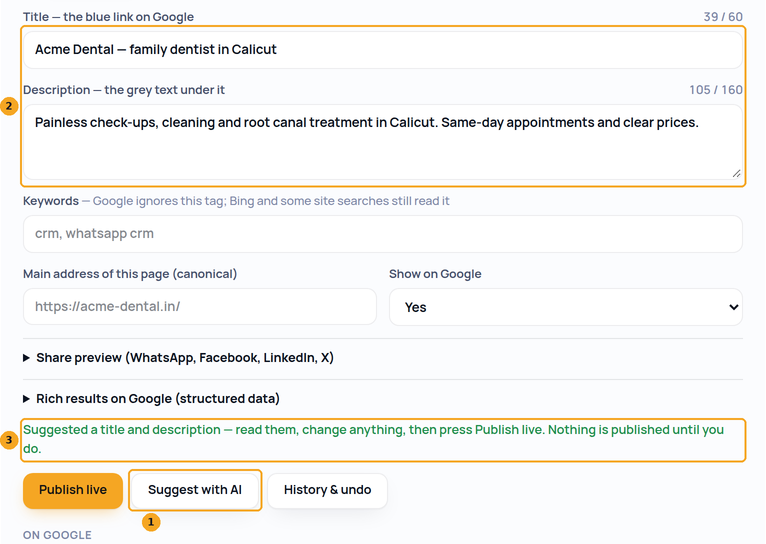
In a page’s editor, Suggest with AI (1) writes a title and description from what is on the page and puts them in the boxes (2). The line above the buttons (3) says so: read them, change anything, then press Publish live. Nothing is published until you do.
6Undo a change
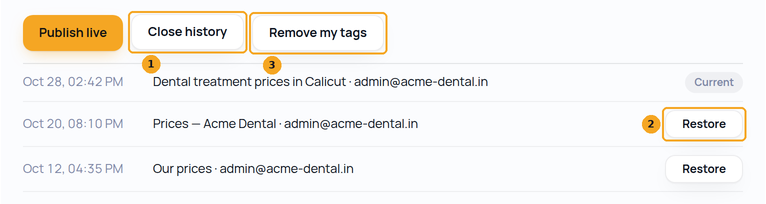
History & undo (1) lists every version you published for the page, newest first. Restore (2) puts an older one back; Remove my tags (3) lets the page show its own again.
7Show your tags in link previews (for your developer)
WhatsApp, Facebook, LinkedIn and X build a link preview from the page your server sends — they never run the Signal script. So your website’s server asks Signal for the page’s tags and puts them in the page. Signal answers at
https://signal.skode.ai/v2/seo?site_key=<your site key>&path=<the page> with the page’s title (t), description (d), share title, text and image (og) and the brand for every title (suffix), or nothing (204) when the page has no tags. Your site key is on accounts.skode.ai → Signal → Install. Ask at most every 5 minutes, and keep the page’s own tags if Signal does not answer within 2 seconds. A Next.js site does it in generateMetadata, as below; any other server (WordPress, PHP, Django) the same way. After a Publish, previews follow within 5 minutes.Next.js (app router) — lib/skode-seo.ts
const SITE_KEY = 'sk_…your site key…';

export async function skodeTags(path) {
  try {
    const res = await fetch(
      `https://signal.skode.ai/v2/seo?site_key=${SITE_KEY}&path=${encodeURIComponent(path)}`,
      { next: { revalidate: 300 }, signal: AbortSignal.timeout(2000) },
    );
    return res.status === 200 ? await res.json() : null;   // 204 = no tags for this page
  } catch {
    return null;                                            // Signal slow or down: keep your own tags
  }
}

// In a page: app/pricing/page.tsx
export async function generateMetadata() {
  const own = { title: 'Pricing', description: 'Plans for every team.' };
  const t = await skodeTags('/pricing');
  if (!t) return own;
  const title = t.t ? (t.suffix && !t.t.endsWith(t.suffix) ? `${t.t} | ${t.suffix}` : t.t) : own.title;
  return {
    title: { absolute: title },
    description: t.d || own.description,
    openGraph: {
      title: t.og?.title || title,
      description: t.og?.description || t.d || own.description,
      ...(t.og?.image ? { images: [t.og.image] } : {}),
    },
    ...(t.noindex ? { robots: { index: false } } : {}),
  };
}
© 2026 SkedX · Sample data only · Share and link freely · Copying the product or its design is not allowed · Terms
Common questions
Why does WhatsApp or Facebook still show my old title?
Link previews read only the page your server sends; they do not run the Signal script. Google does. Once your website’s server asks Signal for the tags (the last step, for your developer), previews follow within 5 minutes of a Publish. WhatsApp and Facebook also keep a preview they made for a while — Facebook’s Sharing Debugger fetches it again.
Which pages are checked?
Every page of your website Signal knows of — your busiest first, then every page you wrote tags for, every page in your sitemap and every other page visitors opened — up to 1000 each night, the ones read longest ago first. Check my pages checks the busiest 8 straight away; Read it now reads one page.
A page is missing from Your pages. Why?
Signal lists pages visitors opened in the last 30 days, pages in your website’s sitemap (yoursite.com/sitemap.xml) and pages you wrote tags for. Add the page to your sitemap, or type its address in the search box to write its tags now.
Where does “On the page now” come from?
From what your visitors’ browsers showed in the last 30 days — which is what Google indexes — or, for a page nobody opened lately, from what your website’s server sends.
My site is built in the browser (React, Bolt, Webflow apps). Is it checked properly?
Yes. The check reads each page the way your visitors’ browsers showed it, which is what Google indexes — not the empty shell a server sends.
Does Suggest with AI change my website?
No. It only fills the boxes in the editor. Nothing reaches your website until you press Publish live.
Useful links
Previous: Check whether SkedX Signal is on a page · All Your organization guides
Did this guide help?
Still stuck?Chat with support →


