One line of code on your website and every SkedX product can see who visits, where they came from, and the enquiries they send.
Before you take it, the page tells you exactly what it records and what it never does. About three minutes.
In review: written from the product, not yet walked through live.
1Read what Signal records
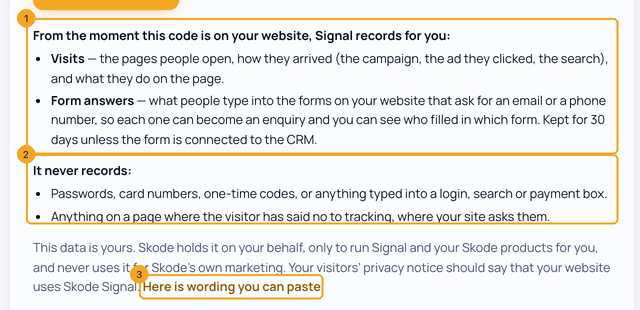
Go to accounts.skode.ai → Signal. Under your script, the page says what Signal records for you from the moment the code is on your website (1): the visits, and what people type into your forms that ask for an email or a phone number, kept 30 days unless the form is connected to the CRM. Then what it never records (2). Your visitors’ privacy notice should say your website uses SkedX Signal; Here is wording you can paste (3) gives you a sentence for it.
2Choose Record form answers, then take your script
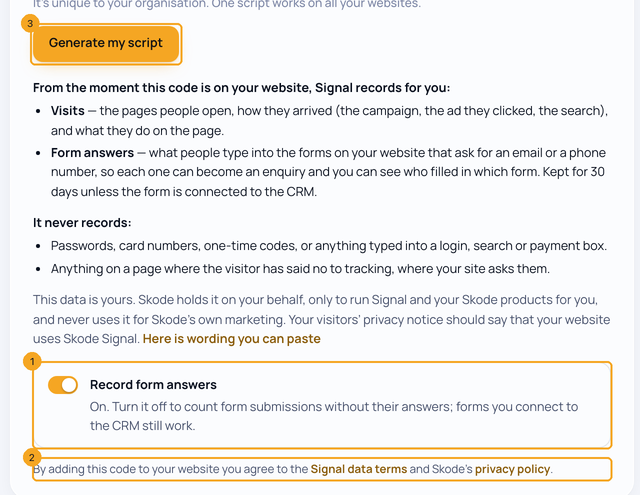
Record form answers (1) is on for a new site, so you can see who filled in a form before you connect it. Turn it off to count form submissions without their answers; forms you connect to the CRM still work. Adding the code to your website is agreeing to the Signal data terms and SkedX’s privacy policy (2). Click Generate my script (3).
3Paste it on your website and check
Paste the script just before
</head> on every page (1); any website builder works. On Google Tag Manager, open Using Google Tag Manager instead? (2) for the four steps. Then open your website, click around for a few seconds, and click Check now (3). The page becomes your Signal dashboard when the first visit arrives.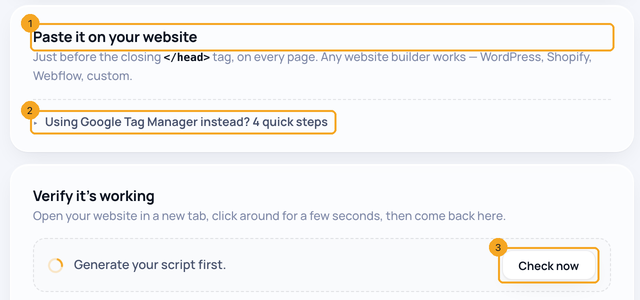
4Change it later
On the Signal page, Get script shows your script again, with the Record form answers switch (1). Turning it off deletes every form answer Signal is holding for your site. What it records, and what it never does (2) opens the full notice.

© 2026 SkedX · Sample data only · Share and link freely · Copying the product or its design is not allowed · Terms
Common questions
How do I check one page?
On Install & websites, type the address under Check a page. Signal says in one line whether it is on that page, and where its forms send.
Does Signal record passwords or card numbers?
No. Password boxes, card numbers, one-time codes and anything typed into a login, search or payment box are never recorded, and nothing is recorded on a page where the visitor has said no to tracking, if your site asks them.
Who owns this data?
You do. SkedX holds it on your behalf, only to run Signal and your SkedX products for you, and never uses it for SkedX’s own marketing.
How long are form answers kept?
Answers to a form you have not connected to the CRM are kept 30 days, encrypted, then deleted. A connected form’s answers become enquiries in your CRM.
What happens if I turn Record form answers off?
Signal counts form submissions without their answers and deletes the answers it is holding. Forms you connect to the CRM keep working.
Does a half-filled SkedX Form count as a submission?
No. Only a finished form counts as a submission. When someone fills part of a SkedX Form, or leaves it, Signal keeps that on their record as an unfinished form, but it is never counted as a submission or a conversion.
Do my SkedX Forms report to my Signal?
Yes. When your workspace has SkedX Signal, the pages of your SkedX Forms (form.skode.ai/f/…) report to your own Signal, by themselves — nothing to paste. The ad or link that brought each person (LinkedIn, Facebook, a campaign tag) lands on that person, so their record shows how they found the form. Someone who comes to your form from your website, with Signal on it, stays the same person across both. A form opened in preview reports nothing.
Why are my form visits not in my website traffic?
A visit to a SkedX Form page is counted as a visit to your form, not to your website, so your website’s visitors, page views and top pages stay about your website. The visit still shows on the person, as “Form page /f/…”, with the campaign that brought them, and a finished form counts as a submission.
I pasted SkedX Form’s older script (form.skode.ai/spy.js). Do I need to change it?
No, if your company has SkedX Signal. The older script now starts your Signal script on the same page by itself, so the page reaches Signal and your CRM’s Website forms with nothing to re-paste. It starts Signal only for a website address your Signal lists, and never a second time on a page that already has it. For a new page, paste the Signal script shown here — one script covers every SkedX product.
Next in Your organizationCheck whether SkedX Signal is on a page →
Useful links
Previous: Lead forms count as goals by themselves · All Your organization guides
Did this guide help?
Still stuck?Chat with support →


