Your customers come in many ways — a search, an ad, a chat, a call.
The Signal tab puts every one of them in order on the person’s record and shows which one made them an enquiry.
In review: written from the product, not yet walked through live.
1Open the Signal tab
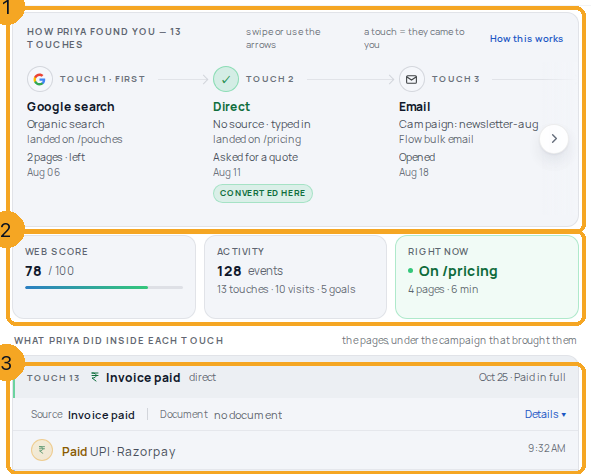
Open an enquiry or contact and choose the Signal tab — among the record’s tabs, or, on a record that shows the Activity card, inside that card next to Chats; it is the same tab in both places. At the top is the strip of touches (1), headed How Priya found you with the person’s own name, then three tiles (2) — Web score, Activity and Right now — and below them a section for each touch (3).
2Read the strip of touches
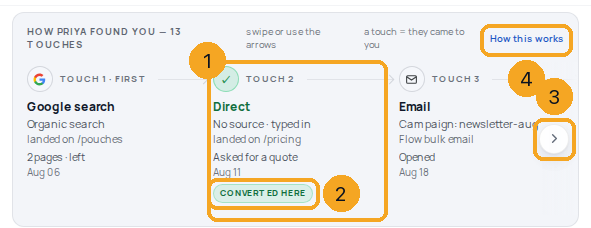
Each card (1) is one touch — a time they came to you — oldest first, with where it came from, the page they landed on and the date. The touch that created the enquiry says CONVERTED HERE (2). Use the arrow (3), or swipe, to see the later touches. How this works (4) opens this guide.
3Open a touch to see where it came from
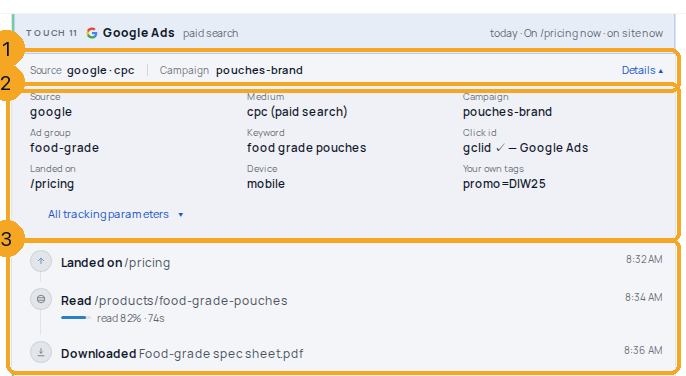
Each touch’s section starts with its source and campaign (1). Choose Details for everything that came with it (2): medium, ad group, keyword, the ad click id, the landing page, device and your own tags; All tracking parameters lists the rest. Below are the things they did inside that touch (3): pages they landed on and read, files they downloaded.
4See how long a chat ran
A chat touch says how many messages it holds — in its section’s header (1) and under its last row, with the time of the last message (2). SkedX reads it from SkedX Flow when you open the tab, with your own inbox access; if Flow is slow, the touch shows without it.

5See what happened after a touch
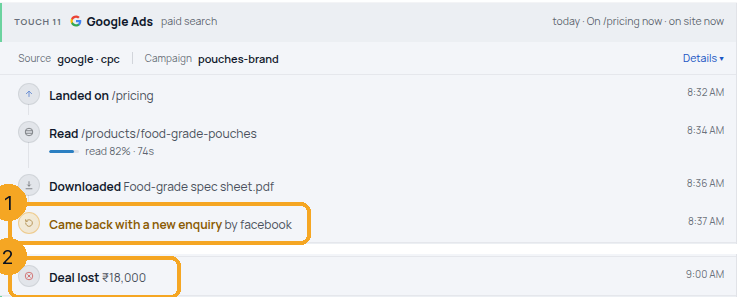
What came next sits on the touch before it: Came back with a new enquiry (1) when the same person wrote in again, and Deal lost with its amount (2) or Marked lost with the status when your team closed it. These are never counted as goals.
6See what is not a touch
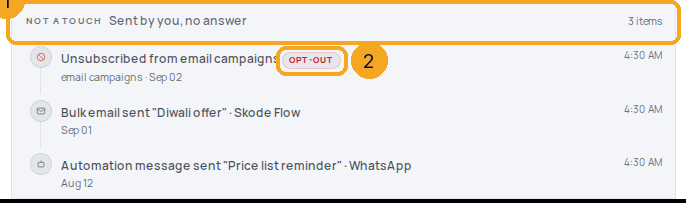
Messages you sent that got no answer — a bulk email, an automation message — are listed apart under Not a touch (1), because the person did not come to you. An unsubscribe shows as OPT-OUT (2).
7No email or phone yet
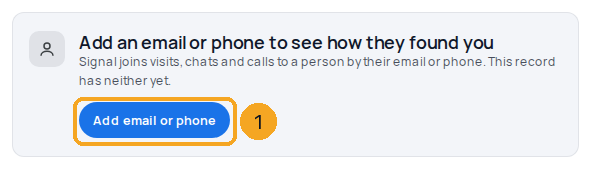
Signal joins visits, chats and calls to a person by their email or phone. If the record has neither, choose Add email or phone (1); the touches appear once it has one.
8On a phone
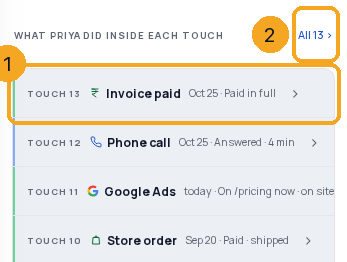
On a phone the touches are a list (1); All (2) shows every one. Tap a touch to open it.
9Read a touch on a phone
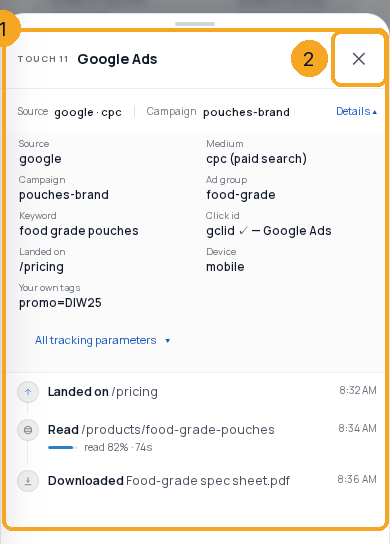
The touch opens in a sheet from the bottom (1) with the same source, details and what they did. Close it with ✕ (2).
© 2026 SkedX · Sample data only · Share and link freely · Copying the product or its design is not allowed · Terms
Common questions
What does “14 messages in all · last 11:20” on a chat mean?
How many messages that chat holds and when the last one was, read from SkedX Flow each time you open the tab. You see it only for chats your inbox access lets you see. If Flow is slow to answer, the touch shows without the line.
What do Deal lost, Marked lost and Came back with a new enquiry mean?
What happened after a touch: a deal on this record was marked lost (with its amount), the record was moved to a lost status (with that status), or the same person sent a new enquiry that was matched to this record. They sit on the touch before them. They are never counted as goals, so your goal numbers do not change.
Why does a salesperson’s email show as a touch?
When the person opens, clicks or replies to an email your team sent from SkedX CRM, they came back to you. One email conversation is one touch, such as Outlook email · 1:1 email, with what they did. An open marked SOFT SIGNAL came from an Apple mailbox, which can open emails by itself, so it may not be the person. A link to your own website in that email joins the visit it starts to the person.
What does JOINED on “Became known” mean?
It is the moment Signal learned who this browser was — an email or phone in a form, a chat or a link. The line says how many of their earlier visits and clicks, made before you knew them, joined this record then.
What do “On /pricing now” and “on site now” mean?
The person is on your website at this moment. Their latest touch’s card says which page they are on, and its section says how many pages they have looked at today. It changes as they move and goes once they leave.
What does “4 fields captured” on a form mean?
The form they sent carried 4 fields. It is a count only: the answers stay in SkedX Signal and are not shown on this tab. A form whose answers were held back says nothing.
Why does a touch say ChatGPT or Gemini?
The person came to your website from an AI assistant’s answer: ChatGPT, Perplexity, Gemini, Copilot, Claude or another one linked to you. SkedX Signal counts these visits as their own channel, AI Assistant, from 3 Nov 2026; earlier visits keep the channel they were saved with.
What counts as a touch?
A time the person came to you: a search, an ad click, a website visit, an email they opened, a chat, a call, a meeting, an order or a payment. A message you sent that got no answer is not a touch; it is listed under Not a touch.
Someone has no touches — why?
Signal joins activity to a person by email or phone. Add one to the record. Website visits show once SkedX Signal is on your website.
Does this send my customers’ data to Facebook?
No. The tab only reads what SkedX already has. Outcomes reach Meta only if you have set up Send CRM conversions to Facebook.
Next in IntegrationsSee what reached Facebook, and send a failed conversion again →
Did this guide help?
Still stuck?Chat with support →


