Website forms says “Signal is watching” when any page of your website has the script.
A landing page without it loses every visit and every enquiry it gets. Check a page tells you, page by page, in one line.
In review: written from the product, not yet walked through live.
1See a page that needs you
On accounts.skode.ai → Signal → Overview, a page you checked that still has no script is named under things need you (1), with where its form sends its answers. Click Check the page (2) to check it again.

2Check a page
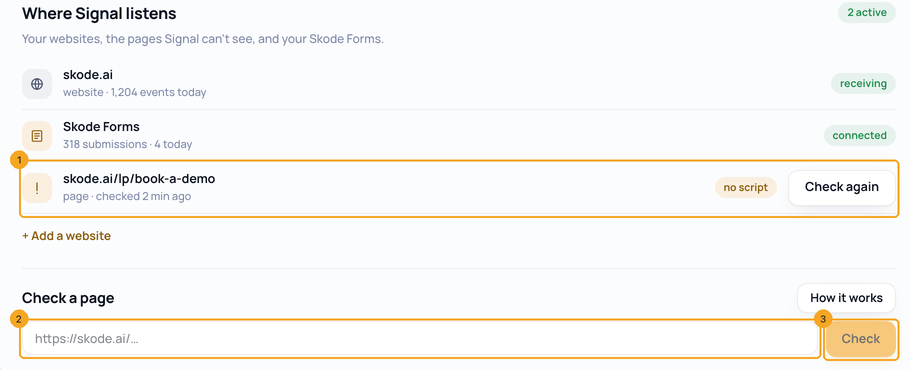
Open Install & websites. Under Where Signal listens, every page that still needs someone has its own row (1). Under Check a page, type any address on your website (2) and click Check (3). Nothing on your website changes.
3Read the answer and fix it
The first line (1) is the answer. Signal isn’t on this page: click Copy the line (2) and paste it just before
</head> on that page, or Email my developer (3) — the email carries the page and the line. Each form on the page is one row (4): Sends to Zoho CRM means it also sends its answers to another system, so those enquiries can end up there instead of in SkedX; Not seen yet means Signal adds it when the first person opens the page with the script.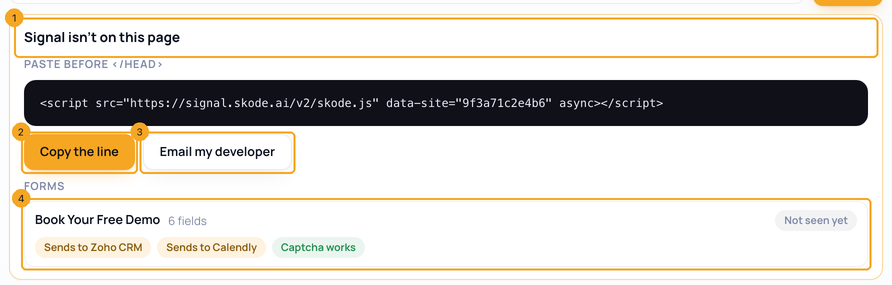
4When nobody can send a form
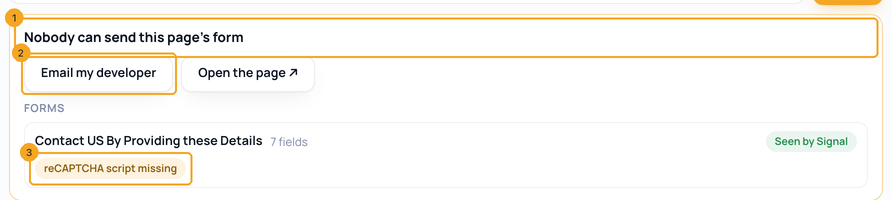
Nobody can send this page’s form (1) means Signal is on the page, but the form’s captcha has no script, so its send button never works. Email my developer (2): the email names the form and its captcha. The form’s tag (3) says which captcha.
5Check a page from the CRM
In SkedX CRM, Settings → Integrations → Website forms has Check a page (1) in its head — on a phone, Check a page on your-website ›. A page that still has no script is named above the numbers (2), with Check again.

6Connect a form the check found
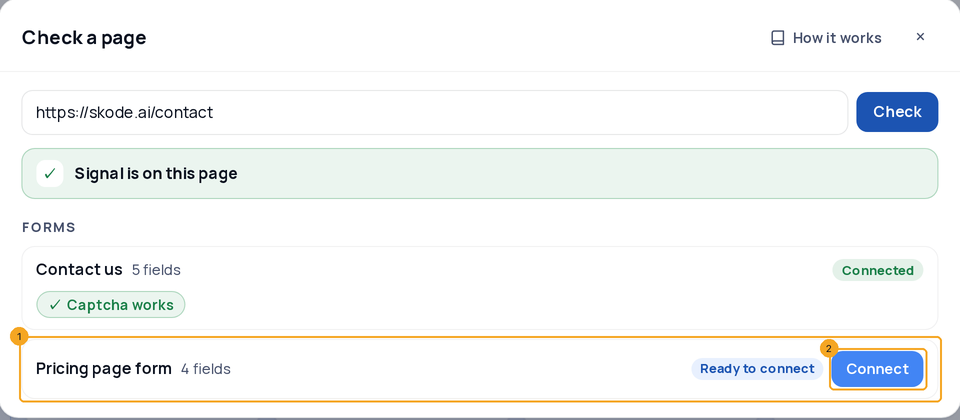
A form Signal has already seen on your website shows Ready to connect (1). Click Connect (2) — the same popup as on the Website forms page opens, and its enquiries start arriving.
© 2026 SkedX · Sample data only · Share and link freely · Copying the product or its design is not allowed · Terms
Common questions
Why does Website forms say “Signal is watching” when a page has no script?
That line answers for your whole website: one page with the script is enough for it. A landing page made separately — often for an ad — may not have it. Check that page.
Does a check change my website?
No. Signal reads the page the way a browser would, without running it, and keeps only the answer — never the page or anything a visitor typed.
Which pages can I check?
https pages on your own website: the addresses you added under Where Signal listens, and any Signal has heard from. 30 checks an hour.
My page uses Google Tag Manager. Why does it say “Signal may load through Tag Manager”?
A check can’t see inside a Tag Manager container. Open the page once in your browser — when Signal hears it, the page counts as having Signal.
What does “Its forms load in the browser” mean?
The page builds itself after it opens, so a check can’t list its forms. They show up on Website forms after the first visit with the script.
My page has SkedX Form’s older script. Why does a check say Signal is not there?
The older script (form.skode.ai/spy.js) starts Signal when the page opens in a browser, and a check reads the page without running it. Open the page once in your browser — when Signal hears it, the page counts as having Signal.
Next in Your organizationShow your pages well on Google — titles, descriptions and the daily check →
Useful links
Previous: Put SkedX Signal on your website · All Your organization guides
Did this guide help?
Still stuck?Chat with support →


