Every send a form makes is in <b>Activity</b>, with the reason it didn’t become an enquiry and one thing to do next. You need the <b>Manage integrations</b> permission.
In review: written from the product, not yet walked through live.
1Open Activity
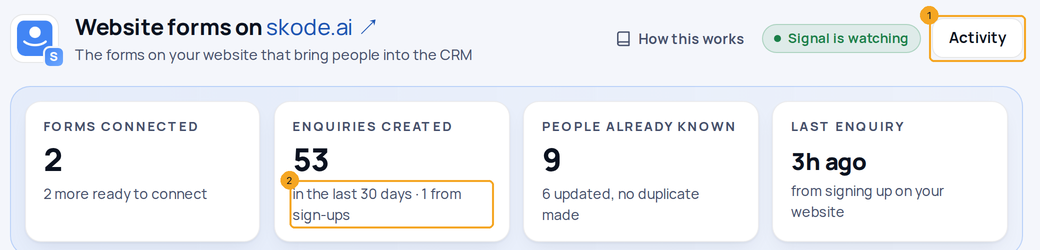
Go to Settings → Integrations → Website forms and click Activity (1) on the page, or on one form. People who signed up on your website count in Enquiries created too, and the box says how many (2).
2Show only the problems
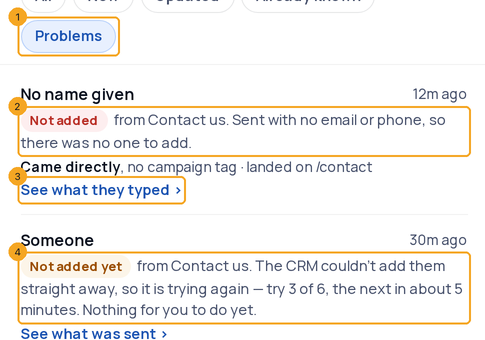
Click Problems (1). Each line says why it didn’t become an enquiry (2) and offers one next step (3). A line that says Not added yet (4) is our move: the CRM is trying again by itself, up to 6 times over about an hour, and the line says when the next try is.
3See what they typed
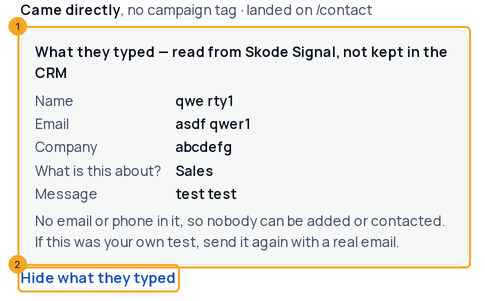
Sent with no email or phone means nobody could be identified, so there was no one to add. Click See what they typed: the answers open in the line (1), read from SkedX Signal and never stored in the CRM. Random letters usually mean someone was testing the form. Hide what they typed (2) closes it.
4Do the line’s next step
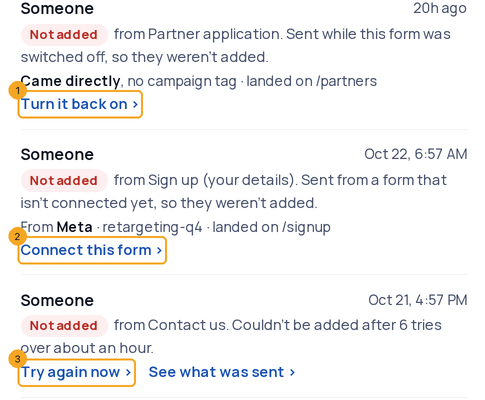
A send while the form was switched off offers Turn it back on (1). A send from a form that isn’t connected yet offers Connect this form (2), which opens the same popup as the page and can bring in the people already waiting. A send the CRM gave up on after 6 tries offers Try again now (3).
5When nobody can send the form
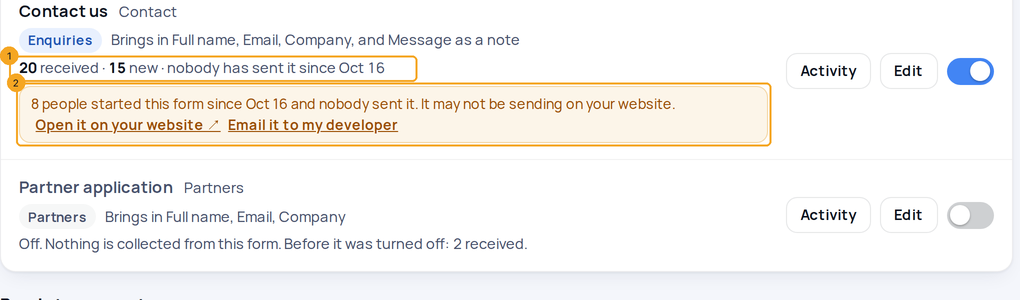
If people keep starting a connected form and nobody sends it (5 starts, no send for 7 days), its card says so (1) and shows a warning (2). In the warning, click Open it on your website to try it yourself, or Email it to my developer. A common cause is a security check, such as a captcha, whose script never loads, so the button stays greyed out. Owners and admins also get one notification, A website form may not be sending.
© 2026 SkedX · Sample data only · Share and link freely · Copying the product or its design is not allowed · Terms
Common questions
My landing page’s form never shows here. Why?
The page may not have Signal’s script, or its form may send its answers to another system such as Zoho CRM. Click Check a page on Website forms and paste the page’s address — it says which, and the fix.
Someone says they sent the form, but there is no line at all.
Signal may not be on that page, or the form never sent: if people start it and nobody sends it, its card says so. Open the page with Open it on your website and try it. A visitor who refused tracking on a site that asks is never recorded.
How long can I see what someone typed?
SkedX Signal keeps sends it could not link to anyone for 60 days. After that the line says it no longer has them. The CRM never stores what they typed.
What does Not sent mean?
Someone typed into the form and left without sending it. It is one line per form per day, with how many people did it, and only on websites that record partial fills. It is never counted as received.
Do I have to do anything when a line says Not added yet?
No. The CRM is trying again by itself, up to 6 times over about an hour. If it still can’t add them, the line offers Try again now.
Why do sign-ups show here?
Someone who signs up or signs in on your website becomes known without filling a form, and becomes an enquiry. Their line says from signing up on your website, and they count in Enquiries created.
Next in IntegrationsConnect Meta Lead Ads (Facebook and Instagram) →
Useful links
- Website forms in SkedX
- Integration history — Every website-form send, as it arrived
Previous: Turn your website forms into enquiries · All Integrations guides
Did this guide help?
Still stuck?Chat with support →


