So that a small team can set up its own follow-ups in the CRM without learning every setting: say what should happen to the enquiry, see what it would change, apply it.
In review: written from the product, not yet walked through live.
1Click + and say what the step should do
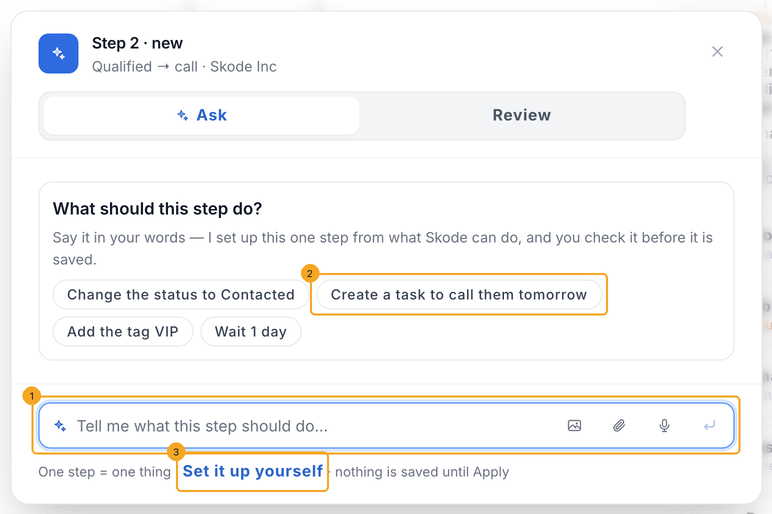
In Automate → Workflows, open an automation and click the + under a step. Type what the new step should do in the box (1), or pick an example (2). Prefer to choose it from the list? Click Set it up yourself (3).
2Check the step, and add the one more it needs
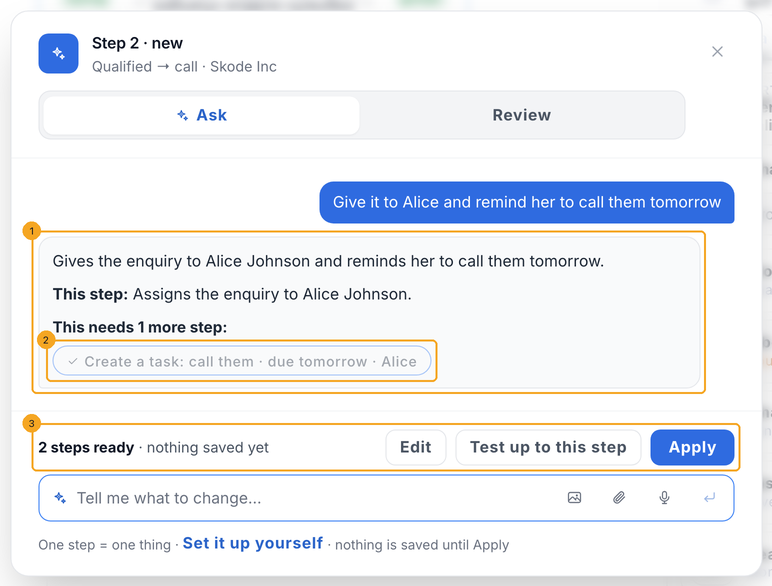
SkedX answers with the one step it set up, in words (1). One step does one thing, so when your sentence needs more it offers the extra step — click it to add it (2). The bar says how many steps are ready (3); nothing is saved yet.
3A chat step goes to SkedX Flow
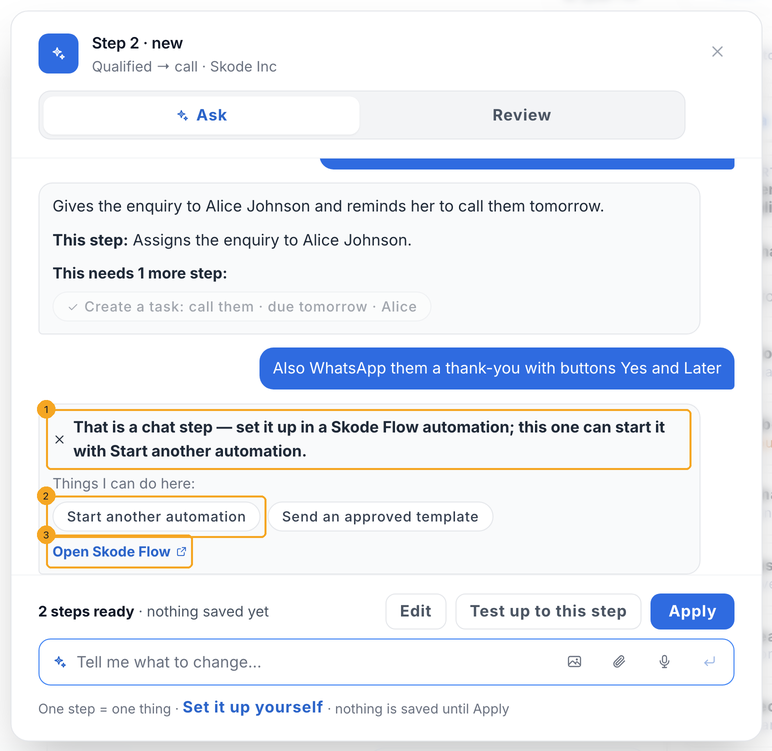
Buttons that wait for a reply are a chat, and chats are set up in a SkedX Flow automation. SkedX says so (1) and offers what this automation can do instead — Start another automation (2) or send an approved template — or Open Skode Flow (3) to build the chat. The steps already set up stay ready.
4Review what changes on the enquiry, then Apply
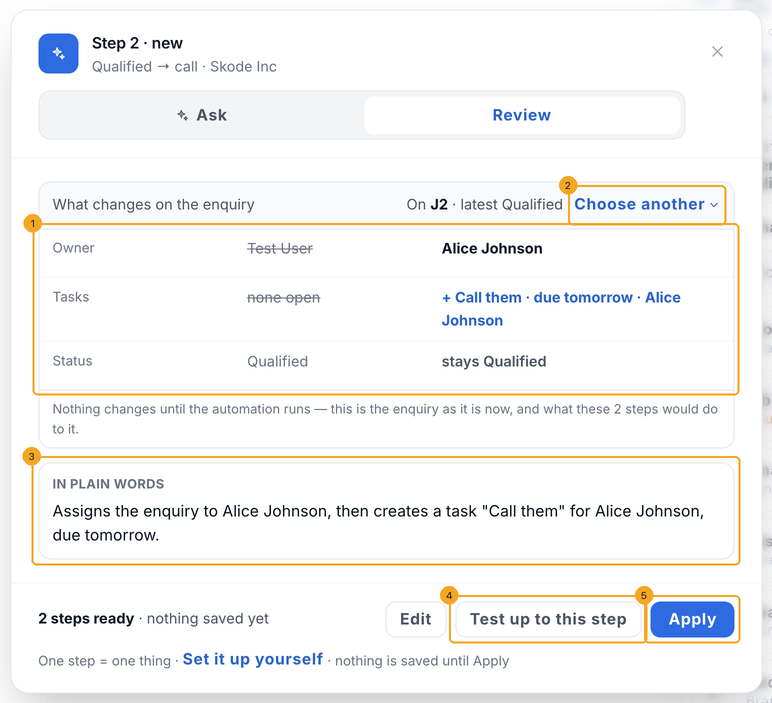
Open Review: what these steps would change on a real enquiry, before and after (1) — the latest one that fits the start, or Choose another (2). In plain words (3) says what the steps do. Test up to this step (4) runs the automation to here without sending anything; Apply (5) puts the steps on the automation, and Undo takes them back.
5Change a step that is there
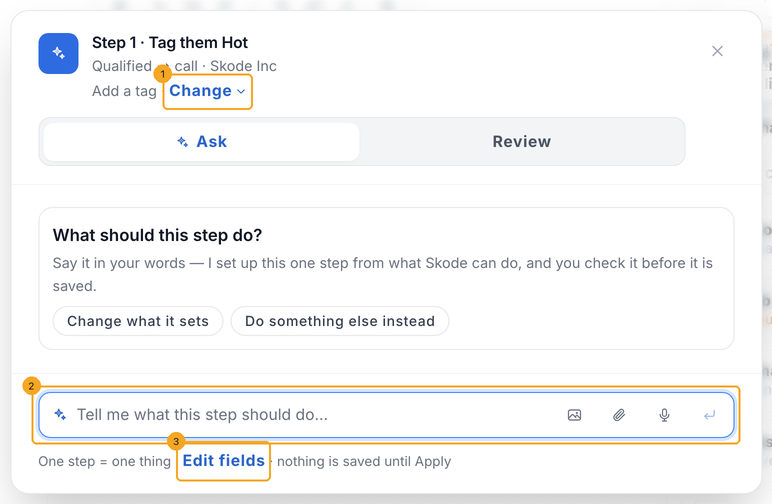
Click a step on the automation. The pop-up says what the step is, with Change (1) to make it another kind. Type the change in the box (2) — for example “tag them VIP instead”. Edit fields (3) shows the step’s own settings and always works, with or without asking.
© 2026 SkedX · Sample data only · Share and link freely · Copying the product or its design is not allowed · Terms
Common questions
I asked a step to “create a lead when a WhatsApp message comes” and it said it needs a new automation
This automation already starts on something else (for example a new enquiry), and a step can’t change what starts it. Click Start a new automation for this: a new automation opens in a new tab with your words already asked — it starts when a WhatsApp message comes in and creates the enquiry. Nothing in the automation you were in changes.
Does it save or change anything by itself?
No. Nothing is saved until you click Apply, and no enquiry changes until the automation runs. Review shows the enquiry as it is now and what the steps would do to it.
What can it set up?
Only the steps SkedX CRM really has: status, owner, tags, notes, tasks, fields, score, an email, telling a teammate, the deal stage, an approved WhatsApp template, waits, rules, paths, remembering a value and starting another automation. It uses your own statuses, people, tags and fields.
Why does it send me to SkedX Flow for a WhatsApp message with buttons?
A message that waits for the customer to tap a button is a chat, and chats are built in a SkedX Flow automation. This automation can start that one with Start another automation, or send an approved template on its own.
Can I start a new automation by describing it?
Yes — on a new automation, use Describe an automation instead. The pop-up on this page sets up and changes one step at a time.
What if asking is not working?
Use Set it up yourself on a new step, or Edit fields on a step that is there — both always work.
Useful links
- Workflows in SkedX CRM — where every CRM automation is set up
Previous: Build a SkedX CRM automation step by step · All Getting started guides
Did this guide help?
Still stuck?Chat with support →


