The list is only useful if you can carve it down to the people you mean.
Three tools do it.
In review: written from the product, not yet walked through live.
1Search
The search box on the Profiles list matches names, phone numbers and emails as you type.
2Filter
Filter by tag, owner, status or a field value. Filters stack — each one narrows the list further.
3Save the view
Built a filter combination you’ll use again? Save it as a view and it’s one click from then on.
4Filter from the side panel
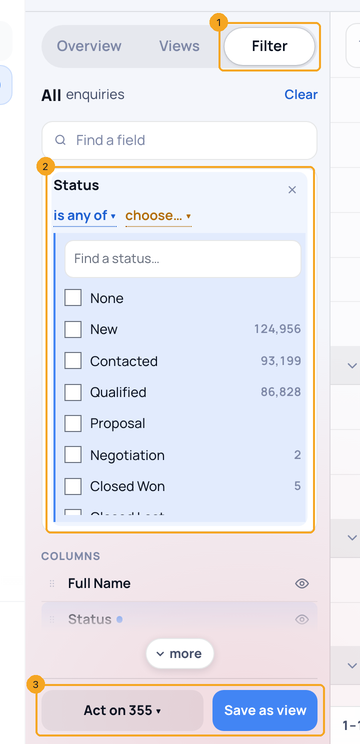
On Enquiries, open Filter in the side panel (1) and press a field to add a condition (2). The list narrows as you go. At the foot (3), Save as view keeps it and Act on works on everyone it shows.
© 2026 SkedX · Sample data only · Share and link freely · Copying the product or its design is not allowed · Terms
Common questions
How do I see the follow-ups that are due, including overdue ones?
Add a condition on the date field (for example Next follow-up date) and choose today or earlier. It shows every record whose date is today or any day before it; a record with no date is not shown. Save it as a view so the list is one click away. Don’t use “in the last 365 days” for this: it drops anything older than a year.
Can I filter a profile’s list by stage or by owner?
Yes. In a profile’s Filters, choose Stage to pick from the profile’s own stages (or Enquiries’ stages when the profile has none), and choose the owner field to pick people by name. “Is me” is still there for your own records.
Filters opened with conditions I didn’t set. Why?
Filters keeps an unfinished set of conditions if you leave without applying, and offers it back with a note at the top (“Restored draft from …”): Keep uses it, the ✕ beside it throws it away and goes back to what is applied. It is only offered over the same conditions you started from, so it never replaces a different saved view’s conditions.
Do capital letters matter when I filter?
Not on a field people type into. City is kochi also finds Kochi, KOCHI and “ Kochi ” with spaces around it — the same for is any of, starts with, ends with and does not equal. Fields where you pick from a list (Status, Priority and your own option lists) match the option you choose. An assignment rule with the same condition takes exactly the records this list shows.
Next in ProfilesSort a list by any column →
Previous: Tags and smart tagging · All Profiles guides
Did this guide help?
Still stuck?Chat with support →


