Click its name and the whole list follows — every page of it, not just the rows you can see.
In review: written from the product, not yet walked through live.
1Click a column to sort
Click a column’s name (1) in the header. The first click sorts it the way that column is usually read first — A → Z for names and words, High → low for numbers and money, Newest first for dates, a status in your pipeline’s order — and a blue arrow (2) shows the way. Click again for the other way, and a third time to go back to the view’s own order. The whole list is sorted on the server, so page two follows page one.

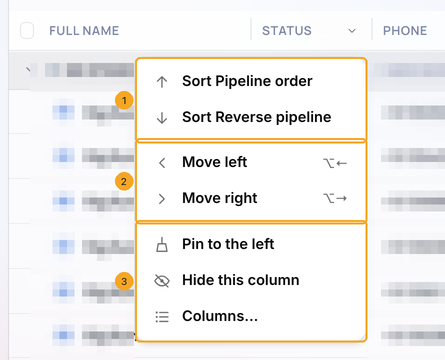
2The column menu
Point at a column and open its ▾, or right-click the column. Sort (1) names the order in that column’s own words, the first click’s order first — A → Z, High → low, Newest first, Pipeline order. Move left and Move right (2) move the column one place (or focus the header and press ⌥← / ⌥→). Pin to the left, Hide this column and Columns… (3) keep a column in view, take it off, or choose what the list shows.
3Drag a column to move it
Hold a column by its name and drag it left or right: it lifts (1), and a blue line (2) marks where it will land. Let go to drop it there. The name column moves the same way on every list, and your order is kept on your account — the same on any computer, and after you sign out. A row’s ⋯ menu column stays last (“Always last”).

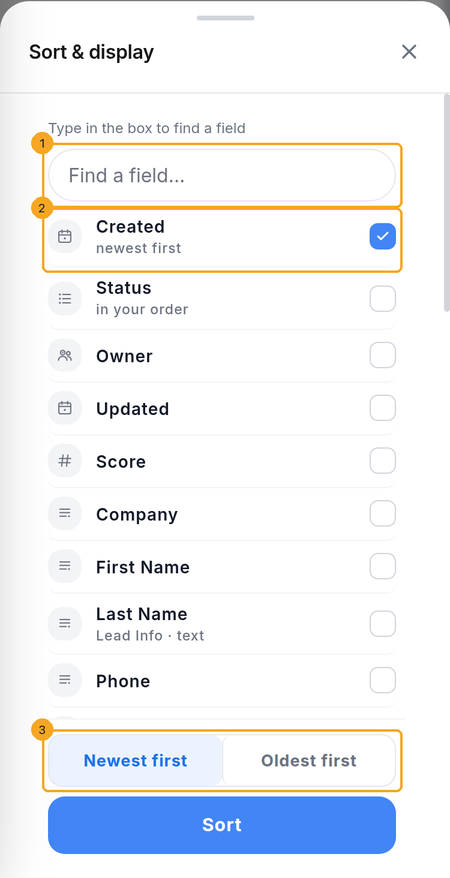
4On a phone: sort by any field
Tap Sort on the list. Type in Find a field (1) to narrow the fields, tap the one you want (2), then the direction (3) in that field’s words — Newest first, A → Z, High → low, Pipeline order. It starts on the same order a click on a computer gives; tap Sort.
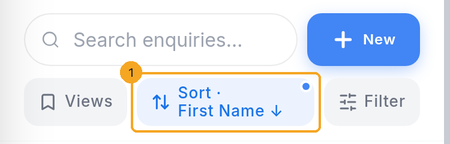
5The button says what sorts
Back on the list, the Sort button (1) names the field and the direction — for example Sort · First Name ↓. Tap it to change the sort, or pick Created to go back to newest first.
© 2026 SkedX · Sample data only · Share and link freely · Copying the product or its design is not allowed · Terms
Common questions
In what order does a Status column sort?
In your pipeline’s order — the menu says Pipeline order and Reverse pipeline — not A to Z, so New comes before Won the way your team reads it. Priority sorts the same way. Your own option lists sort in the order your admin listed the options (Option order).
Why does a number column sort biggest first?
Because that is what people look for first — the biggest budget, the newest enquiry, the yeses. Click once more for the other way (Low → high, Oldest first). Names and words still start at A.
Where do records with no value go?
Last, whichever way you sort, so the filled-in ones are always at the top.
Does a saved view keep its sort?
Yes. The sort is stored with the view, the same on a computer and a phone, so a view sorted on a computer opens sorted on a phone.
Which lists sort this way?
Enquiries, Contacts, Deals, and every profile drawn from them. On Contacts the Profiles and Deals counts say Not sortable yet. Contacts has no saved views yet, so its sort stays in this browser — sort on the phone and the computer opens in the same order.
How does the Deals list sort?
A deal sorts by its enquiry’s name, the Stage in your pipeline’s order, the Owner as the column shows it, and Value, MRR and Close date by value. Probability, Phone, Email, Source, Next step and Updated say Not sortable yet. A saved Deals view keeps its sort, and the phone’s Sort uses the same order.
A column says “Not sortable yet”. Why?
Some columns have no single value to order by — a formula, a field with many choices, a file. They show no arrow and say so; filter by them instead.
Next in ProfilesChoose the columns a list shows, and their order →
Previous: Search, filter, and save views · All Profiles guides
Did this guide help?
Still stuck?Chat with support →


