SkedX
Help · CRM · Profiles

Read a profile’s page: its own numbers, views and filter

2 min readFor all rolesUpdated 3 Nov 2026In review

A profile opens on the same page as Enquiries, in its own words and with its own numbers.

In review: written from the product, not yet walked through live.

Transcript · 1:08

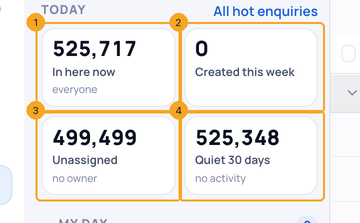
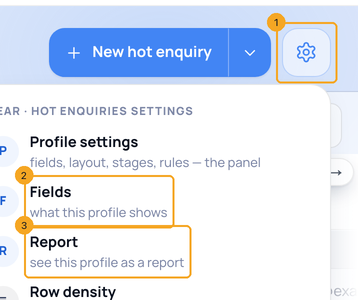
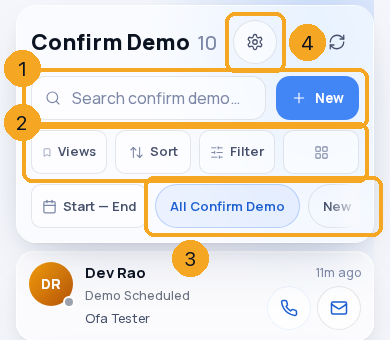
In SkedX, a profile built on Enquiries opens on the same page as Enquiries. Here is Confirm Demo. The side panel sits beside the list, with Overview, Views and Filter. Overview shows the profile's own four numbers. In here now shows everyone. Press Created this week, or Unassigned, to see exactly those people. Press it again to see everyone. Quiet 30 days only counts. Press the gear. Fields and Report are under Profile settings. Import is on the arrow beside New. On a phone, the profile has the same header as Enquiries. Search and New at the top. Then Views, Sort, Filter and the panel button. Next come the profile's own statuses. Tap one to see only those people. The title says how many of the whole. Each card shows the name with the time at the top right, then the status, then the owner, with WhatsApp, Call and Email beside them. Tap All Confirm Demo to see everyone again.

1Open a profile
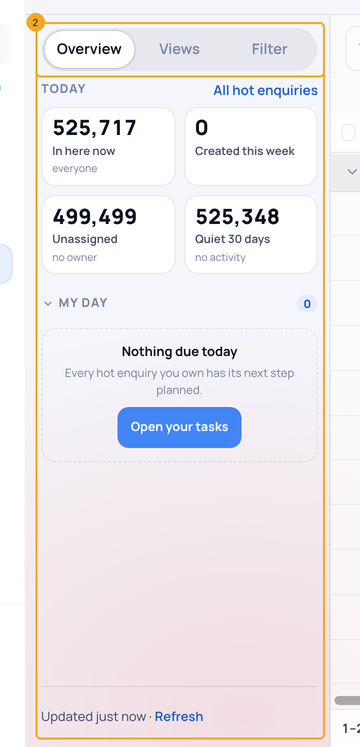
Under Profiles in the sidebar, open a profile built on Enquiries. The side panel (1) sits beside the list, with Overview, Views and Filter (2).
The side panel (1) with Overview, Views and Filter (2)

2Use its four numbers

In here now (1) shows everyone. Press Created this week (2) or Unassigned (3) to see exactly those people, and press it again to see everyone. Quiet 30 days (4) only counts.
In here now (1), Created this week (2), Unassigned (3) and Quiet 30 days (4)

3Find Fields and Report

Press the gear (1). Fields (2) and Report (3) are under Profile settings. Import is on the arrow beside New.
The gear (1) with Fields (2) and Report (3)

4On a phone

A profile has the same header as Enquiries: search and New (1), then Views, Sort, Filter and the panel button (2). Tap one of the profile’s statuses (3) to see only those people. The gear (4) holds Profile settings, Import, Fields and Report.
On a phone: search and New (1), Views, Sort, Filter and the panel (2), the statuses (3) and the gear (4)

© 2026 SkedX · Sample data only · Share and link freely · Copying the product or its design is not allowed · Terms

Common questions

Where did the blue band go?

Its four numbers moved into the side panel, and they work the same way.

Why is there no Board or Cards?

A profile has List only for now. Board and Cards are on Enquiries.

My profile looks different.

A profile built on Contacts has its own columns, and no Views or My day yet. See Read a Contacts list.

Does this change who is in the profile?

No. Only the page changed.

On my phone, what are the chips under Filter?

The profile’s own statuses, in its order. Tap one to see only those people. Tap All to see everyone.

Previous: Read a Contacts list: who they are, where they stand and what comes next · All Profiles guides

Did this guide help?

View as markdown

Keep reading

READY WHEN YOU ARE

One record
Start there

Free plan, no card. Five tools replaced in an afternoon; your data stays yours.

pick a slot. we call you, on your clock.
pick a slot.
we call you,
on your clock.

No card. We only use your details to set you up or call you back.

A 20-minute call with a real person, on your clock.
SetupUnder 5 min
CardNot required
Replaces5 tools
Your dataExport anytime