3 min readFor all rolesUpdated 11 Nov 2026In review
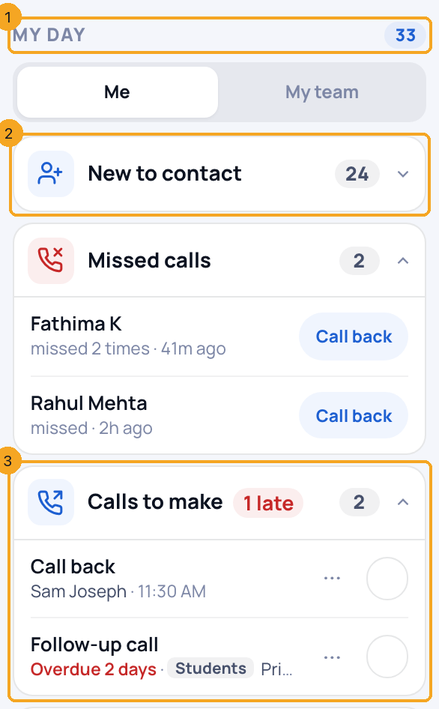
One card tells you what to do next: each kind of work with its number, most urgent first.
In review: written from the product, not yet walked through live.
Transcript · 1:16
What needs you today? My day lists it, kind by kind, in SkedX CRM. Open Overview in the side panel. My day counts everything left for today, and late work is shown in red. A big group folds to its number. Tap it, and its people open in place, each with one button. Tick a task when it is done. The three dots move it to another day, or mark it not needed. When a task is done, Plan next step opens the person, so nobody is left with nothing planned. Call, email or message as usual. Your matching task closes by itself, and you get five seconds to keep it open. A person from another profile wears its name. When an invoice is paid, a reminder that only names the person asks before it closes. If you lead a team, switch to My team. Each row says whose it is. An owner or admin can turn automatic closing off in Settings, under Tasks. That is your day in SkedX CRM: what is due, what is late, and what comes next.
1Read your day
Open Overview in the side panel. My day (1) counts everything left for today. Each kind of work is a card with its own icon and number: a big group is folded (2); a group of three or fewer shows its rows, with late work in red (3).
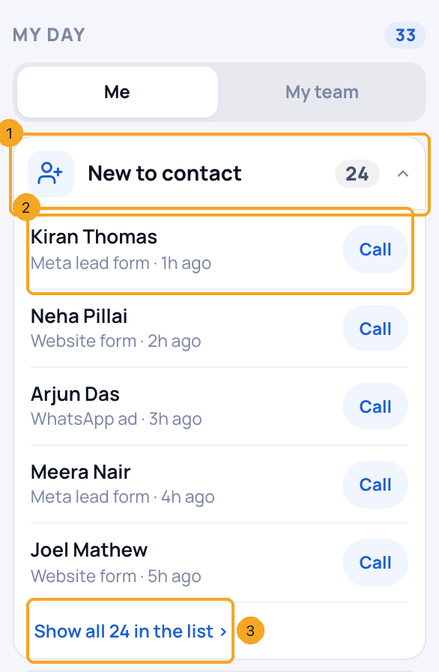
Tap a folded group (1). Its first five people open in place, each with one button (2). Show all in the list (3) narrows the list beside it to everyone in the group.
3Finish, move or drop a task
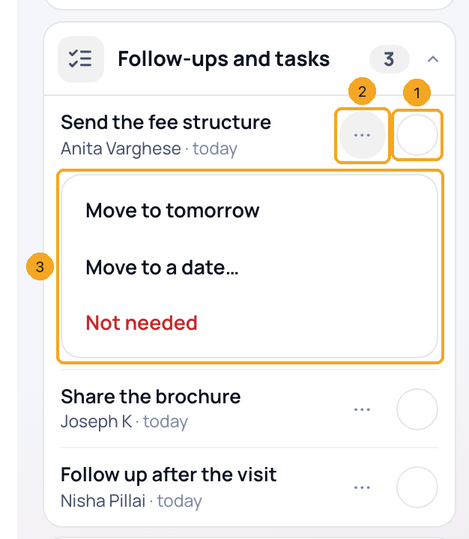
Tick the circle (1) when it is done. The three dots (2) open Move to tomorrow, Move to a date and Not needed (3). Not needed cancels the task: it stays in Tasks and on the person’s history.
4Plan what comes next
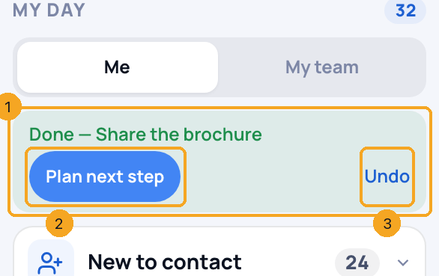
A finished task leaves and the bar (1) names it. Plan next step (2) opens the person so nobody is left with nothing planned; Undo (3) puts the task back.
5Let tasks close by themselves
Call, email or message the person as usual. If you have one task of that kind for them, due today or late, a bar says Closing … with Keep open for five seconds, then it is done. For a future task, two of a kind or a plain follow-up, it asks Was this it? and waits.
6See where a row comes from, and answer a paid invoice
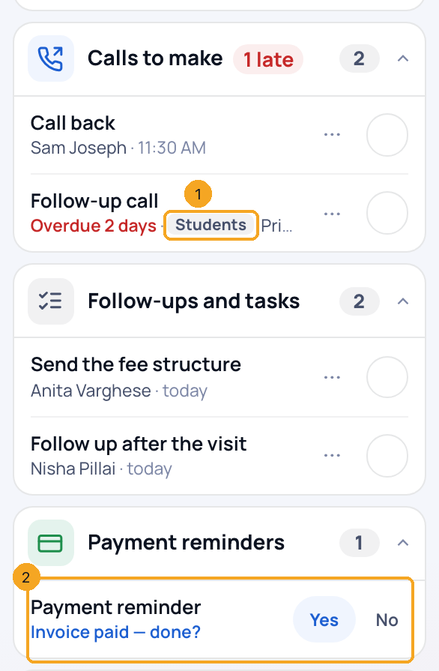
A person from another profile wears its name, such as Students (1). When an invoice is paid, its payment reminder closes by itself; a reminder that names only the person asks Invoice paid — done? (2): Yes closes it, No keeps it.
7See your team’s day
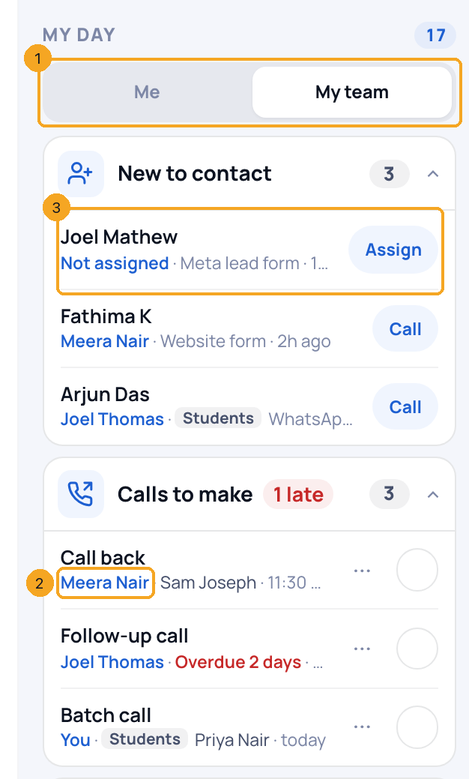
If your role sees other people’s records and your company has more than one person, Me · My team (1) sits at the top. In My team, each row starts with whose it is (2), and someone nobody owns yet says Not assigned with Assign (3).
8Turn automatic closing on or off
Open Settings → Tasks. Tasks close by themselves (1) is on for everyone; an owner or admin turns it off with the switch (2), and tasks then close only when ticked.
Your own work for today, on anyone in any profile: people assigned to you in the last 7 days whom nobody has contacted, missed and unanswered calls from the last 7 days, your tasks due today or late (calls, follow-ups, meetings, payment reminders), chats where the customer wrote last, and open people you own with nothing planned.
How does a task close by itself?
When your connected call, sent email or sent message is saved on the person, and you have exactly one open task of that kind for them due today or earlier. You get five seconds to press Keep open, and the closed task can be reopened later.
When does it ask instead of closing?
When the task is due in the future, when you have two tasks of the same kind for that person, when the task is a plain follow-up, or when the call was a tap on your own phone. Ignored, the task stays.
Why is a group folded?
A group with more than three items shows only its number. Tap it to open it in place.
Does it show other people’s tasks?
No. Only work assigned to you.
Can a company turn automatic closing off?
Yes. In Settings → Tasks, an owner or admin turns off Tasks close by themselves for the whole company.
Does a payment close my payment reminder?
Yes, when the invoice is paid in full and the reminder is for that invoice. A part-payment closes nothing. A reminder that names only the person asks Invoice paid — done? instead.
Can a manager see the team’s day?
Yes. Anyone whose role already sees other people’s records gets Me · My team at the top of My day, once the company has more than one person (SkedX’s own support account never counts). Each row names whose it is.
What is the small tag on a row?
The profile that person is in, such as Students, when it is not the list you are on.