Keep each person’s Instagram, LinkedIn and other accounts one tap away on the enquiry, next to their email and phone.
In review: written from the product, not yet walked through live.
1Find the line of icons
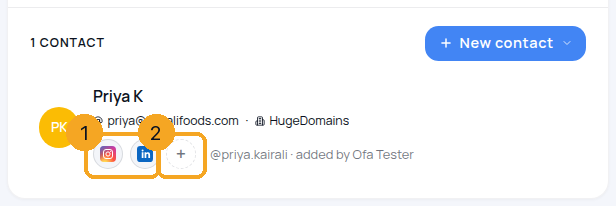
Open an enquiry and choose Contacts. Under each person’s details is a line of account icons (1) and a + (2).
2Add an account with +
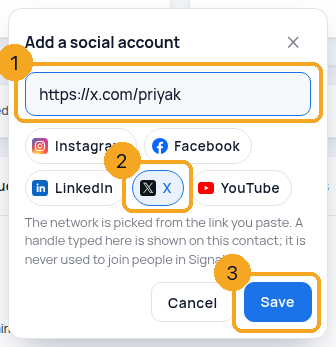
Press +. Paste their profile link (1) — the network is picked from it (2) — or type a handle and press the network. Then Save (3).
3Open, copy, edit or remove
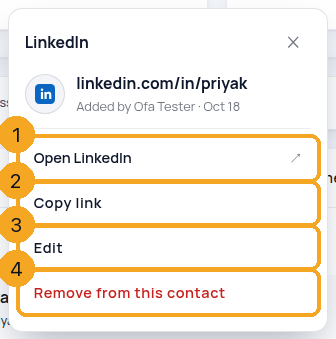
Press an icon: Open the account (1) or Copy link (2). One you added by hand also has Edit (3) and Remove from this contact (4) — press Remove twice to confirm.
4Accounts SkedX Signal joined
An Instagram or Messenger account SkedX Signal joined to the person (a DM or an ad chat) shows the same way, marked Skode Signal. It can’t be edited here; Hide on this contact keeps it off the line, and + then offers Show … again.
© 2026 SkedX · Sample data only · Share and link freely · Copying the product or its design is not allowed · Terms
Common questions
Does a handle I type match the person in Signal?
No. It is shown on the contact only. SkedX Signal joins people by what they do — a DM, an ad chat, a shared email or phone — never by a typed handle, which can be renamed or mistyped.
Why can’t I edit an Instagram account marked SkedX Signal?
It was not typed in; Signal joined it from the person’s own messages. You can hide it on this contact, and show it again from +.
I don’t see the + button
Adding needs edit access to contacts. Ask your admin.
Which links are accepted?
Profile links on Instagram, Facebook, LinkedIn, X and YouTube. Anything else is refused with the reason, so an icon never opens another site.
Next in ProfilesWhat is a profile? →
Previous: See everything that needs you today — My day · All Profiles guides
Did this guide help?
Still stuck?Chat with support →


