So that everyone who writes to you from an ad lands on one record by itself — named, owned, and never twice — without a workflow to build.
In review: written from the product, not yet walked through live.
1Switch it on and tick the channels
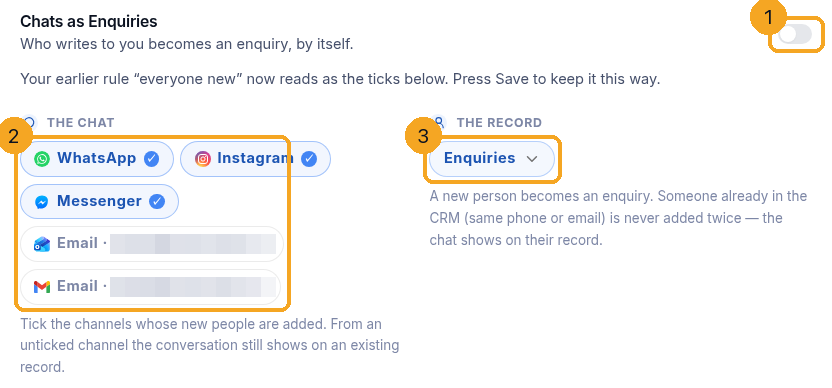
Go to Inbox → the gear → Chats as your profile. The switch in the title (1) turns it on. Under The chat, tick (2) each channel and mailbox whose new people are added — each wears its own mark. Under The record, pick the profile (3) they become. People already in the CRM (same phone or email) are never added twice; the chat shows on their record.
2See what crosses, and who waits
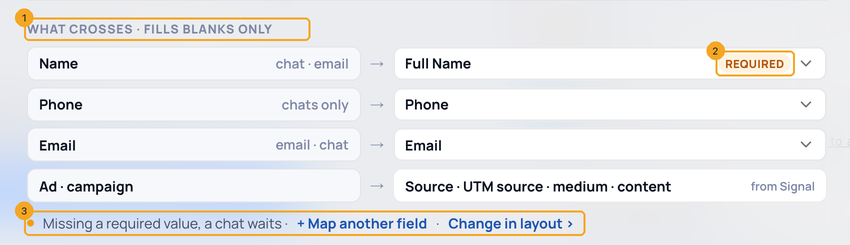
What crosses (1): name, phone and email each land in the profile field shown; the ad and campaign come from Signal. A field your profile’s layout requires is tagged Required (2): a chat without it waits rather than becoming half a record. A field the layout lets chats skip is tagged Not for chats. The line under it (3) says a chat missing a required value waits, and Change in layout opens the profile’s layout, where Required is set.
3Let chats skip a required field
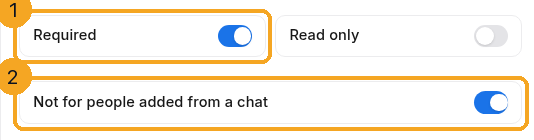
A WhatsApp chat has a phone but no email, so an Email your layout requires would make most chats wait. The layout decides: open Settings → Field Editor for the profile (or Change in layout on the card) — the profile’s page opens in Edit layout. Point at the field, press its pencil, and with Required (1) on, switch on Not for people added from a chat (2), then Save. Chats and emails can then add someone without it; forms, imports and people typing a record must still fill it.
4Only some chats? Add a rule
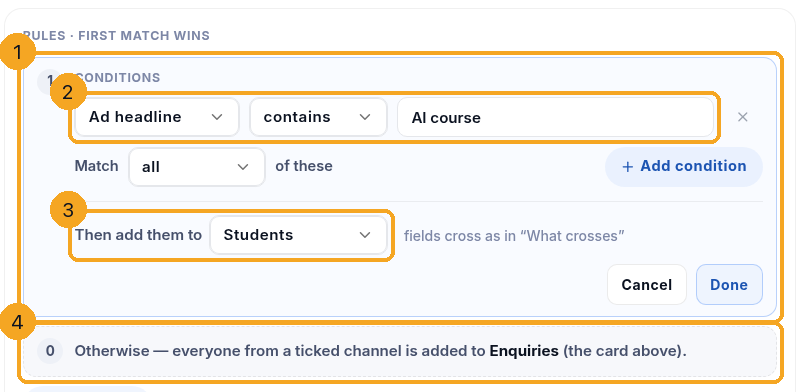
Click Only some chats? Add a rule. Each rule (1) is read top to bottom and the first match wins. Its conditions (2) are the same rows every filter uses — channel, number or mailbox, has a phone or email, first message contains, came from an ad, ad headline contains — with Match all / any. Then add them to (3) picks the profile. Rule zero (4), everyone from a ticked channel, is read last.
5More options: status, broadcast replies, AI answers, automations
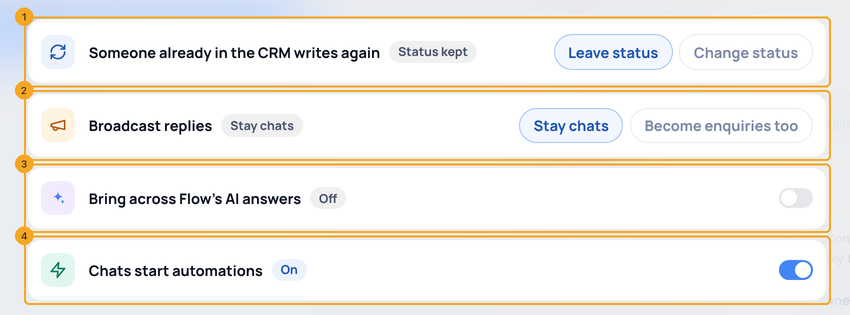
Click More options under the rules. While it is closed it names any choice that is not the default. Someone already in the CRM writes again (1): Leave status (the default) keeps a Paid customer Paid; Change status asks If status is and Change to, for chats and connected mailboxes. Broadcast replies (2): Stay chats (the default) or Become your profile too — a reply within 72 hours of a WhatsApp campaign counts as a reply to it, and a list you upload for a broadcast is never added. Bring across Flow’s AI answers (3): switch it on and point each question Flow asks in chat at one of the profile’s fields; blanks are filled, never overwritten. Chats start automations (4): off, a message starts no CRM automation — nothing is deleted or paused; this one saves at once. The other three save with Save.
6Watch it work, and add who is waiting
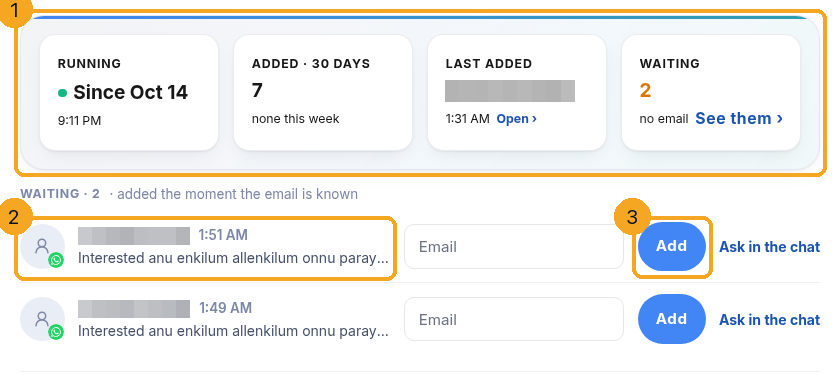
Once on, the card shows (1) since when it runs, how many it added in 30 days and this week, the last person added (Open goes to their record) and how many are waiting (See them goes to the list). Each waiting person (2) has a box for the missing value: type it and press Add (3), or Ask in the chat. They are also added by themselves the moment the value arrives in the chat.
7When it cannot run
If chats stop being added, the card says so (1): how many, since when, and what SkedX was told. The button beside it (2) is the one fix — for example running it as your company’s owner. Each person is added the next time they write.

8Open the person from the chat
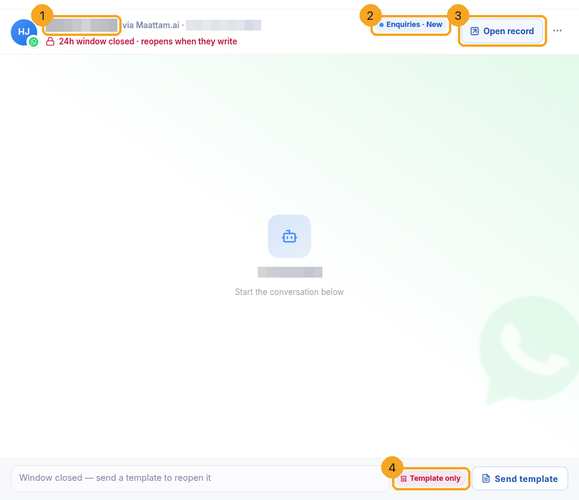
In a chat, the header shows the person’s name from the CRM (1), where they are — profile · status (2) — and Open record (3). Add to profile appears only when nobody matches. Free-form OK or Template only (4) sits in the reply box, beside Send.
© 2026 SkedX · Sample data only · Share and link freely · Copying the product or its design is not allowed · Terms
Common questions
Does someone who replies to my WhatsApp broadcast become a record?
Not by default — a reply within 72 hours of a campaign stays a chat. Open More options and choose Become too to add them like anyone else who writes. People already in the CRM are linked either way, and a list you upload for a broadcast is never added.
Why is a chat waiting?
Your profile’s layout marks a field required (often Email) and the chat has not given it yet. The person waits on the card instead of becoming half a record. They are added the moment the value arrives in the chat, or when someone types it on the waiting row and presses Add. If chats should never wait for that field, tick Not for people added from a chat under Required in the layout.
Can I change Required on the Chats as card?
No — the layout is the one place Required is set, so a field means the same thing everywhere. The card shows what the layout says and links Change in layout; there, under Required, Not for people added from a chat lets chats skip that field.
Why does the chat header show a name the customer never typed?
It is the name on their CRM record, found by the phone or email they wrote from — the name your team typed. With no record it shows the name from the channel, and with none at all the number, written properly.
Where did Convert to enquiry go?
It is now Add to , and it only appears when nobody in the CRM matches the chat. When the person is already in the CRM, the header offers Open record instead, so nobody is added twice.
Does a mailbox add everyone who emails it?
Only a mailbox you tick, and only senders the CRM does not have yet. A mailbox set to show People in the CRM never adds anyone — it only links mail to people you already have.
Who owns the new record?
Whoever the chat is assigned to. If the person already has a record with an owner, that owner keeps them.
Someone who is already a lead wrote again in a new chat — will they get a second record?
No. When a chat or an email comes from a phone number or email address already on a record, it joins that record — whether they come back weeks later, write to another of your numbers, or fill in your Facebook form and then tap through to WhatsApp. Who counts as the same person is your duplicate rule (for example phone and email both, or your own customer number); with no rule set, the phone, then the email. Whether to add them as new is never asked for a chat, and a number saved without the country code still matches. Empty fields are filled from the chat and nothing is overwritten; the owner keeps them and is told they got in touch again. The record’s status stays as it was, unless your company chose otherwise under More options. The record’s history says they got in touch again. A different number and email is a different person to the CRM: if the same customer used two, merge the two records.
Previous: When an email is not delivered: why, and what to do · All Inbox guides
Did this guide help?
Still stuck?Chat with support →


