Four numbers that answer “what needs me today?” — and one press shows you who they are.
In review: written from the product, not yet walked through live.
1Open the Overview
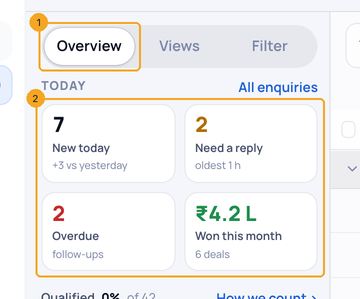
On Enquiries, the side panel opens on Overview (1). The four numbers sit at the top (2).
2Press a number to see who it counts
Press Overdue (1): the tile stays lit and the list shows exactly those enquiries (2). Press it again to see everyone.

3Read what each number counts
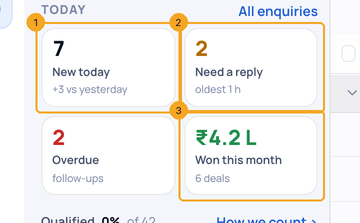
New today (1) compares with yesterday; Need a reply (2) says how long the oldest has waited; Won this month (3) shows the money and how many deals.
4Your Qualified rate, under the four
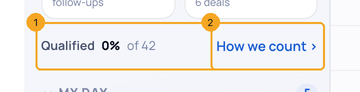
Under the four numbers, Qualified (1) says what share of your enquiries reached the stages your team counts as qualified — press it to see only those, again to see everyone. How we count › (2) shows which stages count. Not chosen yet? The line says Not set up and Set up › takes you there.
5On a phone
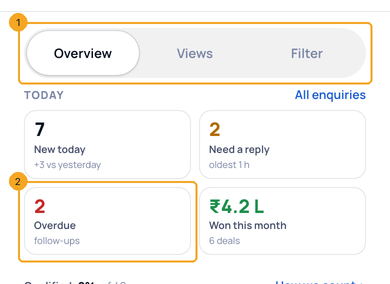
Tap the panel button beside Filter on the list: the same Overview · Views · Filter (1) open as a sheet. Tap a number (2) and the sheet closes on exactly those enquiries; open the sheet and tap the number again to see everyone.
© 2026 SkedX · Sample data only · Share and link freely · Copying the product or its design is not allowed · Terms
Common questions
Why does Need a reply show a dash?
Chats could not be read just now. Press the tile to try again.
Does Won this month count a deal I created last month?
Yes, if it was won this month — a deal counts in the month it was won, not when it was created.
Do the numbers count only my enquiries?
They count the enquiries you are allowed to see on this list.
Next in ProfilesSee everything that needs you today — My day →
Did this guide help?
Still stuck?Chat with support →


