Everything you need to read the list at a glance sits in one panel beside it, in three tabs.
In review: written from the product, not yet walked through live.
1The side panel and its three tabs
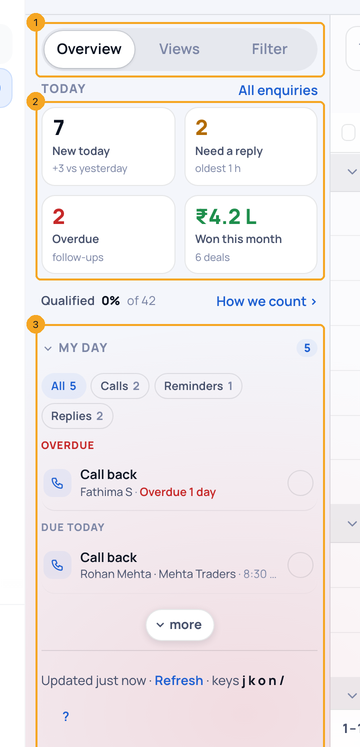
Beside your list is one side panel with three tabs (1). Overview starts with four numbers (2): press one to see exactly those enquiries. Under them is My day (3), what needs you today.
2Your views
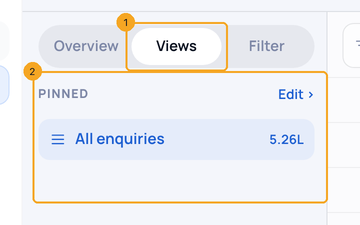
Open Views (1). Your saved views are listed with how many enquiries each holds (2); a count turns red when one of its enquiries has a follow-up past due.
3Filter the list
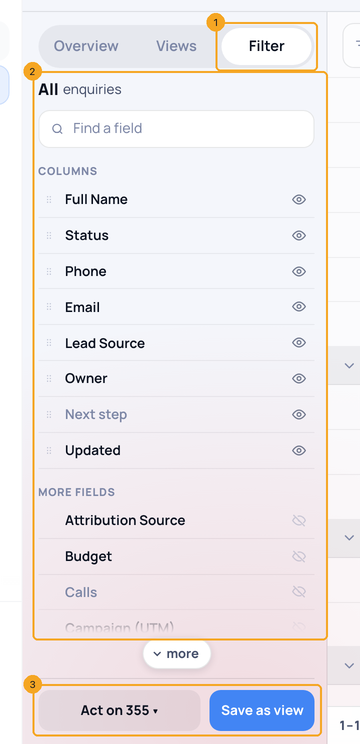
Open Filter (1) to narrow the list and choose its columns (2). At the foot (3), Save as view keeps the filter and Act on works on everyone it shows.
4Where this week’s enquiries came from
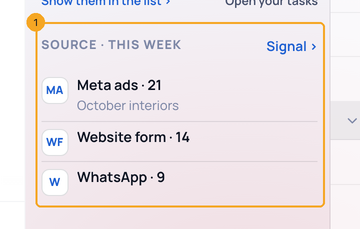
Lower down Overview, Source · this week (1) shows the channels this week’s enquiries arrived through — a form, an ad, a chat. Above the tabs, Attention appears only when something needs you, such as enquiries that arrived while your plan was view-only.
5What the list holds in open deals
Each stage heading (1) shows what its people hold in open deals, and the foot of the list (2) shows the total for the whole list, with your filters and search. The money comes from each person’s Revenue tab, in your company’s currency. It is never the Budget field.

6How fresh the list is
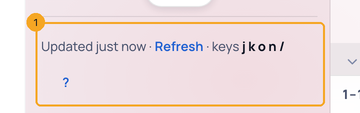
The line at the foot of Overview (1) says when the list was last updated. Refresh in it loads the list and the numbers again.
© 2026 SkedX · Sample data only · Share and link freely · Copying the product or its design is not allowed · Terms
Common questions
Qualified says “Set up ›”.
Nobody has chosen which stages count as qualified yet. Click it and pick the stages; the number appears.
Why is a view’s count red?
One of the enquiries in that view has a follow-up past its time. Open the view and look at the Next step column.
Where are these on my phone?
Tap the panel button beside Filter on the list: the same three tabs open as a sheet.
On my phone, what are the chips under Filter?
Your company’s own statuses, in your order. Tap one to see only those enquiries. Tap All to see everyone.
Why is Pipeline different from the Budget column?
Pipeline adds up open deals on each person’s Revenue tab. Budget is a field on the enquiry, and a deal never changes it, so the two can differ. Budget keeps its own column and its own sort.
Why is Pipeline lower here than on the Deals page?
The Deals page counts every open deal you may open. A list counts only its own people, so someone moved into a profile counts on that profile’s list, not here.
Pipeline says “1 not counted”.
A deal in a currency with no exchange rate is left out of the total and counted beside it, because rupees and dollars can’t be added as they are. An admin can check Currency settings from the link at the foot of the list.
Why does Pipeline say ₹0?
The people on the list have open deals, but none of those deals has an amount yet. A deal made when someone crosses into a deal stage starts at zero. Open the deal on the Deals page or the Revenue tab and enter its value, and Pipeline rises.
I don’t see Pipeline.
It shows when the people on the list hold an open deal you may open. A stage heading shows it only when the list is grouped by stage; grouped by Owner or Source, only the foot shows it. The phone list doesn’t show it.
Why doesn’t a Board column add up from its cards?
A card shows the Budget field. The figure at the top of a column is open deals from the Revenue tab.
The list is empty — what now?
The page says why and offers the next step: Clear all filters or Save this as a view when filters hide everything; Clear the search or add what you typed as a new enquiry; Create an enquiry, Import from CSV or connect a form when there are none yet; Open the profile they moved to when a stage rule moved them.
Do my profiles (Contacts, Customers, my own) look the same?
Yes — a profile built on Enquiries opens on this same page, in its own words and with its own four numbers. A profile built on Contacts opens on this table too, with its own columns.
Previous: Use SkedX CRM on a small laptop: the folded sidebar and side panel · All Profiles guides
Did this guide help?
Still stuck?Chat with support →


