Deals read like Enquiries now: one frame, one panel, the List in stage bands, the Board with whole-stage totals.
In review: written from the product, not yet walked through live.
1The frame and the panel
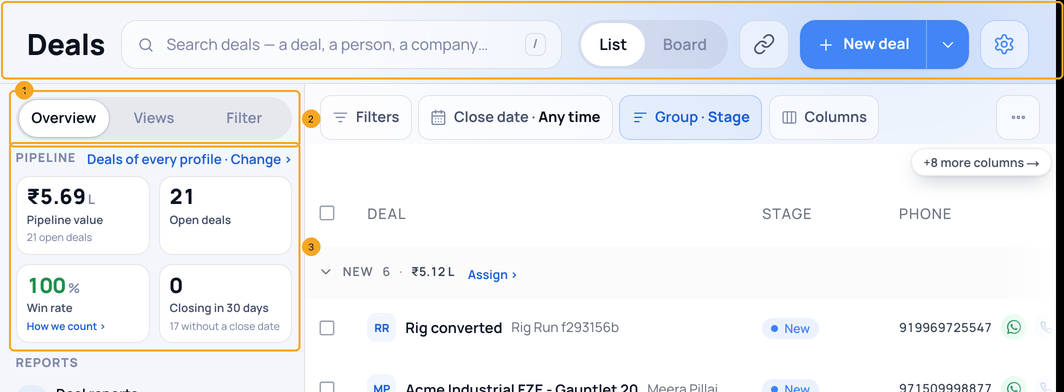
Open Deals. The header (1) holds the search, List | Board and + New deal (Import under its arrow). The side panel (2) has Overview, Views and Filter; Overview’s four numbers (3) narrow the list when pressed.
2The List in stage bands
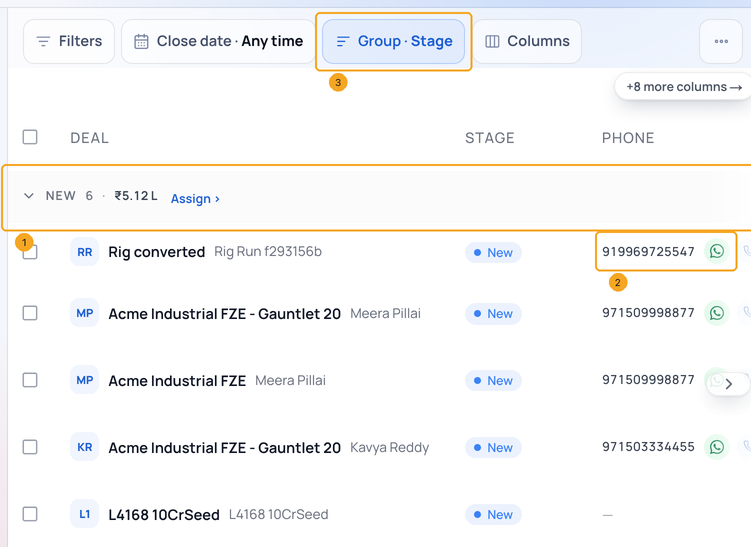
On the List, rows sit in stage bands (1): each band names the stage, its count and total, with Call list › and Assign › for its people. Phone and Email (2) carry the person’s number and address with WhatsApp and Call. Group · Stage on the toolbar (3) turns the bands off for one flat list.
3The Board
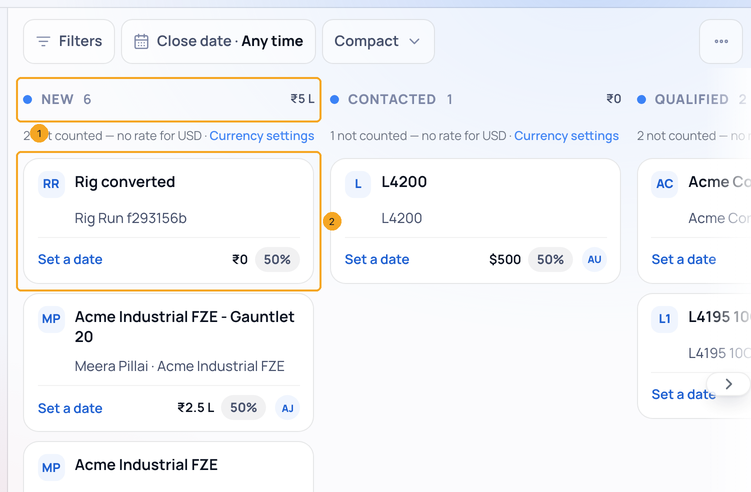
On the Board, each lane head (1) says the stage’s count and total for the whole stage. A card (2) shows the deal, its person and where they came from, the next step or the close date, the value and the probability. When a lane holds more than is loaded, Show 50 more at its foot loads the next rows.
4On your phone
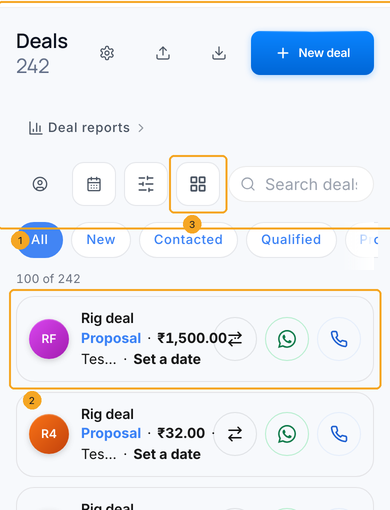
On a phone the same page keeps today’s rows on the glass: the header panel (1) with the search, New deal and the stage chips, the cards (2) with the deal, its stage, value, person, owner and close date, WhatsApp and Call. The panel button (3) opens Overview, Views and Filter as a sheet.
© 2026 SkedX · Sample data only · Share and link freely · Copying the product or its design is not allowed · Terms
Common questions
Why does a lane say 212 when I see fewer cards?
The lane head counts the whole stage; the Board loads the first 200 deals of the page. Show 50 more at the lane’s foot loads the rest, and the List shows them all.
Where did the KPI boxes go?
They are the four numbers at the top of Overview, in the side panel. Press one to see exactly those deals; press it again to see every deal.
Why does Enquiries show a lower pipeline than this page?
This page counts every open deal you may open. A list counts only its own people, so someone moved into a profile counts on that profile’s list, not on Enquiries. For the same people the two numbers are the same.
Where is Export?
Twice, as before: in the ⋯ menu on the toolbar (the whole list), and on the bulk bar when rows are selected (the selection).
Can I turn the stage bands off?
Yes — Group · Stage on the toolbar. The list remembers your choice on this computer.
Next in ProfilesMove a deal to another stage: drag it on the Board, pick a stage on the List, mark several won or lost →
Previous: Read the Enquiries page: the numbers, your views and where enquiries came from · All Profiles guides
Did this guide help?
Still stuck?Chat with support →


