A stage change is a drag on the Board, a pick on the List, or one move for many from the bulk bar.
In review: written from the product, not yet walked through live.
1Drag on the Board
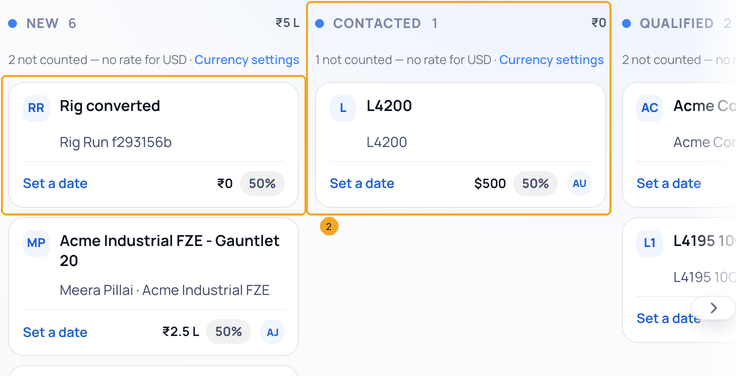
On the Board, drag a card (1) onto another lane (2) and let go. Dropping it on the Won or Lost lane opens that window first, so the amount or the reason is kept.
2Several at once from the List
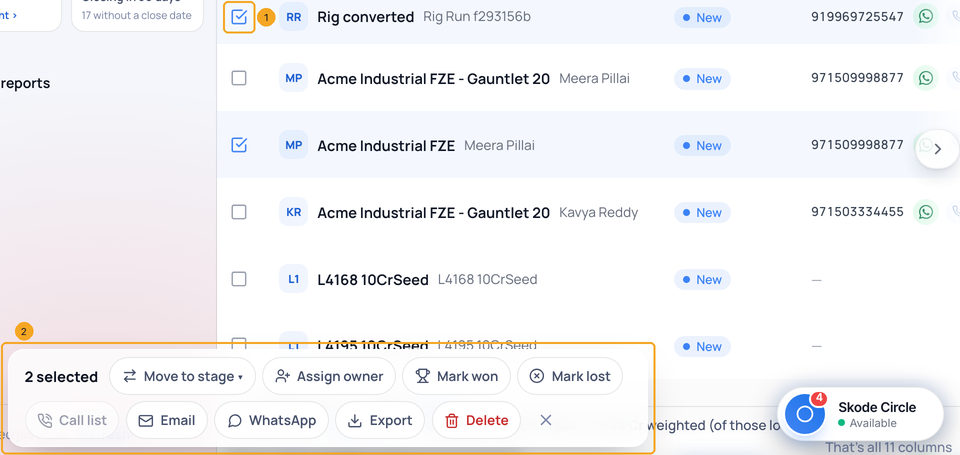
On the List, tick the rows (1). The bar at the foot (2) offers Move to stage, Mark won and Mark lost. A grey action says why you cannot use it yet.
3Mark several won or lost
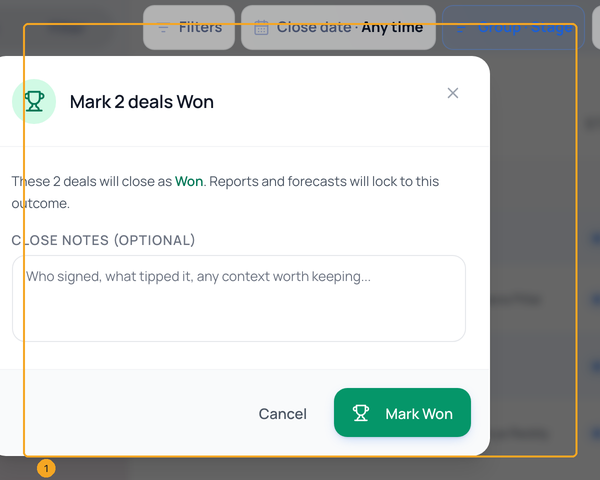
Mark won opens one window for all of them (1); Mark lost asks for one reason for all. The deals move to the won or lost stage and their dates are stamped.
© 2026 SkedX · Sample data only · Share and link freely · Copying the product or its design is not allowed · Terms
Common questions
The card went back where it was.
The move did not save — the page says so and reloads the Board. Try again; if it keeps failing, your role may not have Move stage.
Can I move deals I cannot edit?
No. The bulk bar counts them as skipped and says how many; the rest move.
On my phone?
Tap the arrows button on a card: the stage sheet opens.
Does moving a deal move its person’s stage?
Yes. Moved forward, the person’s stage line moves with it. Moved back by you, it moves back too — when it is that person’s leading open deal (the one furthest along), and the person is not at Won or Lost. Their history says “because its deal moved”.
Next in ProfilesShow the deals of one profile, or of every profile →
Previous: Read the Deals page: the pipeline numbers, your views, the List and the Board · All Profiles guides
Did this guide help?
Still stuck?Chat with support →


