See every stage side by side, and move an enquiry along by dragging it.
In review: written from the product, not yet walked through live.
1Show the Board
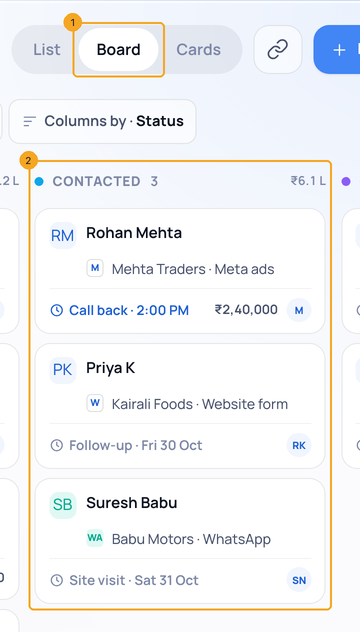
Click Board (1) at the top of the list. Each stage is a lane (2) with its enquiries as cards.
2Drag a card to another stage
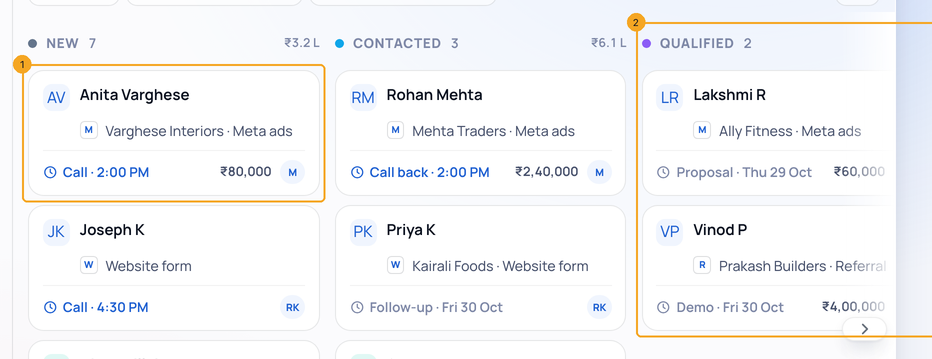
Drag a card (1) by its body onto another lane (2). Its stage changes and is saved at once; if it cannot be saved, the card goes back and you are told.
© 2026 SkedX · Sample data only · Share and link freely · Copying the product or its design is not allowed · Terms
Common questions
The card went back.
The change could not be saved — you’ll see why. Try again, or open the enquiry and change its stage there.
Some stages are off to the right.
The lanes scroll sideways — use the arrow at the edge, or scroll.
Next in ProfilesGroup a list by stage, status, owner or any field →
Previous: Put a stage’s enquiries on a call list, or assign them, in one click · All Profiles guides
Did this guide help?
Still stuck?Chat with support →


