In review: written from the product, not yet walked through live.
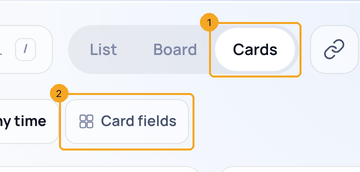
1Show the cards, then open Card fields
Click Cards (1) at the top of the list, then Card fields (2) in the toolbar.
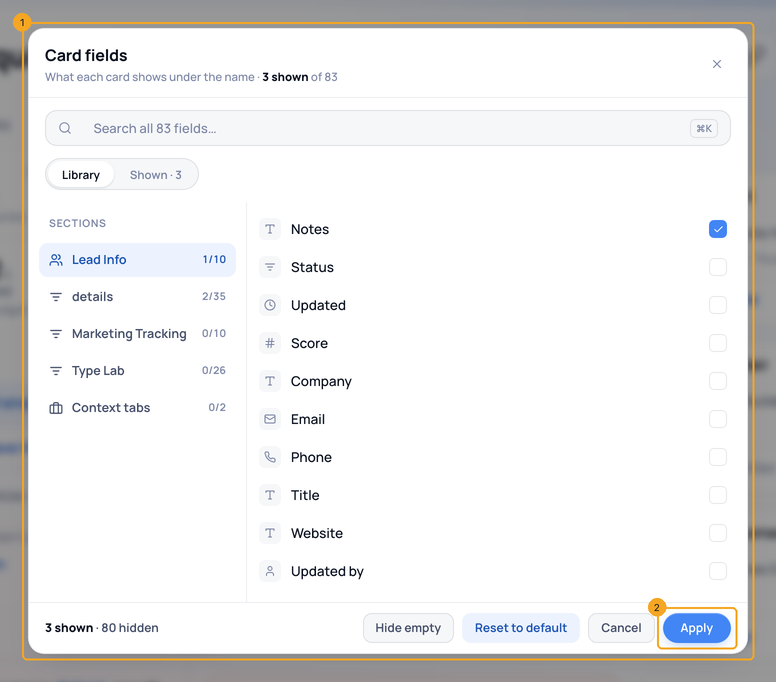
2Pick the fields, then Apply
Tick the fields a card should show (1), then Apply (2). Every card changes at once.
© 2026 SkedX · Sample data only · Share and link freely · Copying the product or its design is not allowed · Terms
Common questions
Does this change the table’s columns?
No. Columns are for the table; Card fields are for the cards.
Next in ProfilesFilter enquiries by who last updated them →
Previous: Group a list by stage, status, owner or any field · All Profiles guides
Did this guide help?
Still stuck?Chat with support →


