Work a whole stage at once — call them all, or hand them to one person.
In review: written from the product, not yet walked through live.
1Find the stage
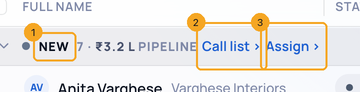
With the list grouped by stage, each band names the stage (1) with how many enquiries it holds and what they hold in open deals.
2Call them, or assign them
Beside the stage’s name (1), Call list › (2) puts the stage’s enquiries on a SkedX Call list. Assign › (3) selects them and opens Assign, so you can give them to one person.
© 2026 SkedX · Sample data only · Share and link freely · Copying the product or its design is not allowed · Terms
Common questions
I don’t see the bands.
Group the list by Status in the toolbar (Group · Status).
Does it take every enquiry in the stage?
It takes the ones loaded on the page. Filter first to narrow them.
Next in ProfilesMove an enquiry to another stage on the Board →
Previous: See each enquiry’s next step, and add a follow-up where there is none · All Profiles guides
Did this guide help?
Still stuck?Chat with support →


