Now one change tells each person once — with everything they need to act — and a field someone else changes is a quiet line, not an interruption.
In review: written from the product, not yet walked through live.
1Many assigned to you: one email
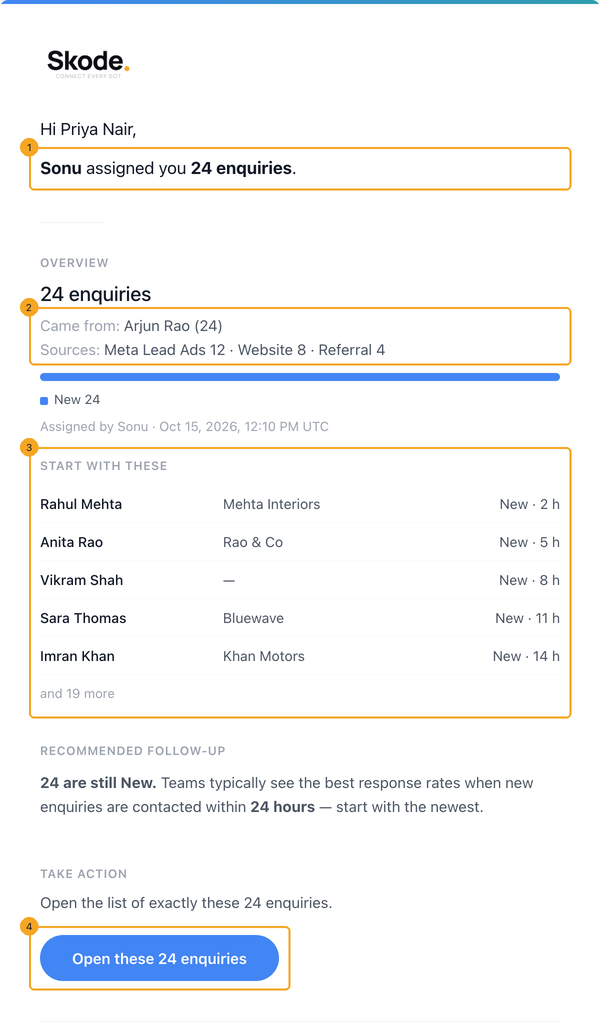
You get one email that says who assigned them and how many (1), where they came from and their sources (2), the newest enquiries to start with (3), and Open these 24 enquiries (4), which opens exactly those records.
2One notification in the bell
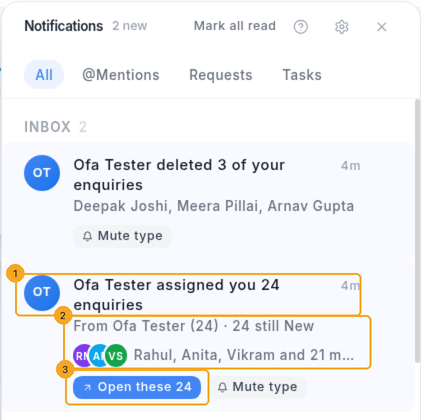
The bell shows one row for the whole change: who did it (1) and the first names with how many are still new (2). Click Open these 24 (3). Your phone gets one push, not one per enquiry.
3Open exactly those records
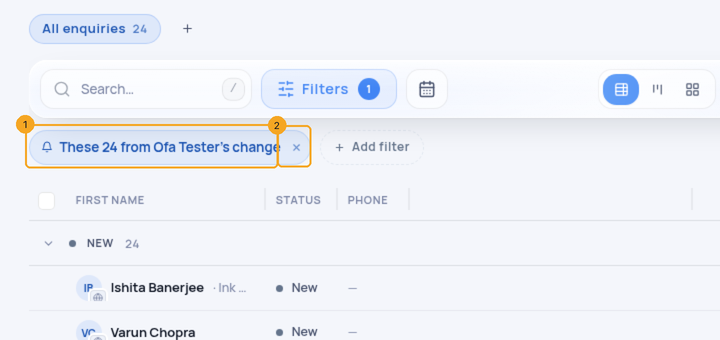
The list opens narrowed to that change, with a chip that says so (1). Remove the chip (2) to see your whole list again.
4When records leave your plate
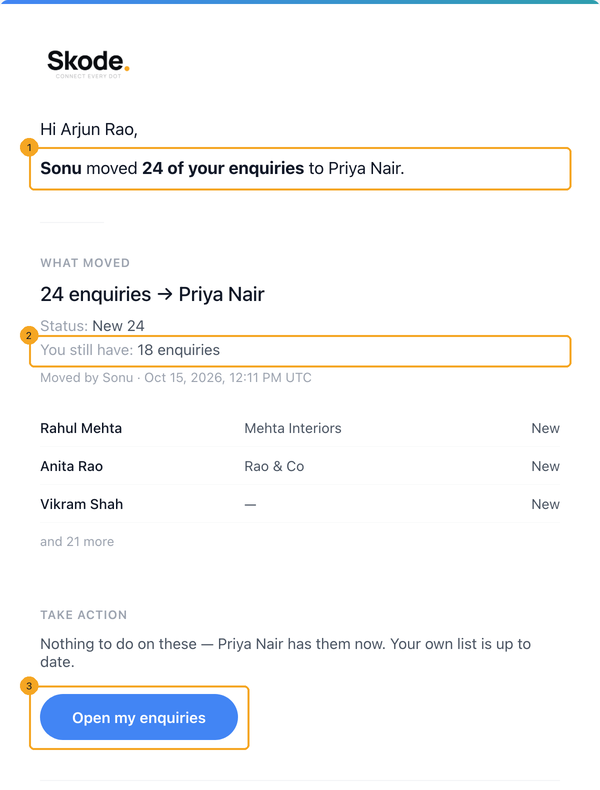
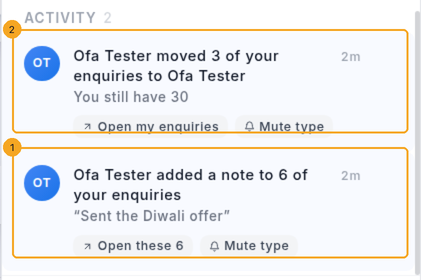
If your enquiries move to someone else, you get one email saying who moved them and to whom (1) and how many you still have (2), so you stop calling those customers. Open my enquiries (3) shows your own list. In the bell it is a quiet row under Activity, with no phone push.
5Changes someone else makes to your records
When a teammate changes a field, adds a note or moves your records along, you get one quiet line under Activity (1) — no email, no push, and it does not count in the bell’s number. Records moved to someone else sit here too (2). Won, lost or deleted records are one row under Inbox, like the delete in step 2.
6When you make the change
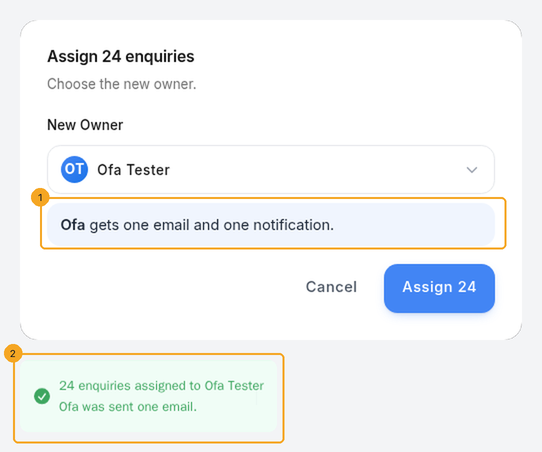
Before you confirm, the assign box says who will be told (1). Afterwards a confirmation names them (2). You are never told about your own change.
7Choose what you get
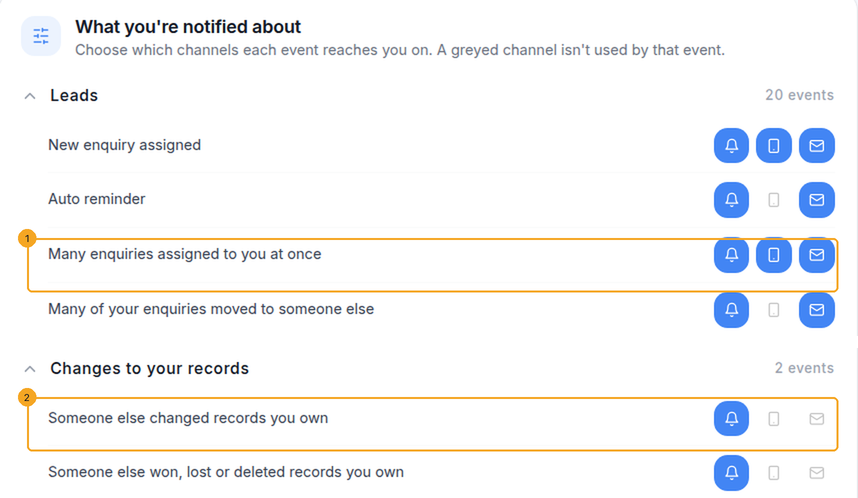
Go to Settings → Notifications. Each kind has its own row — for example Many enquiries assigned to you at once (1) and Someone else changed records you own (2) — where you choose email, bell and push.
© 2026 SkedX · Sample data only · Share and link freely · Copying the product or its design is not allowed · Terms
Common questions
Do I still get an email when one enquiry is assigned to me?
Yes. A single enquiry keeps its own email with its details, and now says who assigned it — a person, or the rule that gave it to you.
Someone changed the status of my enquiries. Why was there no email?
A field change does not put anything new on your plate, so it is a quiet line in the bell’s Activity instead — you can still see who did it and open those records.
What about imports, rules, automations and a teammate leaving?
The same rule: an import tells each person once when it finishes; a run of your reassignment rules tells each person once, naming the rule; automations, Zapier and the API are gathered per person for two minutes; and when someone is removed, each person who receives their work is told once.
I set follow-ups on many enquiries at once. Will I get one email each?
No — follow-ups that fall due together come as one email: “40 follow-ups are due now”.
Why does the SkedX logo now always show in these emails?
It travels inside the email instead of being downloaded each time it is opened, so mail apps such as Outlook show it without asking.
I turned off the “Enquiry assigned” email. Will a new enquiry still email me?
No. An enquiry that arrives already assigned to you follows that switch too. And when you create an enquiry and make yourself the owner, SkedX does not email you about it.
Will I be emailed about a notification I have not opened?
Some notifications are emailed when they sit unread for an hour and did not reach your phone or browser. That email follows the Email notifications switch in Settings → General: turn it off and none is sent. It is never a second copy of an email SkedX already sent you, and a metric watch you set to in-app stays in-app.
Why did I get a “New sign-in” email?
SkedX emails you when your account is signed in to from a device you have not used in the last 180 days — a browser and system, such as “Chrome on Windows” — and names it. Signing in again on a device you already use sends nothing. If you do not recognise the device, change your password straight away.
Do outside people on a task get our team’s comments?
Only the comments they could see on the shared board: your replies in a conversation they started, or every comment when that board is set to show internal comments. A comment marked as the task’s result reaches them once, as the result email. People you add to a task by email address are not sent your team’s own discussion.
Next in Your teamOpen a link from a SkedX email or notification →
Previous: Remove someone from your team in SkedX CRM · All Your team guides
Did this guide help?
Still stuck?Chat with support →


