If it does not, the page tells you within a few seconds and gives you a way on.
In review: written from the product, not yet walked through live.
1See what happened
Wait a few seconds. If the CRM has not opened, “Signing you in…” changes to You’re signed in, but your CRM didn’t open (1).
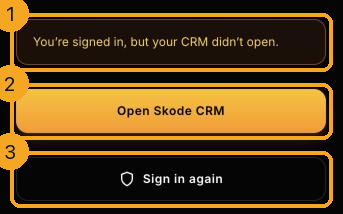
2Open the CRM
Press Open Skode CRM (2). The page you were going to loads in full. This is the one to try first.
3Sign in again
If it still does not open, press Sign in again (3). That starts signing in from the beginning.
© 2026 SkedX · Sample data only · Share and link freely · Copying the product or its design is not allowed · Terms
Common questions
Why did this happen?
Most often a new version of the CRM was going live at that moment. It is usually over within a minute or two.
Did I lose anything?
No. You were already signed in and nothing was being saved at this point.
It keeps coming back
Close the tab and open SkedX CRM again. If it still happens, contact support and say when it started.
Next in Your teamRemove someone from your team in SkedX CRM →
Did this guide help?
Still stuck?Chat with support →


