Here is how to find it, use it, and bring back any field that has gone off the page. You need permission to edit the layout.
In review: written from the product, not yet walked through live.
1Name your new field
In Edit layout, click + Field in a card and choose a type, then type the field’s name in Label (1). If a field with that name already exists, the box says where it is (2) and offers it in one click (3).
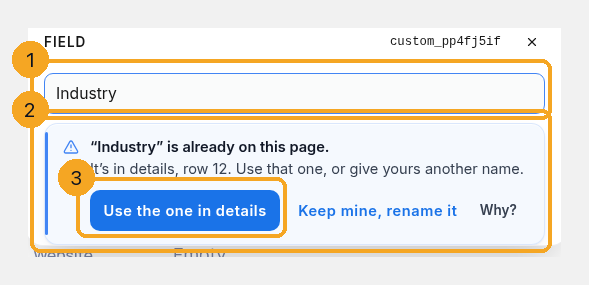
2Use the one that exists
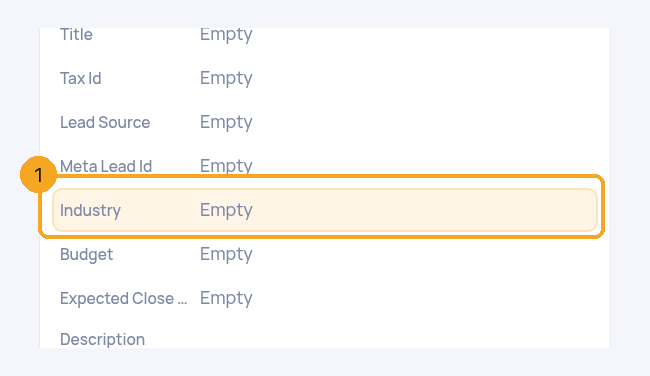
Click Use the one in …. Your new field goes and the existing one is shown, highlighted (1). If it was off the page the button says Put it here; if it was archived, Restore it here — its values come back with it.
3Bring back a field that’s off the page
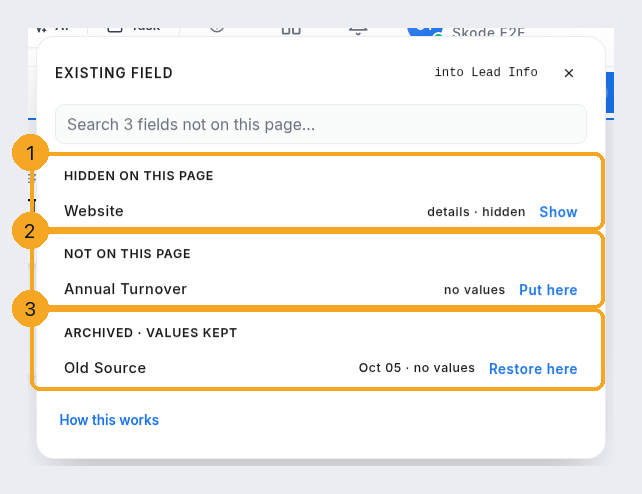
Click + Field → Existing field. It lists the fields hidden on this page (1), the ones on no card (2) and archived ones (3), with how many records hold a value. Click Show, Put here or Restore here.
4Find any field while editing
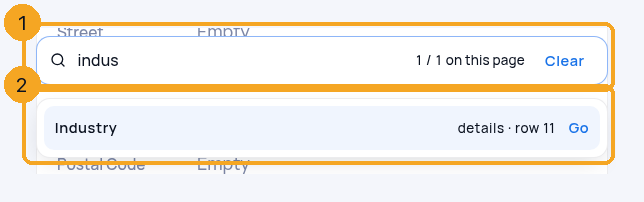
The Find a field box (1) lists every match with where it is (2): its card and row, a new field not saved yet, not on this page, or archived. Click one to go to it or put it here.
5Taking a field off the page keeps its values
Remove a field from a card and a message says it’s off this page, its values are kept, and where to bring it back — with Undo. Removing a whole card names the fields that hold values first.
© 2026 SkedX · Sample data only · Share and link freely · Copying the product or its design is not allowed · Terms
Common questions
Why can’t I make a second field with the same name?
Each name is used once per page, so reports, filters and imports never have to guess which one you mean. Use the existing field, or give yours another name.
Will I lose data if I take a field off the page?
No. Its values stay with each record, and + Field → Existing field brings it back.
Can I rename a built-in field like Industry?
Yes — its label is yours. Its type is fixed, because its values live on the record itself.
On a profile, why does it offer an Enquiries field?
A profile shows Enquiries’ own fields rather than copying them, so the existing field is offered instead of a second one.
Next in ProfilesRemove a drop-down option that records still use →
Previous: Find a field on a record · All Profiles guides
Did this guide help?
Still stuck?Chat with support →


