One box finds any of them — including an empty one tucked away at the foot of a card.
In review: written from the product, not yet walked through live.
1Use the box at the top of the fields
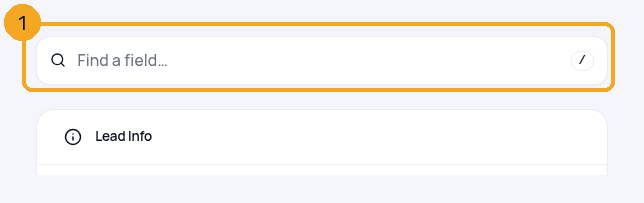
Open any record. The Find a field box (1) sits at the top of the column of field cards. Press / anywhere on the page to jump to it.
2Type part of the name
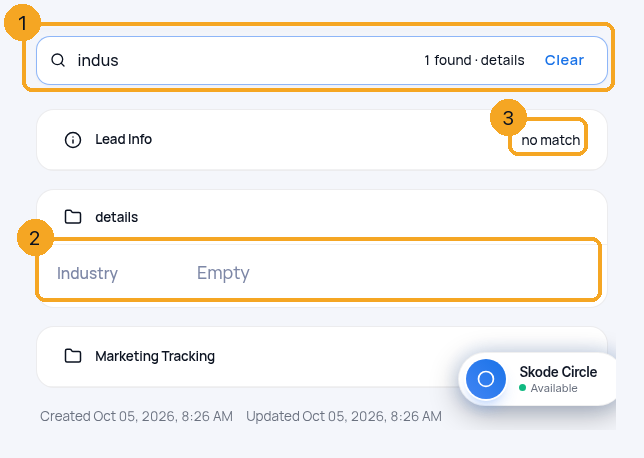
Type a few letters (1). Every card is searched at once: the field you want shows where it lives (2), even when it’s empty, and a card with no match folds down to its title (3). The box says how many it found and in which cards.
3Open it, or see everything again
Press Enter to open the first match, ready to type. Press Esc or click Clear and every field comes back. If nothing matches, the box says so and offers Show every field.
© 2026 SkedX · Sample data only · Share and link freely · Copying the product or its design is not allowed · Terms
Common questions
I know a field exists but the search can’t find it
It may not be on this page. Someone who can edit the layout opens Edit layout and uses + Field → Existing field, which lists every field this page could show.
Does it search what’s inside the fields?
No. It finds fields by their name, not by their values.
Where did the magnifier on each card go?
Each card’s magnifier searched only that card. The one box above the cards searches all of them at once.
Next in ProfilesUse a field that already exists →
Previous: Pop-ups: open the right form the moment something happens · All Profiles guides
Did this guide help?
Still stuck?Chat with support →


