The buttons sit right next to the number and the address.
In review: written from the product, not yet walked through live.
1Use the buttons beside each number and address
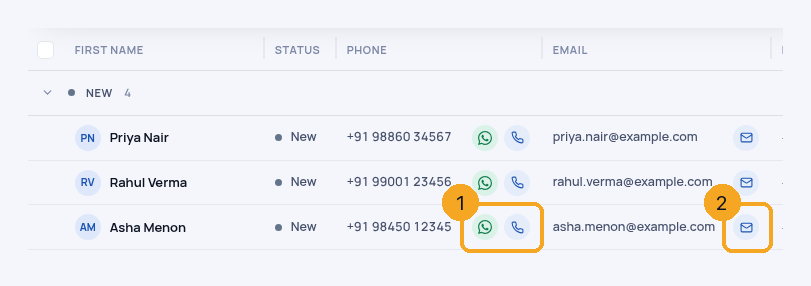
On the Enquiries list, the buttons ride the right edge of the Phone and Email columns: WhatsApp and Call beside each number (1), Email beside each address (2). Call goes through SkedX Call when you have a number, and your phone otherwise.
2WhatsApp opens the chat
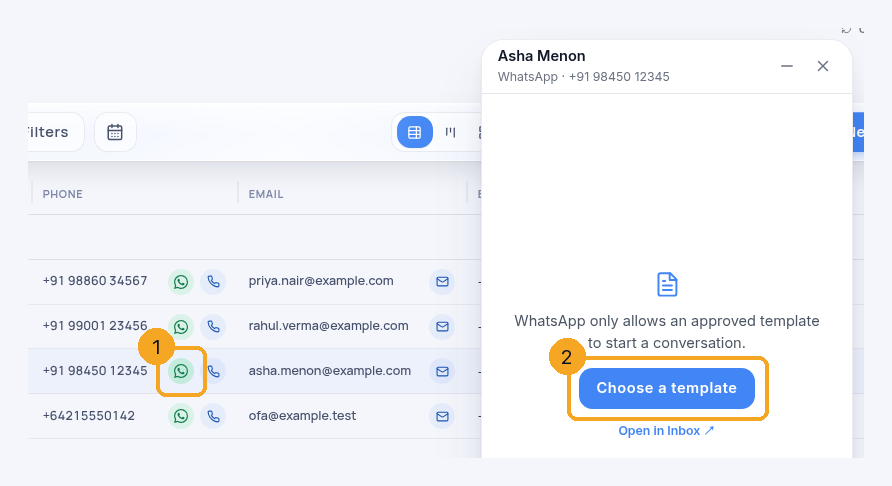
Click WhatsApp (1). It opens this person’s chat in the chat window; if there is no chat yet, it opens on Choose a template (2), because WhatsApp lets a business start a chat only with an approved template. The button shows only when your workspace has WhatsApp connected in Skode Flow.
3On a phone
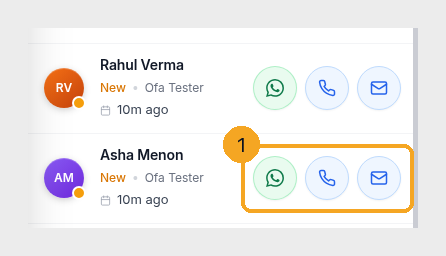
Each row has WhatsApp, Call and Email (1). If a number or address is missing, its button is greyed — tap it to open the enquiry and add one.
© 2026 SkedX · Sample data only · Share and link freely · Copying the product or its design is not allowed · Terms
Common questions
Why does someone’s photo show in the list?
When a record has a photo, the list shows it in the round avatar; everyone else keeps their initials.
What are the small logos after a name?
Every channel you have a conversation with that person on — WhatsApp, Instagram, Messenger, SMS, email and any channel added later — newest first, one logo each; click one to open that conversation. It counts chats you started too. A channel without its own logo yet shows the chat bubble with its name. On a computer only; a phone has no room after the name.
Where did the small letter on the avatar go?
It showed where a person came from (a lead source), not a conversation, so it left the avatar. Where they came from is the Source column; the logos after the name show where they have talked with you.
I don’t see a WhatsApp button
It shows only when your workspace has WhatsApp connected in SkedX Flow. Connect it there and the button appears on every number.
Does the WhatsApp button send a message?
No. It opens the chat; you write and send from there.
Next in ProfilesThe Activity log on a record: read it, search it, write in it →
Previous: Delete a field that holds data — and get it back · All Profiles guides
Did this guide help?
Still stuck?Chat with support →


