SkedX keeps a copy before anything is lost — and only the owner can delete for good.
In review: written from the product, not yet walked through live.
1Archive first
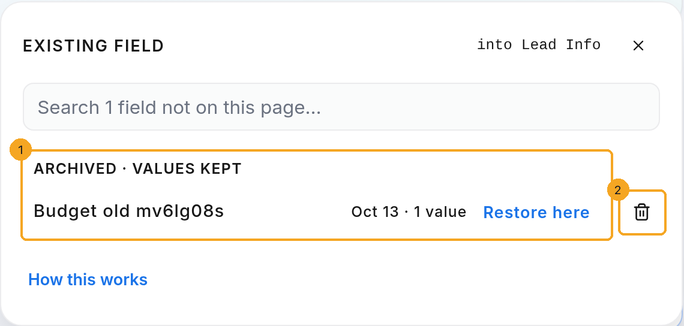
Archive the field first — it hides everywhere and keeps every value. On Enquiries and its profiles, open any record, click Edit layout, then + Field → Existing field: archived fields wait under Archived (1), each with Restore here and a bin (2). In other modules they wait in the Field Editor’s Archived fields.
2Choose where the values go
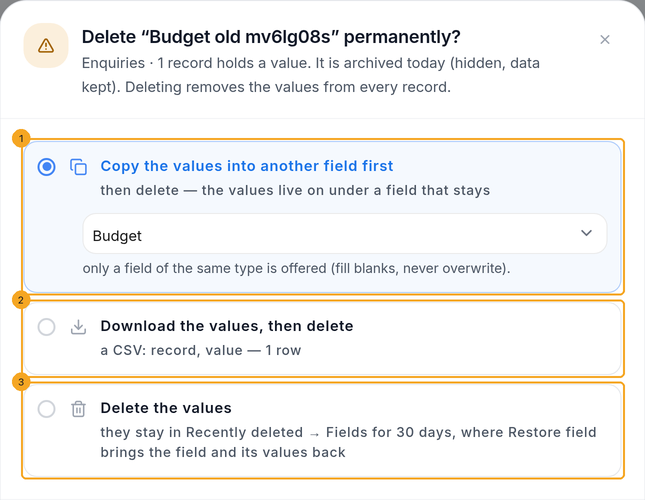
Click the bin beside the archived field. Choose Copy the values into another field first (1), Download the values, then delete (2), or Delete the values (3) — kept 30 days. The button then says what happens, with the number of values.
3Bring a field and its values back
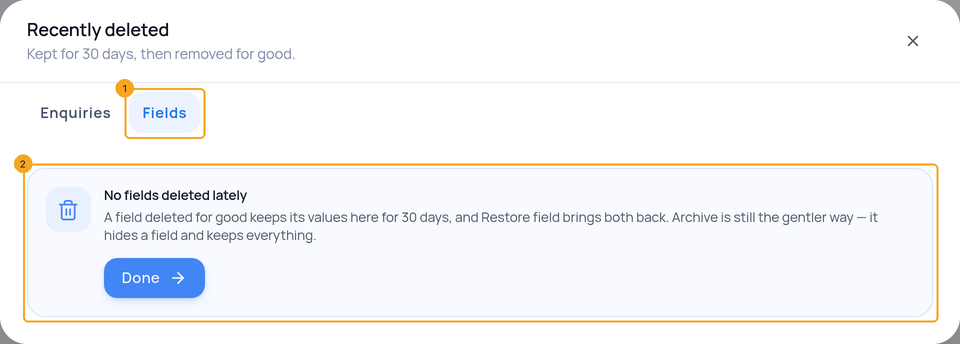
On the list, open ⋯ → Recently deleted and pick Fields (1). Every field deleted for good in the last 30 days is listed there with Restore field — the box (2) says how it works when nothing has been deleted. The field and its values come back; add it to a card from + Field → Existing field. In other modules the same list sits under the Field Editor’s Deleted for good · last 30 days.
© 2026 SkedX · Sample data only · Share and link freely · Copying the product or its design is not allowed · Terms
Common questions
Where is the bin for an Enquiries field?
Enquiries has no separate Field Editor — its Field Editor is Edit layout on a record. Archive the field, then + Field → Existing field → Archived shows the bin beside it.
Why can’t I delete a field for good?
Only the owner can. Keep it archived — it is hidden everywhere and its values are kept — or ask the owner.
What does Copy do with records that already have a value?
Leaves them as they are. Copy only fills blanks.
What happens after 30 days?
The kept values are cleared for good, the same as Recently deleted records.
Next in ProfilesCall, email or WhatsApp someone from the list →
Previous: Remove a drop-down option that records still use · All Profiles guides
Did this guide help?
Still stuck?Chat with support →


