Someone removes “Call back scheduled” from the statuses, and fourteen enquiries still hold it.
SkedX asks where they go before anything changes — and nothing is ever deleted.
In review: written from the product, not yet walked through live.
1Remove the option
In Profile settings → Statuses, the Field Editor, or a field’s choices in Edit layout, click the bin beside the option, then Remove (1). If no record holds it, it goes at once.

2Choose where the records go
SkedX says how many records carry the value (1) and offers three choices: Move them to another option (2) — the next option is picked for you, or + New option… names one; Keep the value, hide the option (3); and Record it first, then move (4), which writes the old value into Previous status before moving them.
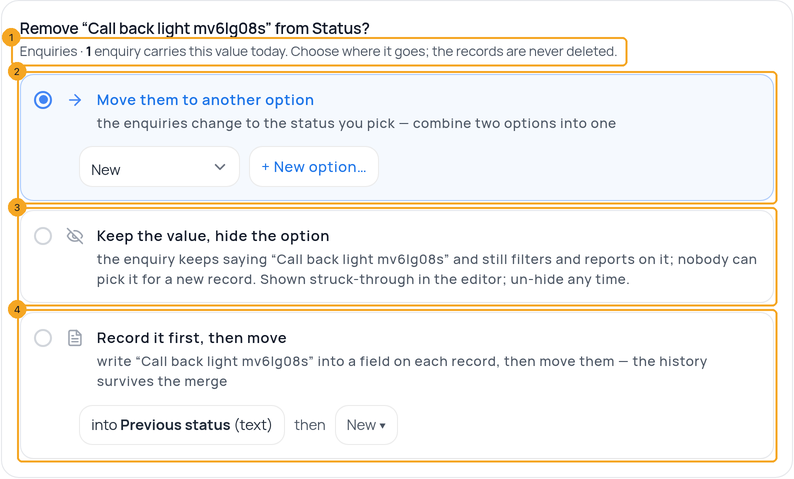
3Confirm with the button that says what happens
The button names the numbers and the place (1) — for example Move 14 to Contacted and remove. Cancel keeps everything as it was.

4Un-hide a kept option any time
A hidden option shows struck through with Un-hide (1) — in Profile settings → Statuses, in a field’s choices in Edit layout, and in the Field Editor. Un-hiding puts it back in the choices; the records never lost it.

© 2026 SkedX · Sample data only · Share and link freely · Copying the product or its design is not allowed · Terms
Common questions
Where did “Just remove” go?
It said records would show “Not set”, but they kept showing the old word. Its honest form is Keep the value, hide the option.
Is anything deleted?
No. Records are moved, or keep their value; the old value can be written into Previous status first.
Who did it, and when?
Every removal is written down: in Earlier layouts (who, when, how many, where they went) and on each moved enquiry’s activity.
Do saved views that filter on it break?
The question names the saved views that filter on the option, so you can look at them. A hidden option keeps working in filters.
Next in ProfilesDelete a field that holds data — and get it back →
Previous: Use a field that already exists · All Profiles guides
Did this guide help?
Still stuck?Chat with support →


