Every record walks a journey from first enquiry to won.
3 min readFor all rolesUpdated 6 Nov 2026In review
The rail on the record shows where they are, how long they have been there and what comes next — and moves them on in one click.
In review: written from the product, not yet walked through live.
Transcript · 0:52
In SkedX, the stage line under a record's top box shows where they are, and how long they have been there. Click a stage further ahead, and SkedX asks first. It names the stages you would skip. Keep it where it is, or move it. Your lists show stages too. Open Columns and tick Stage, right after Status. Each row now shows where its record stands. Click the Stage header to sort in your stages' own order. In Filters, Stage sits beside Status, with a count on each stage. Pick one, and the list narrows. Quick edit, from a row's menu, has Stage as well. Pick a stage and save. The record moves, just as on its stage line.
1See where they are
Open the record. The rail under the top box marks the current stage (1); the stages ahead follow it, and a click on one (2) moves the record there. Many stages? The rail scrolls — the arrow (3) shows on the side that has more. Under the rail, the next step and how long it has been in this stage (4), with Mark lost and Add a task (5).
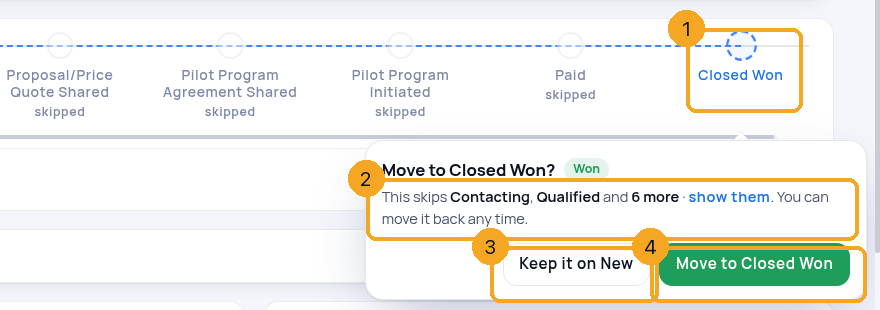
Click a stage further on (1) and the rail asks on that stage before it moves anything: the stages you would skip (2) — two by name, then and N more · show them. Keep it on <stage> (3) leaves it where it is; Move to <stage> (4) moves it. You can move it back any time.
A jump to Closed Won, asked on the stage.
3On a phone
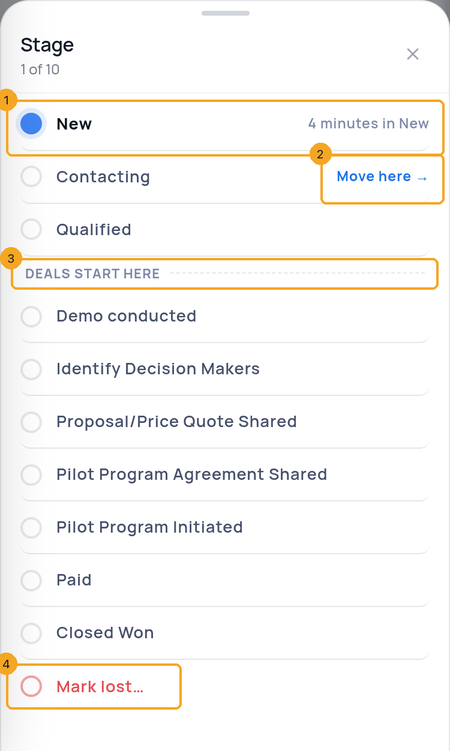
Tap the stage strip on the record: the Stage sheet lists every stage, the current one with how long it has been there (1). Tap a stage and Move here (2) moves the record; a jump ahead asks the same question in the sheet. The dashed line (3) is where deals start. Mark lost… (4) is at the end — losing is an exit, not a stage.
The Stage sheet, on a phone.
4Mark lost asks why
A record you lose leaves the line: Mark lost asks why, and when to look at it again if you want a reminder. It never sits on the rail as a stage, so it never looks like progress.
5See every record’s stage in a list
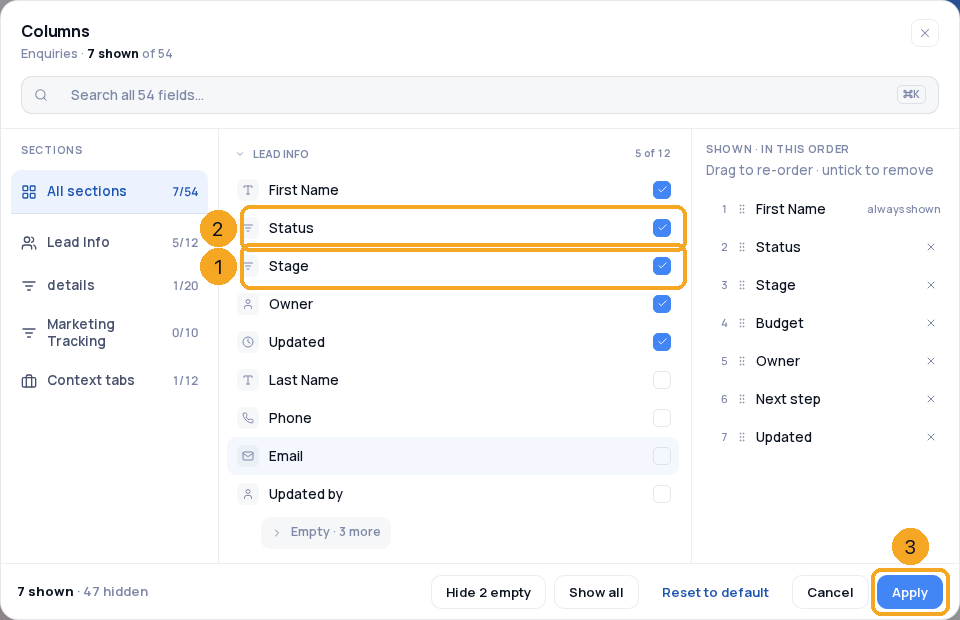
On a list, click Columns and tick Stage (1) — it sits right after Status (2). Press Apply (3): each row shows where its stage line stands, as a pill in the stage’s colour. Stage is offered where the list has two or more stages.
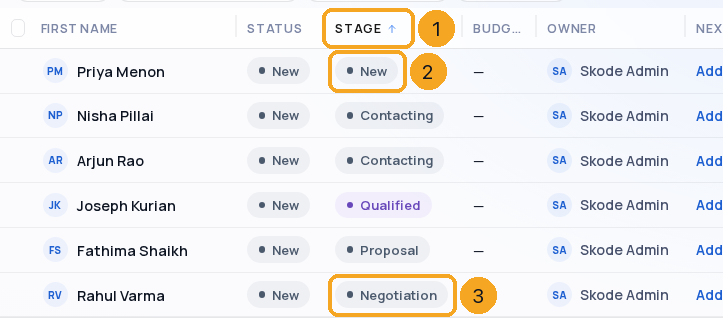
Click the Stage header (1). The list sorts in your stages’ own order — the first stage (2) at the top, the furthest along (3) at the bottom — never A to Z. Click again to reverse it.
Sorted in the stages’ own order.
7Filter by stage
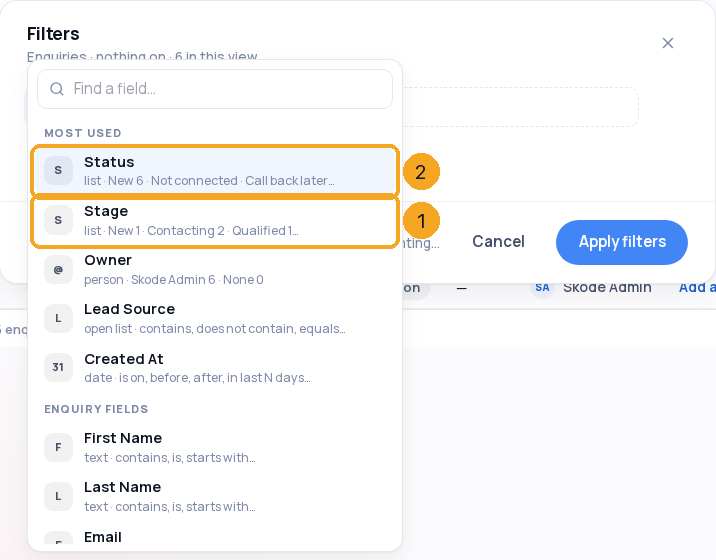
Click Filters. Under Most used, Stage (1) sits right after Status (2), with how many records are in each stage. Pick it, tick one or more stages, and press Show. A saved view keeps the filter.
Stage in Filters, with a count on each stage.
8Move a record from the list
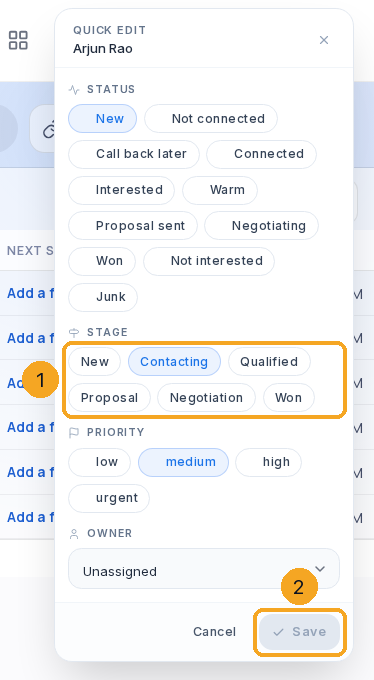
Hover a row, open its ⋯ menu and pick Quick edit. Under Stage (1), pick a stage, then Save (2). The record moves as it does on its stage line, and its history says so. Moving a record with a deal back before the DEAL line asks first what to do with the deal.
Quick edit moves the record like its stage line.
9Export with the stage
Export a list to a CSV file: the file has a Stage column right after Status, with each stage’s name.
Lost is a way out, not a step: a stage called Closed Lost is not drawn on the rail. Use Mark lost…; the records that were lost keep their status, and the board keeps its Lost column.
Can I move a record back?
Yes — click an earlier stage. If it has a deal and you move it back before the DEAL line, the rail asks what to do with the deal first.
Does moving its deal move the record?
Yes, both ways. Move the deal forward and the rail follows. Move it back — on the Revenue tab or the Deals board — and the rail moves back to the same stage, when it is the record’s leading open deal and the record is not at Won or Lost. The history says “because its deal moved”.
Does changing the status move the stage?
Only when your admin set that status to move the stage — then it moves the rail forward by itself, never back.
I don’t see the rail on a record.
Your admin shows it on the record page in Edit layout. Until then the record keeps its status without a rail.
Why is a stage name on two lines?
Long names wrap rather than being cut, so every stage reads in full.
I don’t see Stage in Columns or Filters.
Stage is offered where the list has two or more stages and the record page shows the stage line. Turn the stage line on in Edit layout, or share another profile’s stages.
Which stage does a record count in when it was never moved?
The one its stage line shows: its own stage, else the stage its status points at, else the first stage. The list, its sorting, filters, groups and export all use the same answer.
Can I change the stage of many records at once?
Select them and press Stage on the bar that appears: Move to a stage moves each one, as its stage line does.