When someone reaches the deal stages, the deal is made on the same record — there is nothing to convert. You choose where that happens, and the Deals board and the Revenue tab follow.
In review: written from the product, not yet walked through live.
1Open Edit layout on a record
Open any record and click Edit layout. The stage rail shows the blue DEAL handle (1) between two stages; it nudges once so you can see it moves. Outside Edit layout, hover the Deal mark to read “From here this record has a deal — on your Deals board and the Revenue tab”.

2Drag the DEAL handle
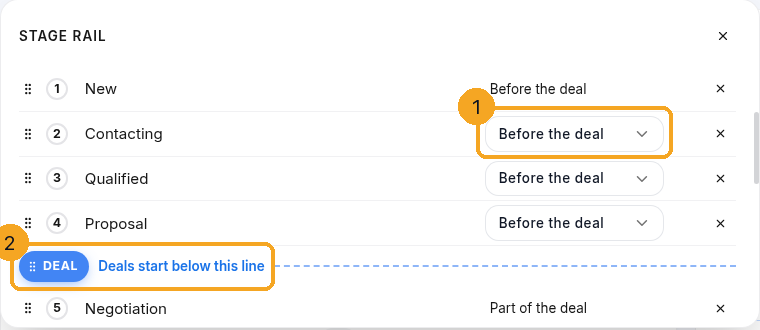
Drag the handle (1) left or right and drop it between the stages where deals should start — here, after Identify Decision Makers. The rail says what it is for (2). With the keyboard, focus the handle and use the arrow keys.

3Or set it stage by stage
Click the rail. In the Stage rail list, each stage has a drop-down (1): Before the deal or Part of the deal. Choosing one moves the line, and the handle moves with it. You can also drag the DEAL row (2) up or down the list.
4Save — and say what happens to records already there
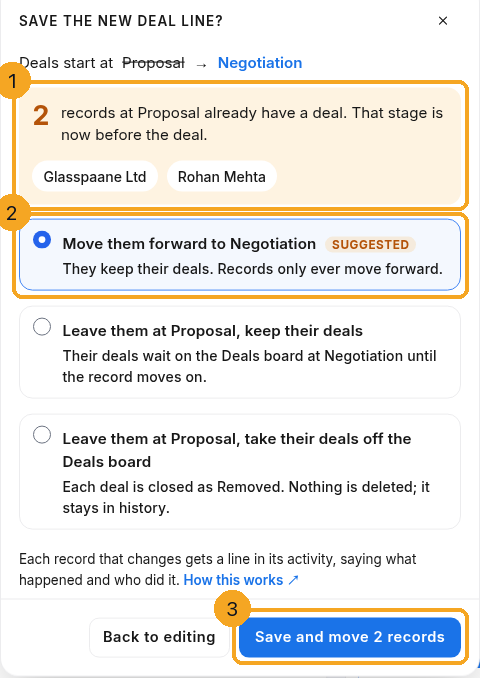
Click Save. If moving the line leaves records on the wrong side, Save the new DEAL line? asks first: how many records, with a few of their names (1), and the choices (2). Nothing changes until you choose. Back to editing leaves everything as it was; the save button says what it will do (3), for example Save and move 2 records.
5If you moved the line later
Records that already have a deal can move forward to the new first deal stage and keep their deals. Or leave them where they are and keep their deals — the deals wait on the Deals board at the new first deal stage.
6If you moved the line earlier
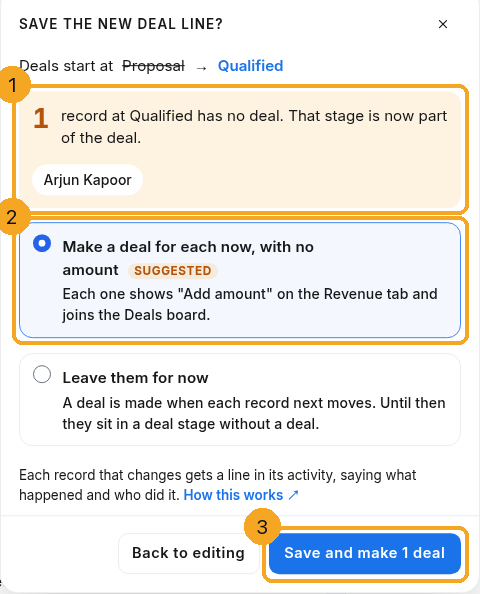
The dialog names the records now inside the deal part that have no deal (1). Make a deal now for each one, with no amount yet (2), or leave them until they next move. The button says what it will do (3).
7See what changed
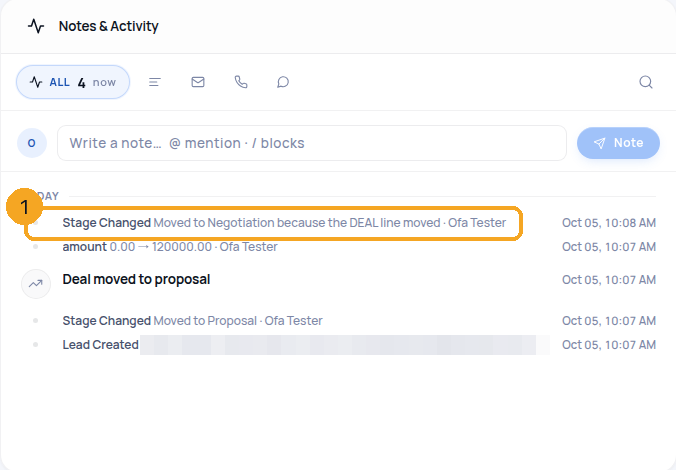
Every record that changes gets a line in its Notes & Activity (1) — Moved to Negotiation because the DEAL line moved, with who did it — so you can always see what happened.
8Moving one record back
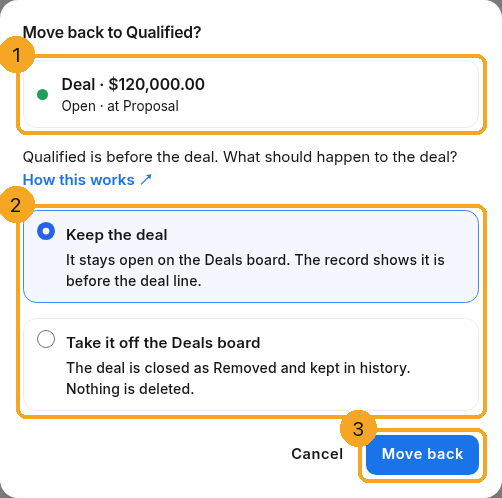
If someone moves a record that has a deal back before the line, Move back to <stage>? shows the deal (1) and asks first (2): Keep the deal, or Take it off the Deals board (the deal closes as Removed — nothing is deleted). Then click Move back (3). On a phone it is the same question, as a sheet.
© 2026 SkedX · Sample data only · Share and link freely · Copying the product or its design is not allowed · Terms
Common questions
Does moving the line delete any deal?
No. At most a deal is closed as Removed, and only when you choose that.
Who can move the line?
Admins and owners with Field Editor access — the same people who can edit the layout.
Is the Deals board changed?
Yes. Its columns are the deal stages, so they follow the line.
A stage’s drop-down is missing — why?
It says why: Won is always part of the deal, Deals cannot start at the first stage, or At least one stage before Won is part of the deal. Move the line with another stage.
I have many stages — where are the rest?
The rail scrolls, and an arrow shows on the side that has more. Stage names wrap onto a second line instead of being cut.
What happens to the deal when I move a record to Won or Lost?
It follows the record. Moving a record onto your Won stage wins its open deal (the one furthest along); moving it onto your lost stage closes every open deal as lost, with the record’s lost reason. Moving it back off Won or Lost reopens the deal that closed there — it never makes a second one. And when the last open deal is marked lost on the Deals board, the record moves to your lost stage.
When does a record get its Customer Since date?
The first time it reaches the Won stage — when its deal is won, or when someone moves it there by hand — or when its status becomes a won status. The date is the day its first deal was won (an imported deal keeps its original date). It is set once and never moved, even if the record later leaves Won.
Next in ProfilesMove a record through its stages →
Previous: Switch a profile to another stage list without losing a stage · All Profiles guides
Did this guide help?
Still stuck?Chat with support →


