A phone number is enough; you do not need their email.
In review: written from the product, not yet walked through live.
1Open the New enquiry form
On Enquiries, click New enquiry (1). The New Enquiry form opens over the list.

2Give a name and a way to reach them
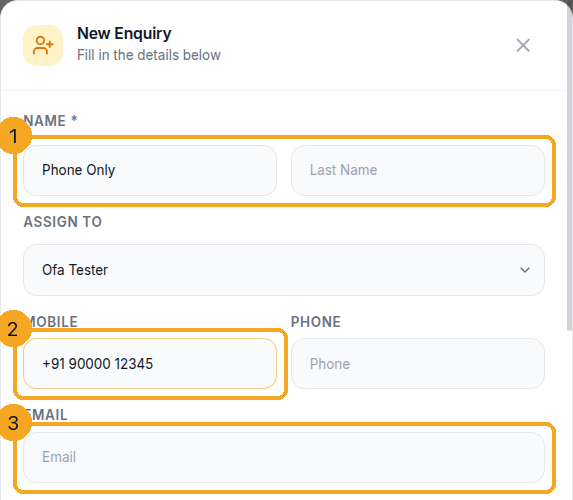
Type the name (1), then a Mobile or Phone number (2) or an Email (3) — one of them is enough. Until there is one, the Create button stays off and says Add a phone or an email — an enquiry needs a way to reach them.
3Fill in what you know
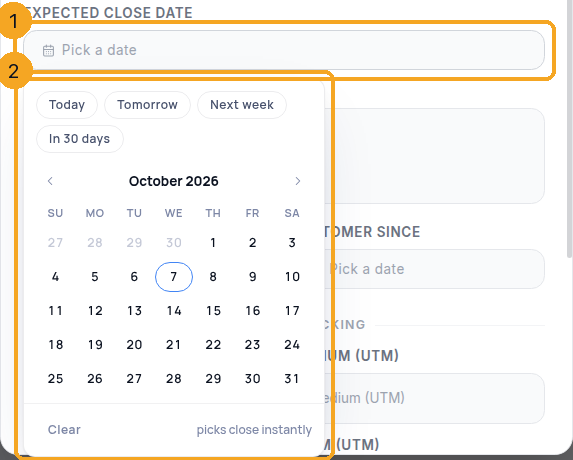
Fill any other field your layout shows. A date field (1) opens a calendar over the form (2) — on a phone, a sheet from the bottom. Each value has one box, even when your layout places it twice.
4Create
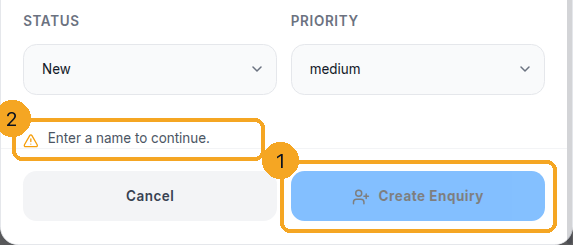
Click Create Enquiry (1). It stays at the bottom of the form however far you scroll. While something is missing it is off, and the line above it (2) says what — for example Enter a name to continue. The record then opens, ready for its first call, message or follow-up.
© 2026 SkedX · Sample data only · Share and link freely · Copying the product or its design is not allowed · Terms
Common questions
Do I need an email?
No. A phone number or an email is enough. If your admin made Email required in the layout, the form asks for it.
Why is Attribution Source not on the form?
SkedX fills it in itself — from your website, Meta ads or a connected app — so nobody has to type it. On the record it shows as a label you cannot edit.
Which fields does the form show?
The ones your layout puts on it. An admin changes them in the layout editor.
Can I add straight into a profile, like Prospects?
Yes. Open that profile’s list and click its New button. The form is titled with the profile’s name, shows that profile’s fields, and the record lands in it.
What priority does a new enquiry get?
Your Priority field’s default if your admin set one, otherwise Medium. You can pick another before you create it.
Next in ProfilesShare stages between profiles, or give one profile its own →
Previous: Profiles and your Flow inbox · All Profiles guides
Did this guide help?
Still stuck?Chat with support →


