Instead of your system asking Flow “anything new?” every minute, Flow tells it the moment something happens: a customer writes in, a message is delivered or read, a template is approved, a conversation is assigned.
You give Flow an address and choose the events; Flow sends each one, signed, within seconds. About eight minutes.
In review: written from the product, not yet walked through live.
1Create the webhook
In Flow, go to Settings → Developers → Outbound Webhooks and click + New webhook. Give it a Name you’ll recognise (1), paste your system’s address under Where should we send it? (2) — use an
https:// address — and click Create (3). Flow shows the signing secret once, starting whsec_: copy it into your system’s settings now. It proves each delivery came from Flow.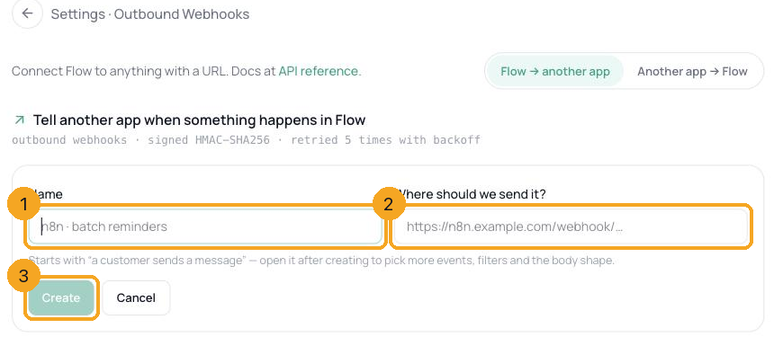
2Choose what to hear about
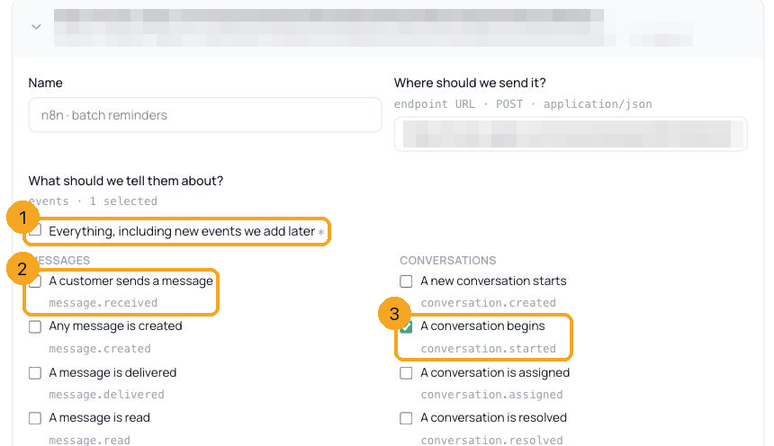
Open the new webhook in the list. Under What should we tell them about? tick the events you need — each shows a plain name and its code name (2), and a ticked box (3) is an event Flow will send. A new webhook starts with A customer sends a message. The ones most teams use:
- A customer sends a message (
message.received) - A message is delivered, is read, fails to send (
message.delivered,.read,.failed) - A conversation is assigned, is resolved, goes quiet (
conversation.assigned,.resolved,.idle) - A contact gets a tag, opts out (
contact.tagged,contact.opted_out) - A template is approved, paused or rejected (
template.status_changed)
3Send only what matters
Only from one channel? · optional (1) limits the webhook to WhatsApp, Instagram or another channel; Only for one brand? · optional (2) to one of your brands. Events that don’t belong to a channel or brand are then not sent. Click Save changes, and make sure On is ticked — only switched-on webhooks receive events.

4What arrives
Each event is a POST with a JSON body — the event’s name, your workspace id, and a
data object with the contact, the conversation and the event’s own details. For A customer sends a message that includes the text, message_type and message_id; for delivered, read or failed, the status and time; for templates, the name, status and previous_status. The headers say which event it is (X-Flow-Event), give the delivery an id (X-Flow-Delivery) and sign it (X-Webhook-Signature).{
"event": "message.received",
"org_id": "…",
"data": {
"eventMeta": {"type": "message.received", "timestamp": "…"},
"contact": {"id": "…", "name": "Meera Nair", "firstName": "Meera", "phone": "…", "tags": ["batch-108"]},
"conversation": {"id": "…", "channel": "whatsapp", "status": "OPEN", "assigneeStatus": "unassigned"},
"channel": "whatsapp",
"message_id": "…",
"message_type": "text",
"text": "Is class on today?"
}
}5Change the shape they receive (optional)
If the other app expects its own format, write it under What we’ll send them · empty = the standard envelope. Put each value in as a token without quotes —
{{contact.name}}, {{contact.phone | digits}}, {{text | truncate: 200}} — and Flow writes it in correctly, text or number. Tidy-ups: digits, e164, upper, lower, trim, date, truncate, json, default, prefix. Need an API key in the request for their gateway? Add it under Extra details their app needs to let us in · optional.{
"name": {{contact.name}},
"mobile": {{contact.phone | digits}},
"note": {{text | truncate: 200}}
}6Answer fast; failures retry by themselves
Reply with any
2xx within 2 seconds, then do slow work afterwards. If your system is down or slow, Flow tries again after 30 seconds, 5 minutes, 30 minutes and 2 hours. The webhook’s delivery log shows every attempt — Event, Result, Speed, Try — and Send again on any that didn’t get through. After 10 failures in a row Flow pauses for 30 seconds (“Paused — their app failed … times in a row”), and an address that answers 410 Gone switches the webhook off.7Check each delivery is genuine
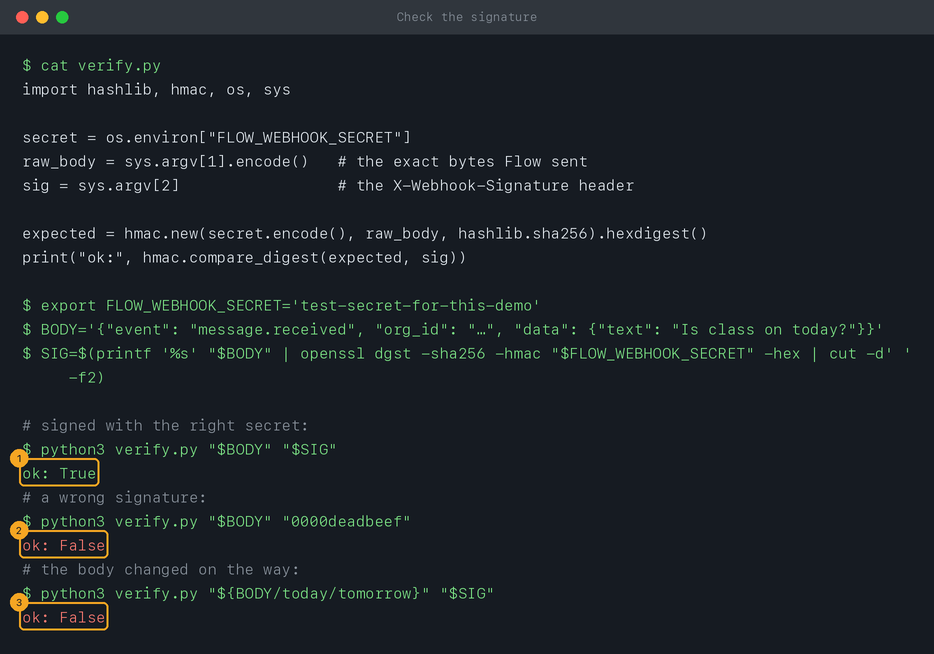
Before acting on a delivery, check its signature and skip ids you’ve already handled. The right signature passes (1); a wrong one (2), or a body changed on the way (3), fails — Check that a webhook really came from Flow has the code for Node, Python and PHP.
© 2026 SkedX · Sample data only · Share and link freely · Copying the product or its design is not allowed · Terms
Common questions
Is there a “send test event” button?
Not yet. Make the event happen once — for A customer sends a message, message your business number from your own phone — and watch it arrive in the delivery log and at your end.
Can I match delivery updates to the template I sent over the API?
By conversation and contact, yes: each update names them. It doesn’t carry the
id or callback_data from the send request.How long is the delivery log kept?
It shows the last 100 deliveries per webhook, each with its attempts — including any that still failed after the last retry, which you can Send again. Older ones drop off the list.
Can I pause a webhook?
Yes — untick On and save. Nothing is sent until you tick it again; events in between aren’t queued.
Can I connect it to Zapier or n8n?
Next in APIs & DevelopersCheck that a webhook really came from Flow →
Useful links
- Outbound Webhooks in Flow — Settings → Developers → Outbound Webhooks
- Flow API reference — the full event list and headers
Previous: Secure an inbound hook · All APIs & Developers guides
Did this guide help?
Still stuck?Chat with support →


