n8n is where many teams already run their reminders — a class timetable, a form, a spreadsheet.
This guide wires it to Flow both ways: an HTTP Request node that sends a WhatsApp template, and a Webhook node that hears back from Flow. About ten minutes, and you need an API key from Flow.
In review: written from the product, not yet walked through live.
1Save your Flow key as an n8n credential
Create an API key in Flow with Send messages and templates ticked. In n8n, open Credentials, add a Header Auth credential and fill it in: Name
Authorization, Value Bearer sk_flow_… — the word Bearer, one space, then your key. Name it SkedX Flow. The key now lives in n8n’s credential store, not in your workflow.2Add an HTTP Request node
After the node that has your data, add HTTP Request and set: Method
POST; URL https://flowserver.skode.ai/api/v1/messages/template/; Authentication Generic Credential Type → Header Auth → SkedX Flow; turn on Send Body, choose JSON, and map your fields into the body. Each blank of the template is one entry in variables, in order.{
"to": "+91{{ $json.phone }}",
"template_name": "batch_session_reminder_v1",
"variables": ["{{ $json.batch }}", "{{ $json.faculty }}", "{{ $json.time }}",
"{{ $json.topic }}", "{{ $json.link }}"],
"callback_data": "{{ $json.batch }}-reminder"
}3Run it once, to your own number
Point
to at your own number and click Execute step. The node’s output shows "ok": true and an id (4) — the template is on its way. Anything else shows an error that names the fix: Flow API errors.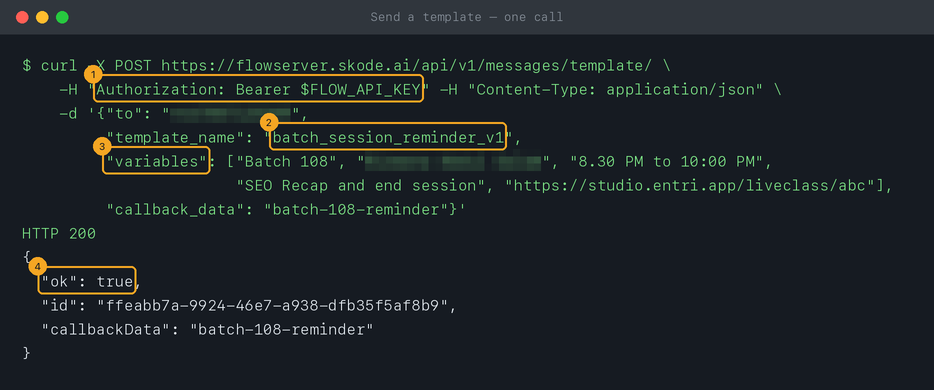
4Rather not store a key? Call an inbound hook
Create an inbound hook in Flow, paste one example of what n8n sends, and let Flow map it — phone to Phone (1), the rest to the template’s blanks (2). Then the HTTP Request node needs only Method
POST, the hook’s address as URL, and your data as the JSON body — no credential. Add a secret header before real traffic (how).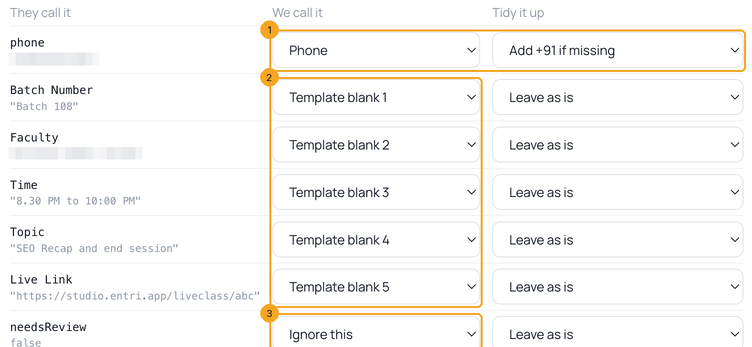
5Hear back from Flow: a Webhook node
Start a new workflow with a Webhook node, set HTTP Method to
POST, and copy its Production URL. In Flow, open Settings → Developers → Outbound Webhooks, click + New webhook, give it a name (1), paste n8n’s address under Where should we send it? (2) and click Create (3); then open it and tick the events you want — for example A customer sends a message. Activate the workflow: n8n answers on its production address only while the workflow is active.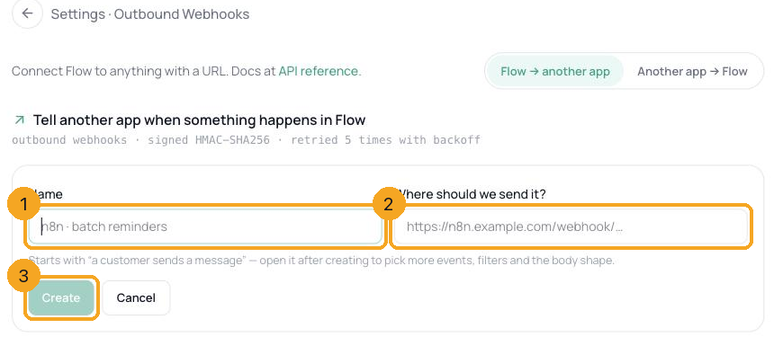
6Check each delivery is genuine
Flow signs every delivery. If the workflow changes anything — updates a record, sends a reply — check the signature first, on the exact bytes received: in the Webhook node’s options turn on Raw Body, then follow Check that a webhook really came from Flow.
© 2026 SkedX · Sample data only · Share and link freely · Copying the product or its design is not allowed · Terms
Common questions
My numbers are saved without +91. Do I need to change them?
No — add it in the body, as in the example:
"+91{{ $json.phone }}". Flow sends to exactly the digits it gets and never adds a country code, so without it the message can’t be delivered.Can one node send to many people?
Yes: n8n runs the HTTP Request node once per item, so a list of 200 students is 200 sends, each with its own blanks. Every send is charged to the messaging wallet — test with a list of one first.
I used Interakt from n8n. What changes?
The URL, the key and a flatter body. Move your API calls from Interakt maps every field.
Where do customers’ replies go?
Into Flow’s inbox, like any conversation. To have them reach n8n too, add A customer sends a message to your outbound webhook (step 5).
Next in APIs & DevelopersMove your WhatsApp API calls from Interakt to Flow →
Useful links
- API Keys in Flow — create the key n8n will use
- Flow API reference — every field of the template request
- n8n: HTTP Request node — n8n’s own documentation
- n8n: Webhook node — n8n’s own documentation
Previous: Connect Flow to Zapier · All APIs & Developers guides
Did this guide help?
Still stuck?Chat with support →


