If your system sends WhatsApp templates through Interakt’s API, moving it to Flow is a small change: a new address, a new key and a flatter body.
Your data and your logic stay as they are. About six minutes per place you send from.
In review: written from the product, not yet walked through live.
1Make sure the template is approved on your Flow number
Templates belong to a WhatsApp number. Before switching a send, list your templates in Flow and check the one you use is there with
"status": "approved" and the same technical name. Moving the number itself to Flow is covered in Channels.2Change the address and the key
Create a Flow API key with Send messages and templates, then swap two lines. Interakt takes its key as HTTP Basic; Flow takes its key after the word
Bearer.Interakt: POST https://api.interakt.ai/v1/public/message/
Authorization: Basic <your Interakt API key>
Flow: POST https://flowserver.skode.ai/api/v1/messages/template/
Authorization: Bearer sk_flow_…3Flatten the body
countryCode+phoneNumber→ oneto, country code first:"+91" + "9876543210"becomes"+919876543210".template.name→template_name.template.bodyValues→variables— the same list, in the same order.template.languageCode→language, or leave it out: Flow uses the template’s own.callbackData→callback_data."type": "Template"— drop it; the address already says it’s a template.
4Before and after
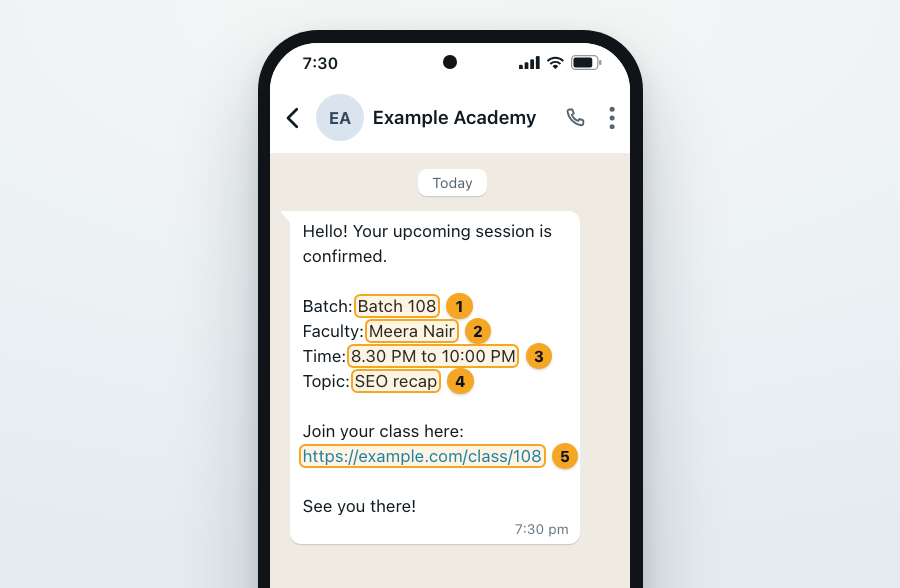
The same reminder, as Interakt took it and as Flow takes it. Either way your customer gets the same message, each value in its blank: the batch (1), the faculty (2), the time (3), the topic (4) and the class link (5).
Interakt
{
  "countryCode": "+91",
  "phoneNumber": "9876543210",
  "callbackData": "batch-108-reminder",
  "type": "Template",
  "template": {
    "name": "batch_session_reminder_v1",
    "languageCode": "en",
    "bodyValues": ["Batch 108", "Meera Nair", "8.30 PM to 10:00 PM",
                   "SEO recap", "https://example.com/class/108"]
  }
}
Flow
{
  "to": "+919876543210",
  "template_name": "batch_session_reminder_v1",
  "variables": ["Batch 108", "Meera Nair", "8.30 PM to 10:00 PM",
                "SEO recap", "https://example.com/class/108"],
  "callback_data": "batch-108-reminder"
}
5Check “ok”, not “result”
Interakt answered
{"result": true, "message": "…", "id": "…"}; Flow answers {"ok": true, "id": "…", "callbackData": "…"} (4). Change the one line that checks for success. Errors come back with "ok": false and an error message — each one explained.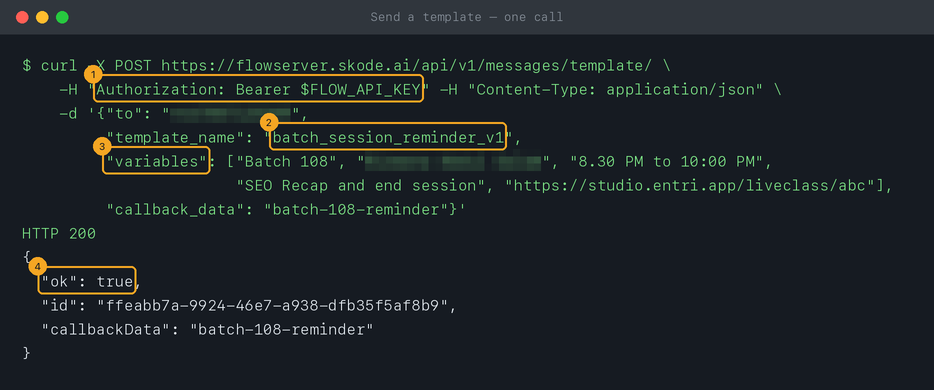
6Sending from n8n? Change one node
In the HTTP Request node that called Interakt, change the URL, swap the credential for a Header Auth one holding
Bearer sk_flow_…, and flatten the JSON body as above — the full n8n guide.© 2026 SkedX · Sample data only · Share and link freely · Copying the product or its design is not allowed · Terms
Common questions
What about headerValues and buttonValues?
Flow’s API fills body blanks only for now. A template whose header or buttons need values can’t be sent through the API yet — use a body-only version for automated sends.
Interakt sent my callbackData back in its webhooks. Does Flow?
Yes. Flow’s delivered, read and failed webhooks carry your
callback_data, next to provider_message_id — the id the send answered with — so you can match a receipt to its send.Are there rate limits like Interakt’s plans?
Flow doesn’t limit how fast you send templates. WhatsApp’s own daily limit for your number still applies.
Can my tool keep sending Interakt’s exact JSON?
Not to the API. If you can’t change what the tool sends, an inbound hook can take fields as they are — but a list such as
bodyValues counts as one value, so it works only when your values arrive as separate fields.Next in APIs & DevelopersBuild your Flow integration with an AI assistant →
Useful links
- Interakt: send templates using APIs — the request you’re moving from
- Flow API reference — the request you’re moving to
Previous: Connect Flow to n8n · All APIs & Developers guides
Did this guide help?
Still stuck?Chat with support →


