An API key is the password your other systems use to work in Flow — to send a template, list your templates or read contacts.
Make one key per system, give it only what that system needs, and keep it where no visitor can see it. About three minutes; you need admin rights in Flow.
In review: written from the product, not yet walked through live.
1Open API Keys
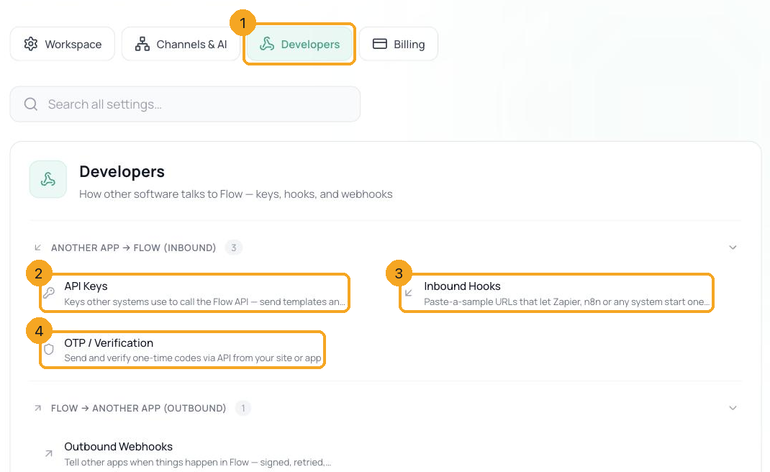
In Flow, go to Settings → Developers (1) → API Keys (2) and click + New key.
2Name it, and choose what it may do
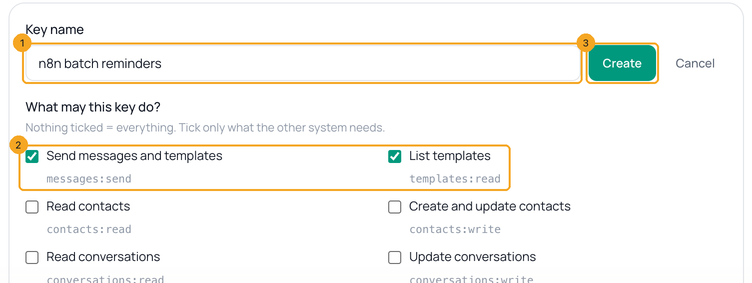
Name the key after the system that will use it (1) — Website, n8n, Class reminders — so you know which one to revoke later. Under What may this key do? tick only what that system needs (2): to send templates, Send messages and templates and List templates. Nothing ticked means the key can do everything. Click Create (3).
3What each permission allows
- Send messages and templates (
messages:send) — send templates and free-text replies. - List templates (
templates:read) — see your templates, their status and how many blanks each has. - Read contacts (
contacts:read) and Create and update contacts (contacts:write) — find and change contacts. - Read conversations (
conversations:read) and Update conversations (conversations:write) — list conversations and change their status.
4Copy the key — it is shown once
Your key appears once, starting with
sk_flow_. Click Copy (1) and store it where your system keeps secrets — an environment variable such as FLOW_API_KEY, or your tool’s credentials. Flow keeps only a fingerprint of it (2), so a lost key can’t be shown again: make a new one. Never put a key in a web page, a phone app or a shared document. Below it, Try it (3) has a ready-made command that sends a real template to a number you own.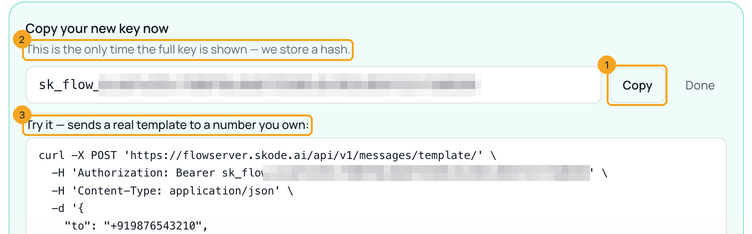
5Send it with every request
Put the key in the
Authorization header, after the word Bearer and one space. This request lists your templates — a safe first test, because it sends nothing:export FLOW_API_KEY="sk_flow_…your key…"
curl -s "https://flowserver.skode.ai/api/v1/templates/?channel=whatsapp" \
-H "Authorization: Bearer $FLOW_API_KEY"6If a request says 401 or 403
401 “Valid API key required” means the key is missing, mistyped or revoked — check the header. 403 means the key isn’t allowed to do that, and the message names the permission it lacks (1), such as
contacts:read: create a key with that box ticked. A 403 saying “The Flow API is not enabled for this account yet” means the Developers tools are switched off for your workspace — message us.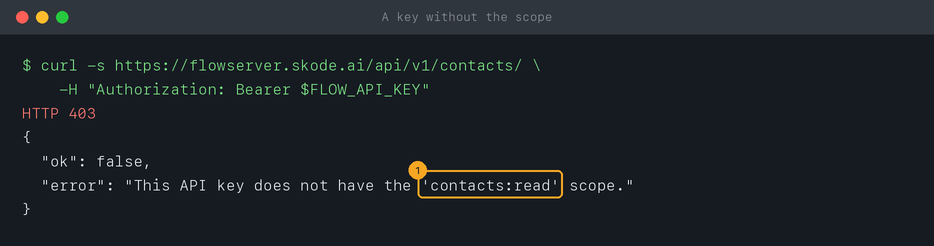
7Check when a key was used, and revoke it
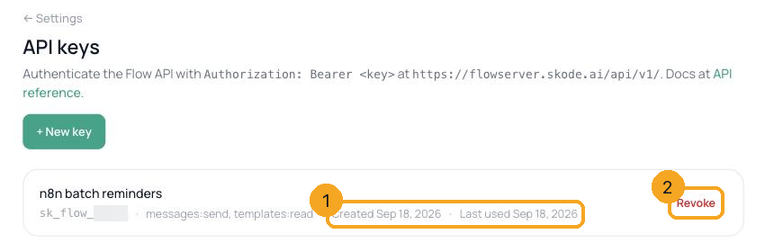
The API Keys list shows each key’s name, the start of the key, its permissions, and its Created and Last used dates (1). A key nobody has used in months is a key to revoke. Click Revoke (2) beside it: it stops working at once, everywhere, and there is no undo — if a live system still uses it, create the replacement first and switch the system over.
© 2026 SkedX · Sample data only · Share and link freely · Copying the product or its design is not allowed · Terms
Common questions
Do API keys expire?
No. A key works until you revoke it. That’s why each system should have its own key: you can revoke one without breaking the others.
I lost my key. Can Flow show it again?
No — Flow keeps only a fingerprint, so nobody can read the key back, not even us. Create a new key, put it in your system, then revoke the old one.
Can two systems share one key?
They can, but don’t. With one key each, Last used tells you which system is active, and revoking one never breaks the other.
Is it safe to paste my key into ChatGPT or Claude?
No. Have the code read it from a setting called
FLOW_API_KEY and put the real key there yourself — our AI prompt is written that way.Where does the key go in Zapier or n8n?
In n8n, as a Header Auth credential — step by step. In Zapier you usually don’t need one: an inbound hook does the job.
Next in APIs & DevelopersSend your first WhatsApp template in 5 minutes →
Useful links
- API Keys in Flow — create, check and revoke keys
- Flow API reference — try a request with your new key
Previous: What the Flow API can do · All APIs & Developers guides
Did this guide help?
Still stuck?Chat with support →


