With Flow on one end, a new row in a sheet, a form entry or a payment can send a WhatsApp template — and a customer’s message in Flow can create a task or a row somewhere else. No code and no API key: Flow’s inbound hooks and outbound webhooks do the work. About ten minutes each way.
In review: written from the product, not yet walked through live.
1Zapier → Flow: make an inbound hook
In Flow, create an inbound hook whose action is Send a WhatsApp template. For the example, paste the fields your Zap will send — say
{"phone": "919876543210", "name": "Asha", "batch": "Batch 108"} — and check the mapping (1–3). Create it and copy its address.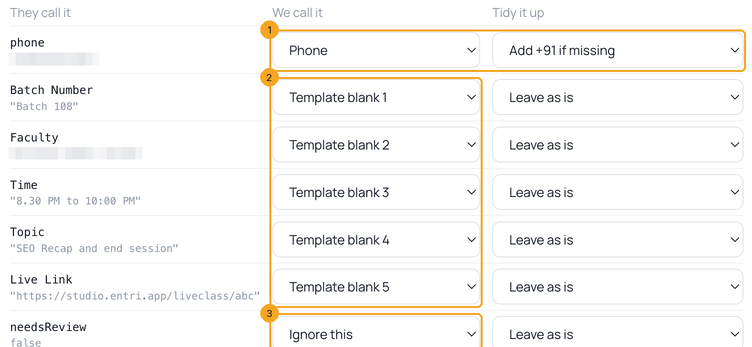
2Add a “Webhooks by Zapier” step
In your Zap, after the trigger (a new sheet row, a form entry…), add the action Webhooks by Zapier with the event POST. Paste the hook’s address into URL, set Payload Type to
json, and under Data add one row per field — the same names you pasted in Flow, filled from your trigger.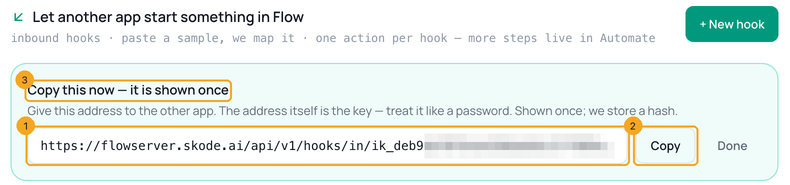
3Test without sending, then for real
To test safely, first add
dry-run/ to the end of the URL and click Test step: Flow answers with what it would do and sends nothing (1–3). Then remove dry-run/, test again with your own number, and turn the Zap on.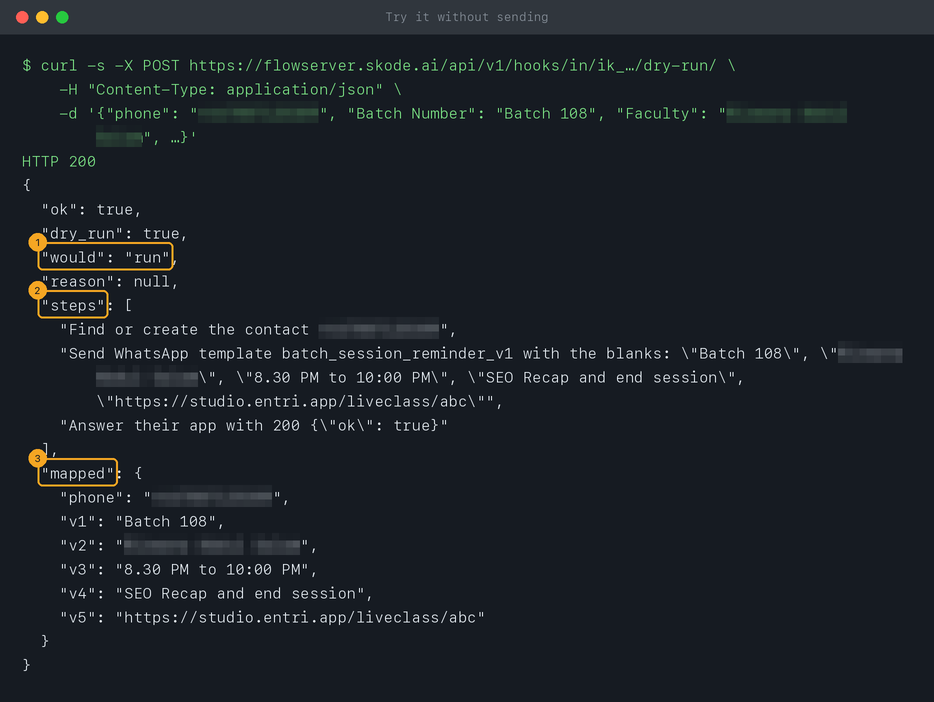
4Add a secret before real traffic
Anyone with the address can call it, so make a new hook with A secret word in a header, and in Zapier’s Headers add
X-Flow-Secret with that word. Set a daily cap too. Secure an inbound hook has every option.5Flow → Zapier: catch Flow’s events
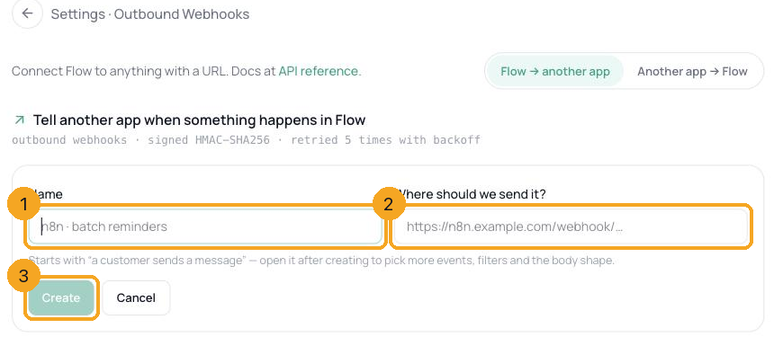
Start a Zap with the trigger Webhooks by Zapier → Catch Hook and copy the URL Zapier gives you. In Flow, open Settings → Developers → Outbound Webhooks, click + New webhook, give it a name (1), paste Zapier’s URL under Where should we send it? (2) and click Create (3); then open it and tick the events you want — for example A customer sends a message (more on webhooks). Make the event happen once (message your own number), then click Test trigger in Zapier to pick it up and map its fields.
© 2026 SkedX · Sample data only · Share and link freely · Copying the product or its design is not allowed · Terms
Common questions
Do I need an API key for Zapier?
No. Zapier → Flow goes through an inbound hook, whose address is its credential; Flow → Zapier goes through an outbound webhook. If you prefer to use the API directly, use Custom Request with the header
Authorization: Bearer sk_flow_… — but store the key carefully.Does each Zap run cost anything in Flow?
Each template Flow sends is charged to the messaging wallet at its category’s rate. Zapier counts tasks on its own plan.
Zapier sent the data, but nothing arrived on WhatsApp.
Open the hook in Flow’s Inbound Hooks list: Recent calls shows what arrived and why Flow did or didn’t send — a missing phone, a condition that didn’t match, the daily cap. The answer Zapier shows says the same.
Can a Zap send different templates?
One hook sends one template. Make one hook per template, or send through the API with Custom Request, where the template name is part of each request.
Next in APIs & DevelopersConnect Flow to n8n →
Useful links
- Inbound Hooks in Flow — Settings → Developers → Inbound Hooks
- Zapier: Send webhooks in Zap workflows — the POST step, in Zapier’s own words
- Zapier: Trigger Zap workflows from webhooks — the Catch Hook trigger
Previous: Check that a webhook really came from Flow · All APIs & Developers guides
Did this guide help?
Still stuck?Chat with support →


