Most tools can already call a web address when something happens — a Zapier zap, an n8n workflow, a form, your CRM.
An inbound hook turns that call into a WhatsApp template, and nobody writes code: you paste one example of what the tool sends, and Flow works out which piece is the phone number and which fill the template’s blanks. About six minutes.
In review: written from the product, not yet walked through live.
1Open Inbound Hooks
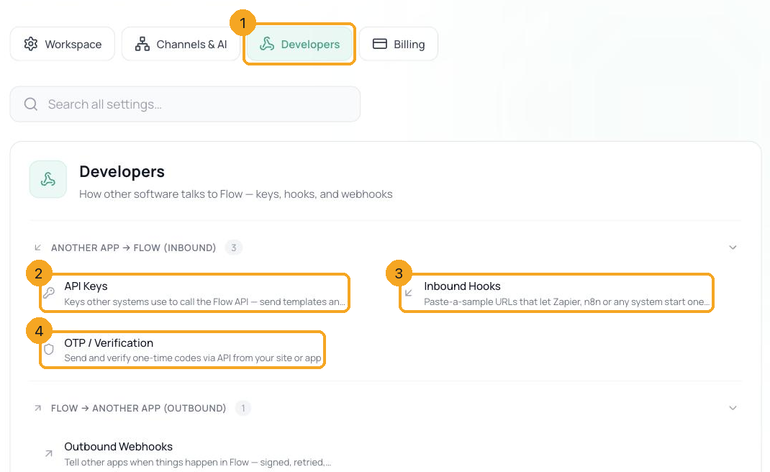
In Flow, go to Settings → Developers (1) → Inbound Hooks (3) and click + New hook.
2Name it, and choose what it does
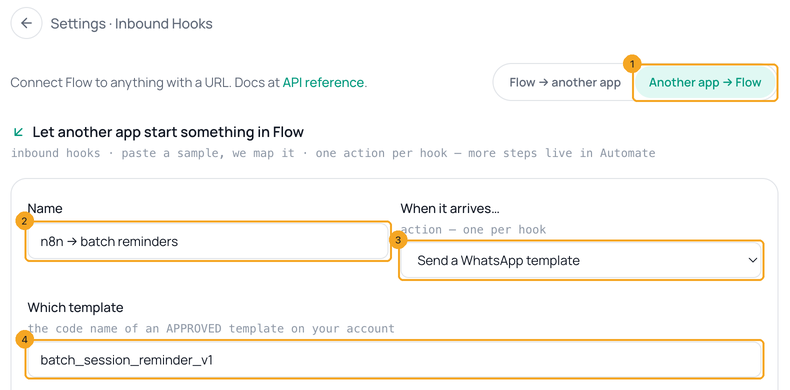
Check Another app → Flow is selected (1). Give the hook a name you’ll recognise (2), and choose what happens when it’s called (3):
- Send a WhatsApp template — type the template’s technical name (4); it must be approved.
- Send a WhatsApp message — free text, for customers who wrote to you in the last 24 hours.
- Create or update the contact — save the person in Flow.
- Tag the contact — add a tag, such as paid.
3Paste one example of what they send
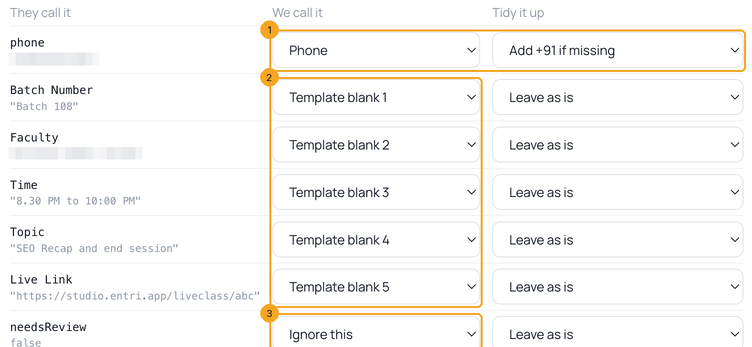
Under Paste an example of what they’ll send, paste a real request body from your tool — Zapier and n8n show one after a test run. JSON and form data both work, and field names are kept exactly as sent. Flow reads every field and suggests what it means: the phone field becomes Phone (1), with Add +91 if missing for 10-digit numbers saved without a country code; the others fill Template blank 1 to 5 in order (2); anything else is set to Ignore this (3). Change any row.
4Tidy values on the way in
The Tidy it up column changes a value before it’s used: Add +91 if missing, Digits only, Trim spaces, UPPERCASE, lowercase, or Put text in front…. Fields nested inside others appear with dotted names, such as
student.phone. A list is one value — to fill several blanks from it, have your tool send separate fields.5Add a condition, a proof and a daily cap
But only when (1) runs the hook only when a field matches — is, is not, contains or exists, for example
status is confirmed; other calls are answered but skipped. How the other app proves it’s really them (2) starts as the secret address alone; add a secret before real traffic (how). Never more than … a day (3) caps how many calls run each day, so a leaked address hits the cap, not your wallet. Click Create hook (4).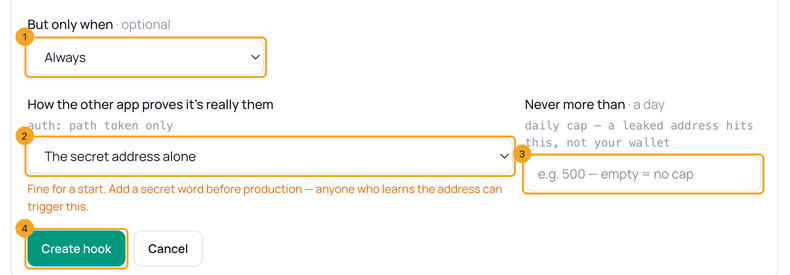
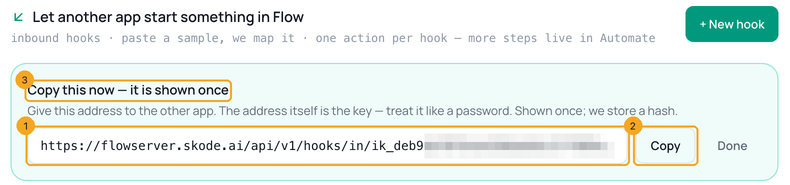
6Copy the address — it is shown once
The hook’s address (1) is its key: anyone who has it can call the hook, so treat it like a password. Click Copy (2) now — as the banner says (3), Flow keeps only a fingerprint and can’t show it again. In your tool, paste it as the URL to POST to.
7Try it without sending
Add
dry-run/ to the end of the address and send the same example. Flow answers with what it would do (1), step by step (2), and the values it mapped (3) — and sends nothing. The panel under a new hook has this command ready to copy.curl -s -X POST "https://flowserver.skode.ai/api/v1/hooks/in/ik_…your hook…/dry-run/" \
-H "Content-Type: application/json" \
-d '{"phone": "919876543210", "Batch Number": "Batch 108"}'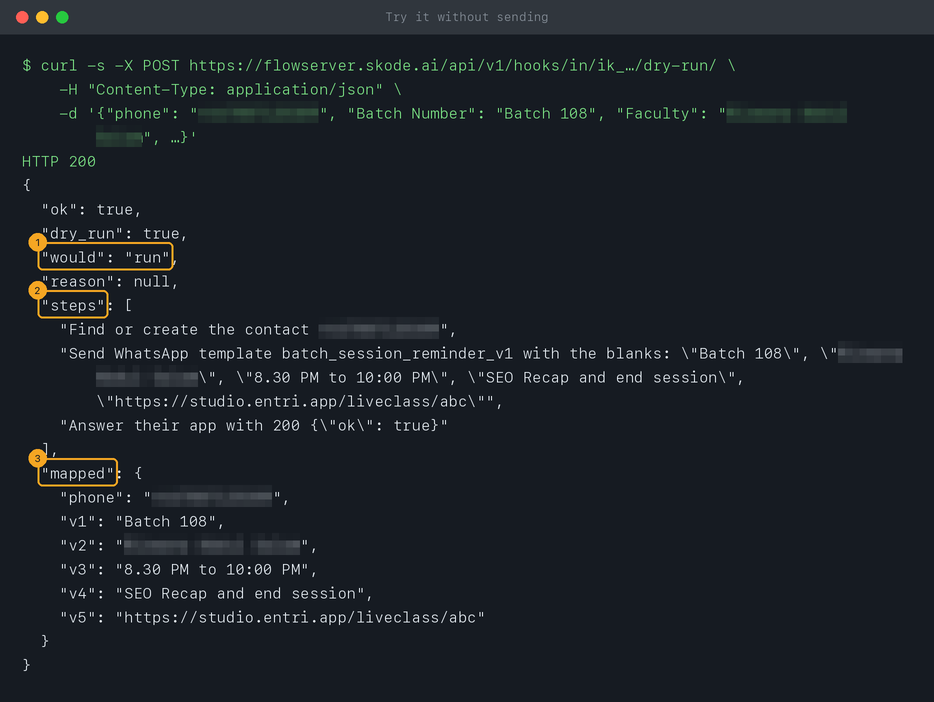
8Switch it on in your tool, and watch it work
Point your tool at the address without
dry-run/ and trigger it. A successful call answers {"ok": true}; a refused one says why. Open the hook in the list to see its Recent calls — what arrived and what Flow did, and how many ran today against your cap. An inbound hook does one thing; for several steps in a row, build it in SkedX Automate.© 2026 SkedX · Sample data only · Share and link freely · Copying the product or its design is not allowed · Terms
Common questions
Can I change a hook after creating it?
No — a hook can only be created or deleted. To change it, create a new one, point your tool at its address, then open the old one and click Delete; its address stops working at once.
When does the daily cap reset?
At midnight UTC — 5:30 am in India. Only calls that actually ran count; skipped and refused calls don’t.
What does a hook answer when the condition doesn’t match?
200 with "skipped": true and the reason, so your tool doesn’t retry — nothing was sent.Can one hook send different templates?
No, one hook sends one template. Make a hook per template — or send through the API, where the template is part of each request.
My tool sends Interakt-shaped JSON with a list of values.
A list maps as one value. Have the tool send the values as separate fields, or switch the request itself: Move your API calls from Interakt.
Next in APIs & DevelopersSecure an inbound hook →
Useful links
- Inbound Hooks in Flow — Settings → Developers → Inbound Hooks
- Flow API reference — the hook address and its answers
Previous: Flow API errors, and how to fix each one · All APIs & Developers guides
Did this guide help?
Still stuck?Chat with support →


