Your website, your CRM or a tool like Zapier can tell Flow to send a WhatsApp template — and Flow can tell those systems when a customer replies. There are three ways in, and this page shows which one fits your job. Most teams need only one.
In review: written from the product, not yet walked through live.
1Find the Developers tab
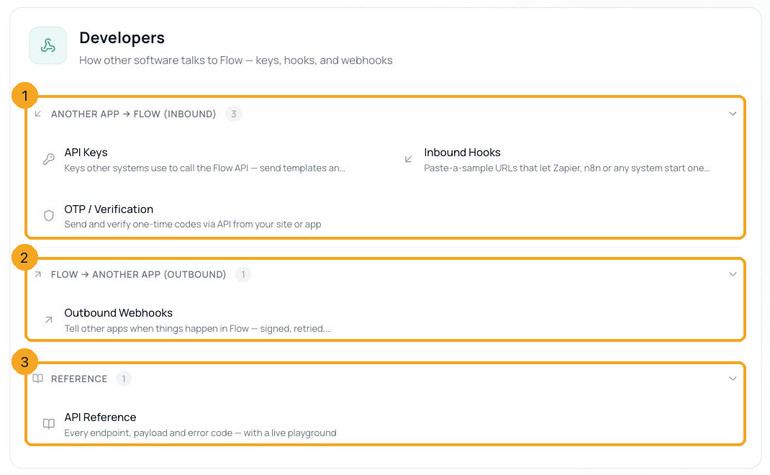
In Flow, open Settings and click the Developers tab. It has three groups: Another app → Flow (1) — API Keys, Inbound Hooks and OTP / Verification; Flow → another app (2) — Outbound Webhooks; and Reference (3) — the API Reference. You need admin rights.
2Send from your own code: an API key
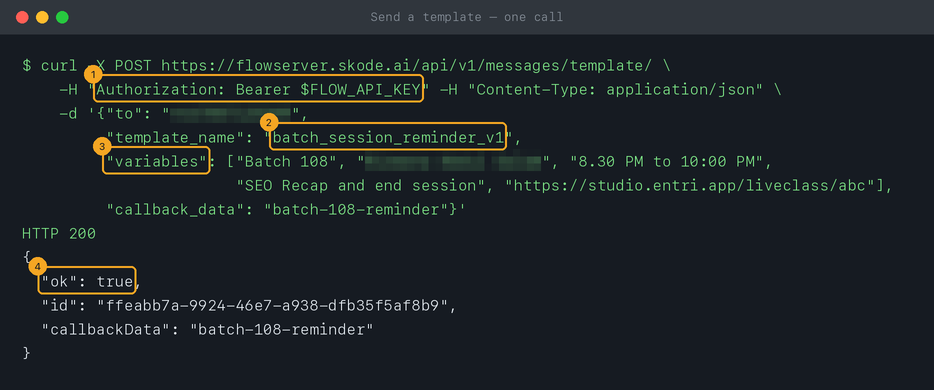
Use an API key when a developer — or an AI assistant writing code for you — can make a web request. One request sends an approved WhatsApp template from your number with your values in its blanks: the key (1), the template’s name (2), its blanks in order (3), and Flow’s answer (4). The same key can list your templates and reply within WhatsApp’s 24-hour window, read and update contacts and conversations, and send one-time login codes.
3Send without code: an inbound hook
Use an inbound hook when a tool like Zapier, n8n, a form builder or your CRM can call a web address, but nobody wants to write code. Paste one example of what that tool sends, and Flow works out that
phone is the phone number (1), which fields fill the template’s blanks (2), and what to ignore (3). You get a private address, and every call to it does that one thing. Set one up, then connect Zapier or n8n to it.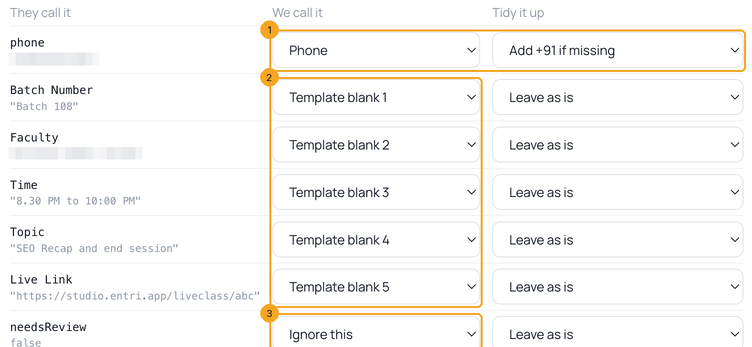
4Hear back from Flow: outbound webhooks
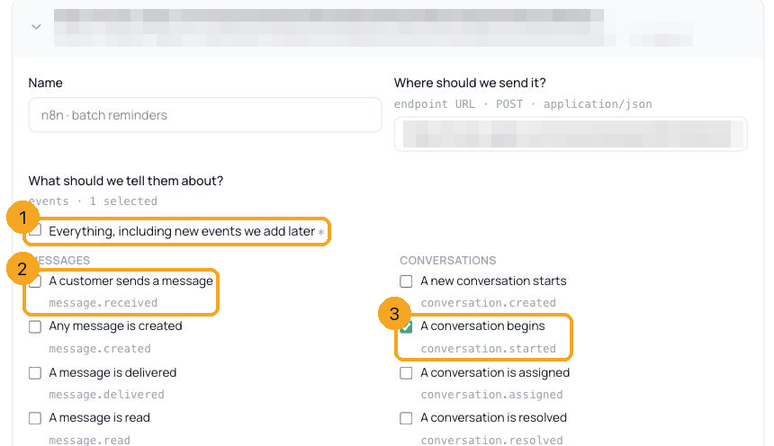
Use an outbound webhook when another system should react to something in Flow — a customer writes in, a message is delivered or read, a template is approved, a conversation is assigned or resolved. Flow sends a signed message to your address within seconds, keeps retrying for about two and a half hours if your system is down, and logs every attempt so you can send it again. You choose what to hear about in plain words: everything (1), or one event at a time (2), each ticked on its own (3). Set one up, and check each delivery is genuine.
5Which one should I use?
- Someone will write code — a developer, or an AI assistant for you: an API key. Full control, any template, one request per message.
- A tool like Zapier, n8n, Make or a form builder can call a web address: an inbound hook. No code; one hook does one thing.
- Another system should react when something happens in Flow: an outbound webhook.
- You send through Interakt today: move your calls across — the same job, a flatter request.
6Keep the reference open
Every request, field and error code is in the API Reference (Settings → Developers → API Reference): its sections (1), the whole reference as an OpenAPI file (2), and a panel for trying requests (3). Every address starts with
https://flowserver.skode.ai/api/v1/ — the reference shows https://flow.skode.ai/api/v1, which works the same.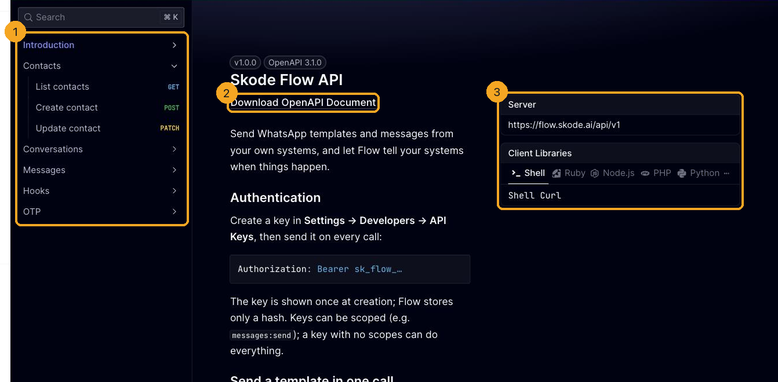
7Before your first send
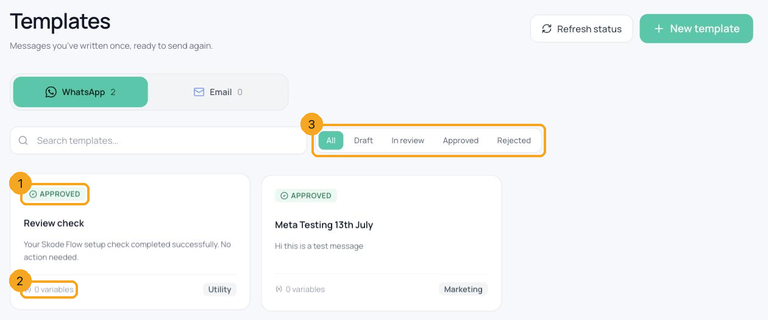
Three things must be in place: a WhatsApp number connected in Settings → Channels, at least one template approved by Meta (1) — the Templates screen shows each one’s status and how many variables it has (2), and filters by status (3) — and credit in the messaging wallet; every template is charged at its category’s rate. Then create an API key and send your first template. No developer? Let an AI assistant write the code.
© 2026 SkedX · Sample data only · Share and link freely · Copying the product or its design is not allowed · Terms
Common questions
Do I need a developer?
Not always. An inbound hook with Zapier or n8n needs no code at all. For your own website or app, an AI assistant can write the code for you — copy our prompt.
What does sending through the API cost?
Each message is charged to the messaging wallet exactly as if your team had sent it from the inbox — templates at their category’s rate. If the wallet is empty, the request is refused with
402 and nothing is sent.Where do customers’ replies go?
Into Flow’s inbox, like any conversation, so your team sees the whole thread. To also get replies in your own system, add an outbound webhook for A customer sends a message.
Is it safe to connect other systems?
Each API key is shown once and stored only as a fingerprint, and can be limited to what one system needs. Hooks can require a secret and a daily cap. Webhooks are signed, so your system can reject fakes. Revoke a key or delete a hook or webhook and it stops at once.
Can I send any message I like?
To start a conversation, or to write to someone who hasn’t messaged you in 24 hours, WhatsApp only allows templates Meta has approved — your request fills in their blanks. Inside the 24 hours, free text is fine.
Next in APIs & DevelopersCreate an API key →
Useful links
- Flow API reference — every request, field and error — with a playground
- OpenAPI file — the same reference as JSON, for tools and AI assistants
- API Keys in Flow — create and revoke keys
- Settings in Flow — Developers tab: hooks, webhooks, OTP
Did this guide help?
Still stuck?Chat with support →


