Flow can send a one-time code to a customer’s WhatsApp, phone or email, and tell your website whether the code they typed is right.
Your site makes two requests — send, then check — and Flow handles the code, the message, expiry and retries. About six minutes to set up.
In review: written from the product, not yet walked through live.
1Turn OTP on
In Flow, open Settings → Developers → OTP / Verification, go to Configuration and switch on Enable OTP (1). While you build, also switch on Test mode (2): every answer then includes the code as
testCode, and nothing is sent or charged. (Without the Developers tab, OTP / Verification sits under Settings → AI & Automation.)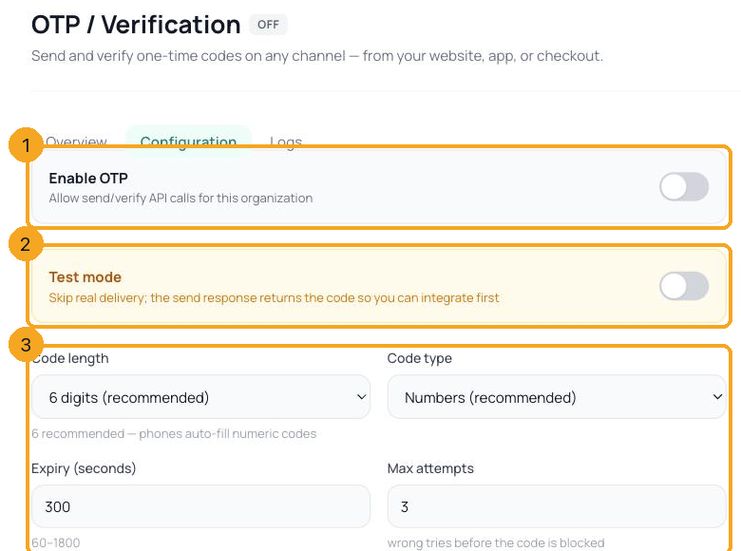
2Choose the rules
On the same screen: Code length (4, 6 or 8; 6 recommended — phones auto-fill numeric codes), Code type, Expiry (seconds) from 60 to 1800 (5 minutes by default), Max attempts before the code is blocked (3 by default), Resend cooldown and Max resends / hour (per number), the Channel order to try, your Brand name in message, and Allowed countries — only
+91 until you add more, which stops costly foreign sends. For WhatsApp, open Advanced — WhatsApp template & SMS DLT (India): WhatsApp AUTH template id holds the id of an approved authentication template on your number. Without one, a WhatsApp code goes as a plain message, which WhatsApp delivers only to people who have written to you in the last 24 hours — everyone else gets the next channel in your order. Message us to set the template up.3Send a code
From your website’s server, send
POST /api/v1/otp/send/ with the customer’s number (with its country code) or email in to, and a channel: auto tries your channel order; whatsapp, sms or email pins one. The key needs Send and check one-time codes, or full access. Keep the requestId that comes back (1). In Test mode the answer also carries the code itself as testCode (2), and nothing is sent.Request
curl -s -X POST "https://flowserver.skode.ai/api/v1/otp/send/" \
  -H "Authorization: Bearer $FLOW_API_KEY" \
  -H "Content-Type: application/json" \
  -d '{"to": "+91XXXXXXXXXX", "channel": "auto"}'
Answer
{"requestId": "…", "channelUsed": "whatsapp", "expiresInSec": 300}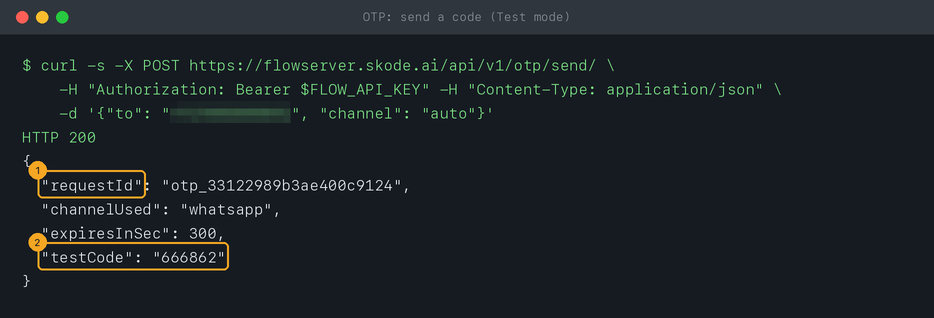
4If OTP isn’t on yet
Until you switch it on, sending answers
403 with "error": "otp_disabled" (1) and a message naming the switch: Settings → Developers → OTP / Verification → Configuration.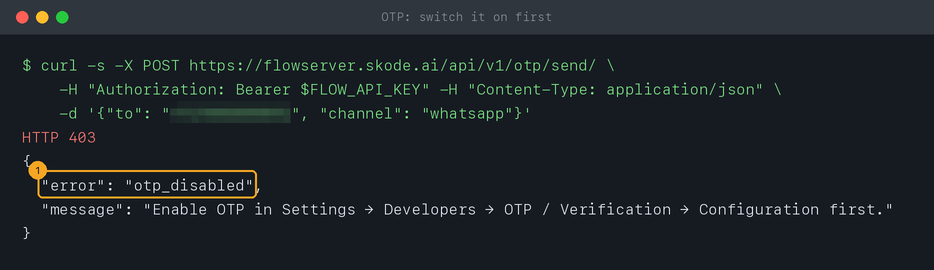
5Check the code the customer typed
Send
POST /api/v1/otp/verify/ with the requestId and the code (letters are not case-sensitive). A code that doesn’t pass answers "verified": false with a reason (1) — wrong_code, expired, too_many_attempts, already_used or delivery_failed — and attemptsLeft. "verified": true (2) means let them in — keep the receiptId as proof.Request
curl -s -X POST "https://flowserver.skode.ai/api/v1/otp/verify/" \
  -H "Authorization: Bearer $FLOW_API_KEY" \
  -H "Content-Type: application/json" \
  -d '{"requestId": "<from the send>", "code": "482913"}'
Answer when the code is wrong
{"verified": false, "reason": "wrong_code", "attemptsLeft": 2}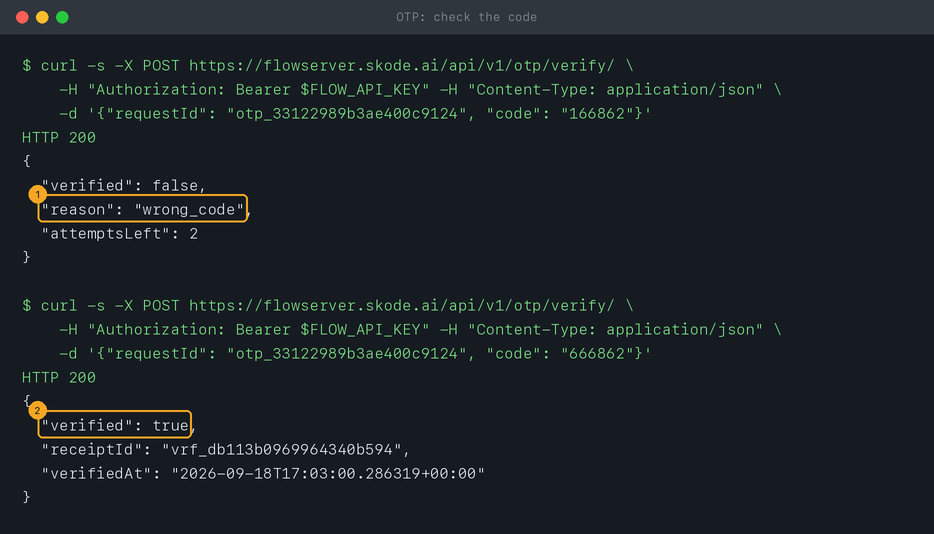
6Follow up on a code
GET /api/v1/otp/<requestId>/ returns where a code stands: the number, masked (1); its status (2) — pending, verified, expired, blocked after too many wrong tries, or failed; the channel used and whether it was delivered (deliveryStatus reads test in Test mode); how many wrong codes were tried (3); and when it was sent, expires or was verified.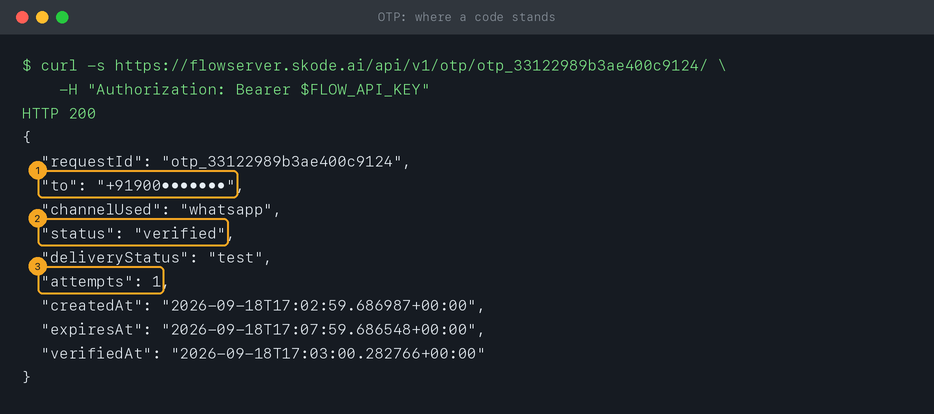
7Limits and cost
By default one number can get a new code every 45 seconds and at most 5 an hour, and your workspace 1,000 an hour. Past a limit, sending answers
429 "rate_limited". Each code sent is charged at WhatsApp’s authentication rate for the customer’s country (or your agreed flat price) and refunded if it can’t be delivered; a low wallet answers 402.© 2026 SkedX · Sample data only · Share and link freely · Copying the product or its design is not allowed · Terms
Common questions
Can I test without sending real messages?
Yes — switch on Test mode (step 1). Answers include
testCode, nothing is delivered and nothing is charged. Switch it off before going live.Why is a foreign number refused?
Only the countries in Allowed countries can get codes — just
+91 at first. Add the calling codes you need, comma-separated.Which channel does “auto” use?
The first in your Channel order that delivers. The answer’s
channelUsed says which.Can I change the message text?
Yes — Custom message, which must include
{code} and can use {minutes} and {brand}. It replaces Flow’s own wording: “Your brand: 482913 is your verification code. Valid for 5 minutes. For your security, do not share this code.” A code sent through a WhatsApp authentication template always uses that template’s approved words. In India, SMS wording must match a template registered with the operators (DLT), so message us before changing it for Indian numbers.Next in APIs & DevelopersFlow API errors, and how to fix each one →
Useful links
- OTP / Verification in Flow — turn it on, set the rules, see the logs
- Flow API reference — the three OTP requests
Previous: Contacts and conversations over the API · All APIs & Developers guides
Did this guide help?
Still stuck?Chat with support →


