Your CRM or back office can read what Flow knows about a person and keep it up to date: find a contact by phone or email, add tags, and check a conversation before replying.
One key, four requests. About six minutes.
In review: written from the product, not yet walked through live.
1Give the key the right permissions
Reading needs Read contacts or Read conversations; changing needs Create and update contacts or Update conversations. Tick only what your system does — create a key. A missing permission is named in a
403 (1).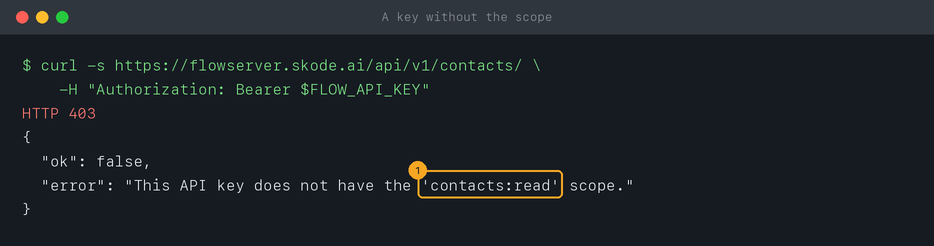
2Find a contact
GET /api/v1/contacts/ with search (1) matches any part of a name, email or phone — the easiest way to find someone by number is to search its digits. Or ask exactly with email or phone. Each contact comes back with its id, name, phone, tags, custom fields and the channel they last used (2). Up to 50 come back at a time (limit, up to 200), newest activity first; page on with offset.curl -s "https://flowserver.skode.ai/api/v1/contacts/?search=9876543210" \
-H "Authorization: Bearer $FLOW_API_KEY"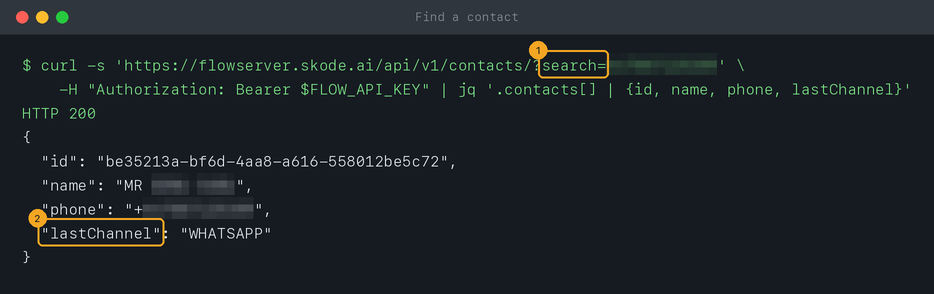
3Update a contact
Send
PATCH /api/v1/contacts/ with the contact’s id and only the fields to change — name, email, company, tags, custom fields. A list such as tags is replaced as a whole, so send the full list you want.curl -s -X PATCH "https://flowserver.skode.ai/api/v1/contacts/" \
-H "Authorization: Bearer $FLOW_API_KEY" \
-H "Content-Type: application/json" \
-d '{"id": "<contact id>", "tags": ["paid", "batch-108"]}'4List conversations — and see if you can reply
GET /api/v1/conversations/ takes channel (such as WHATSAPP), status (OPEN, PENDING or RESOLVED), limit and offset, newest first. Each conversation carries replyability: canFreeReply (1) says whether free text is allowed right now, hoursRemaining (2) how long the window stays open, and reason (3) why not — here, a customer who has never written, so only a template can start the conversation. Check it before a free-text reply; otherwise send a template.curl -s "https://flowserver.skode.ai/api/v1/conversations/?channel=WHATSAPP&status=OPEN&limit=20" \
-H "Authorization: Bearer $FLOW_API_KEY"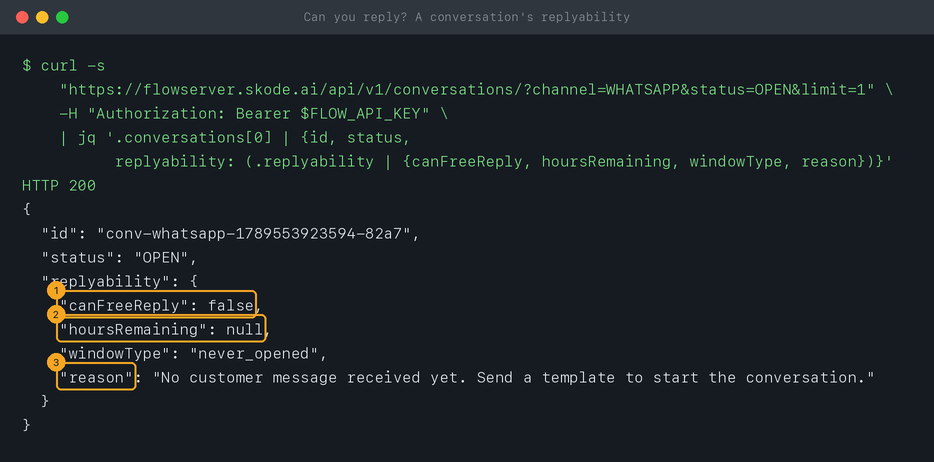
5Change a conversation’s status
Send
PATCH /api/v1/conversations/ with the conversation’s id and the new status — OPEN, PENDING or RESOLVED. Flow saves what you send as it is, so stick to those values.curl -s -X PATCH "https://flowserver.skode.ai/api/v1/conversations/" \
-H "Authorization: Bearer $FLOW_API_KEY" \
-H "Content-Type: application/json" \
-d '{"id": "<conversation id>", "status": "RESOLVED"}'6Create a contact
Send
POST /api/v1/contacts/ with the person’s number (with its country code) or email, plus anything else you know — name, company, tags. The key needs Create and update contacts. Flow stores the number the way it stores every contact, + and the country code first, and answers 201 with the new contact and its id. If that number — or, without a number, that email — already belongs to a contact, you get 409 with the existing contact’s id instead of a duplicate: update that one with PATCH. Flow also creates contacts on its own when you send someone a template or an inbound hook runs Create or update the contact.curl -s -X POST "https://flowserver.skode.ai/api/v1/contacts/" \
-H "Authorization: Bearer $FLOW_API_KEY" \
-H "Content-Type: application/json" \
-d '{"name": "Meera Nair", "phone": "+91XXXXXXXXXX", "tags": ["enquiry"]}'© 2026 SkedX · Sample data only · Share and link freely · Copying the product or its design is not allowed · Terms
Common questions
Why do I get 404 for a contact I can see in Flow?
A key only sees its own workspace. If you run several workspaces, use a key made in the one that holds the contact.
How do I get more than 200 at a time?
You can’t in one request. Page through with
offset: 0, 200, 400… until you have total.Can I filter conversations by the agent they’re assigned to?
Yes — add
assignedTo=<agent id> to GET /api/v1/conversations/. An agent’s id is the assignedTo value on any conversation they hold.Should I send phone numbers with a + here?
For
search, use the digits alone: it matches any part of the stored number, however it was saved.Next in APIs & DevelopersSend and check one-time codes (OTP) →
Useful links
- Flow API reference — every field of a contact and a conversation
- API Keys in Flow — add the contacts and conversations permissions
Previous: Send a WhatsApp template over the API · All APIs & Developers guides
Did this guide help?
Still stuck?Chat with support →


