A WhatsApp template’s words are fixed when Meta approves it; your request only fills its blanks.
This is the full reference for that one request — what to send, what comes back, what isn’t supported yet, and the mistakes that cost the most time.
In review: written from the product, not yet walked through live.
1The request
Send a POST to
https://flowserver.skode.ai/api/v1/messages/template/ with your key in the Authorization header. The key needs Send messages and templates. A template can go out at any time — including to someone who hasn’t written to you in the last 24 hours. This request sends the class reminder pictured under it, each value in its own blank: the batch (1), the faculty (2), the time (3), the topic (4) and the class link (5).curl -s -X POST "https://flowserver.skode.ai/api/v1/messages/template/" \
-H "Authorization: Bearer $FLOW_API_KEY" \
-H "Content-Type: application/json" \
-d '{"to": "+91XXXXXXXXXX",
"template_name": "batch_session_reminder_v1",
"variables": ["Batch 108", "Meera Nair", "8.30 PM to 10:00 PM",
"SEO recap", "https://example.com/class/108"],
"callback_data": "batch-108-reminder"}'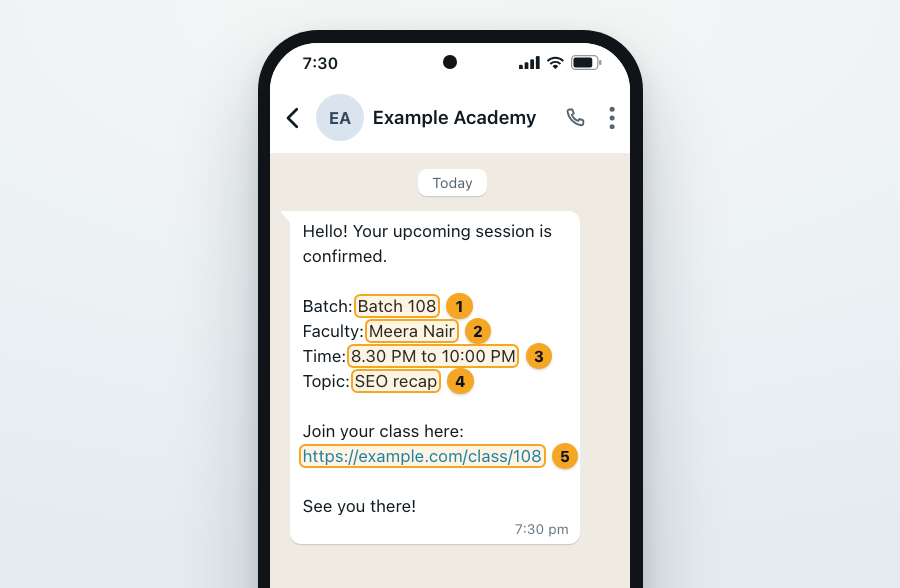
2The fields
to— required. The customer’s number with its country code, such as+91 98765 43210. Flow keeps only the digits and never adds a country code, so9876543210alone goes nowhere. (phoneworks as a name too.)template_name— required. The template’s technical name (step 3). It must be approved.variables— one value per blank in the template’s body,{{1}}first, as a plain list of text.language— optional. Left out, Flow uses the language the template was approved in.enanden_USare different templates.callback_data— optional. Up to 512 characters of your own reference. It comes back in the answer, and in the delivered, read and failed webhooks for that message.
template_name or templateName — both work.3Find the template’s name and blanks
In Flow, open the template in Templates: its Technical name (1) is the name you send, it must show Approved (2), and Variables (3) is how many values it needs. From code,
GET /api/v1/templates/?channel=whatsapp (the key needs List templates) returns the same as templateName, status and variableCount — the highest blank number it uses.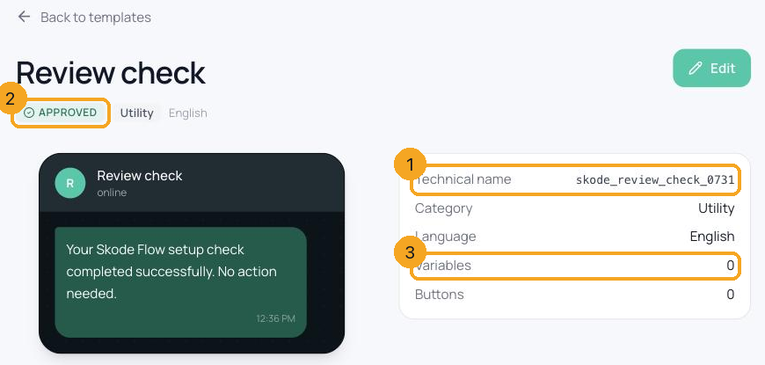
4What comes back
The key (1), the name (2) and the blanks (3) went in;
"ok": true (4) came back, with an id — the message’s id on WhatsApp’s side — a flowMessageId, the message’s id in Flow, which is the message_id its delivered, read and failed webhooks carry, and your callbackData. Keep both ids with your records. The message also appears in the customer’s conversation in Flow’s inbox. Answers always use camelCase names.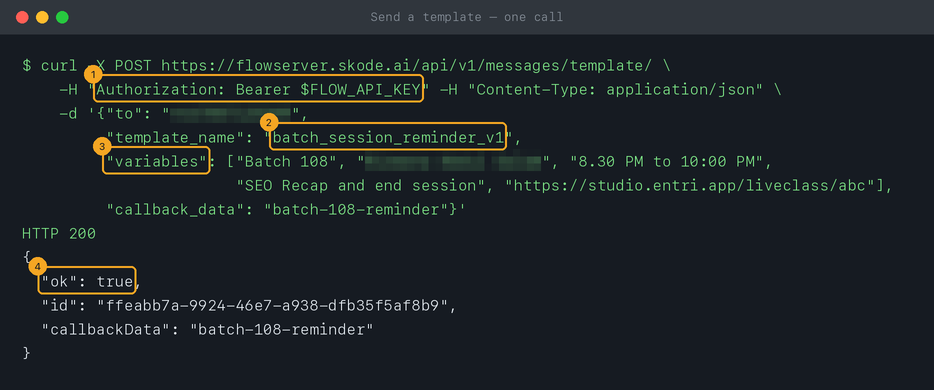
5Fill the blanks exactly
Values go in a plain list —
["Batch 108", "8.30 PM"] — never as named pairs (1): Flow checks that itself and refuses before anything is sent (2). The number of values and the template’s approval are checked by WhatsApp: too few or too many values, an unapproved template or a wrong language come back as a 400 carrying WhatsApp’s own explanation.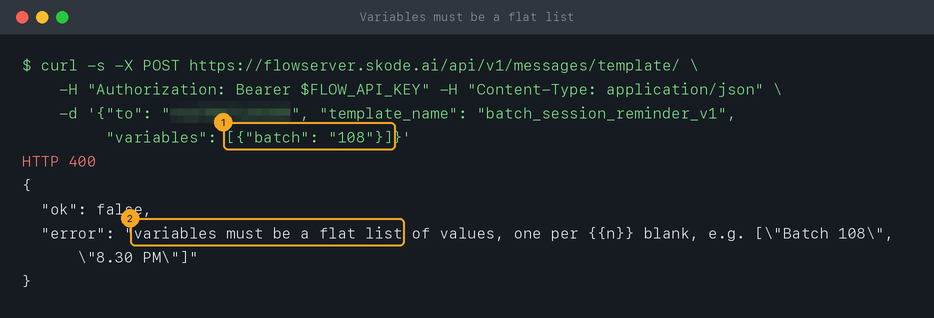
6Not supported yet: images, documents and button blanks
The API fills blanks in a template’s body only. A template whose header needs an image, video or document, or whose header or buttons have their own blanks, can’t be sent through the API yet — use a body-only version of the template for automated sends.
7Replies within 24 hours don’t need a template
Within 24 hours of a customer’s last message you can reply with free text:
POST /api/v1/messages/send/ with "channel": "WHATSAPP", the customer’s number in to, your text, and the conversation’s conversation_id from the conversations list — the reliable way to land in the right thread. Success is {"ok": true, "id": "…"} — the message’s id in Flow. Outside the window WhatsApp refuses free text, and Flow answers 400 with "reason": "window_closed" (1) — send a template instead.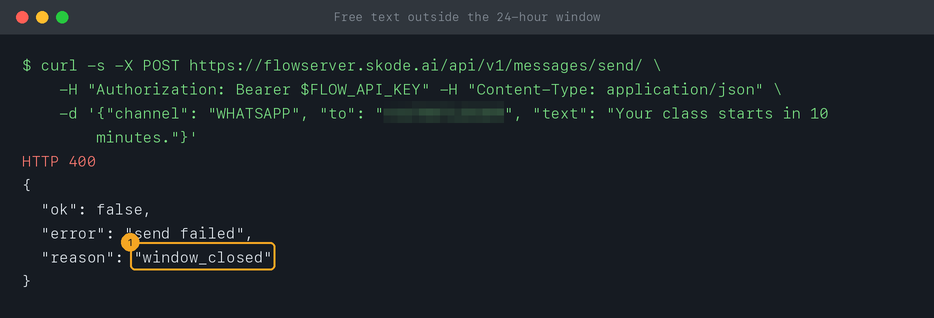
8What it costs
Each template sent is charged to the messaging wallet at its category’s rate — marketing, utility or authentication. If the wallet is empty, or the workspace’s daily spending limit is reached, Flow answers
402 “Your messaging wallet is empty — top it up to send.” and sends nothing. Have your system alert a person on 402, so reminders never stop without anyone noticing.© 2026 SkedX · Sample data only · Share and link freely · Copying the product or its design is not allowed · Terms
Common questions
Can I send a template with an image or a document?
Not through the API yet — it fills body blanks only (step 6). For automated sends, use a version of the template without header media or button blanks.
Do I get delivered and read receipts?
Yes, as outbound webhooks: A message is delivered, A message is read and A message fails to send. Each carries the message’s id in Flow (
message_id, the answer’s flowMessageId), the id the send answered with (provider_message_id) and your callback_data.Can one request go to several numbers?
No — one request per recipient. Loop over your list; each send is charged separately.
Where do replies go?
Into the customer’s conversation in Flow’s inbox. To receive them in your own system too, use an outbound webhook for A customer sends a message.
Is there a limit on how fast I can send?
Flow doesn’t slow your requests down, but WhatsApp limits how many people a number may start conversations with each day, by its messaging tier. Check your number’s limit in WhatsApp Manager before a large send.
Next in APIs & DevelopersContacts and conversations over the API →
Useful links
- Templates in Flow — technical names, status and the preview
- Flow API reference — this request, with a playground
- Wallet in Flow — top up before a large send
Previous: Send your first WhatsApp template in 5 minutes · All APIs & Developers guides
Did this guide help?
Still stuck?Chat with support →


