The quickest way to see the Flow API work end to end: two commands in a terminal, and a WhatsApp template arrives on your own phone.
You need an API key, one approved template and credit in the messaging wallet. Send to your own number first — every send is real, and charged.
In review: written from the product, not yet walked through live.
1Keep your key ready
No key yet? Create one with Send messages and templates and List templates ticked. Open a terminal (on Windows, Git Bash) and keep the key in a variable, so it never sits in your commands:
export FLOW_API_KEY="sk_flow_…your key…"2See which templates you may send
This lists your WhatsApp templates and sends nothing. Note how many blanks each one has —
variableCount (1) — and pick one whose status is approved (2); drafts and templates that are pending, rejected, paused or disabled can’t be sent. Its templateName is the name you’ll send.curl -s "https://flowserver.skode.ai/api/v1/templates/?channel=whatsapp" \
-H "Authorization: Bearer $FLOW_API_KEY"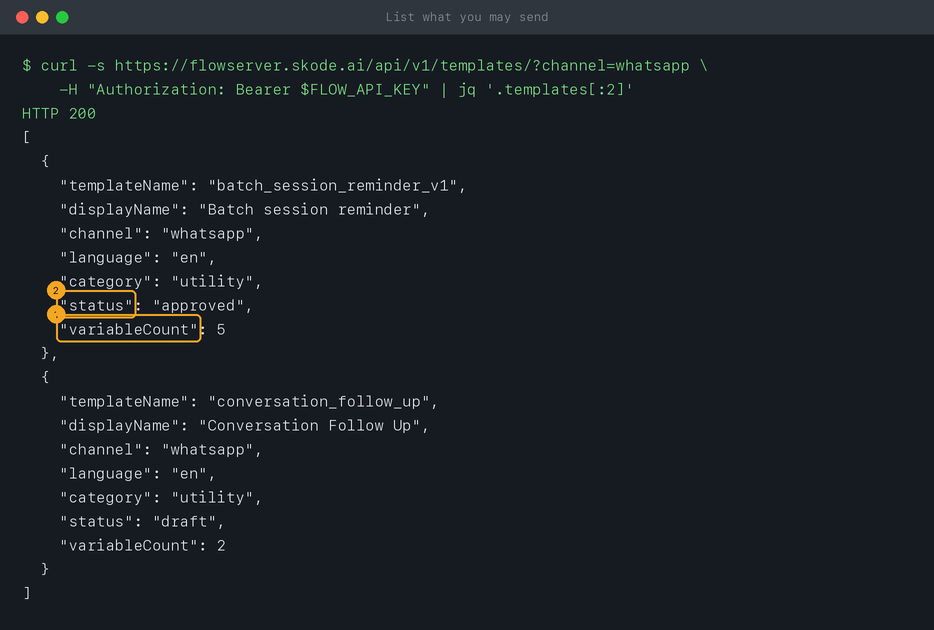
3Send it to your own number
Change three things in this command: your own WhatsApp number in
to, with the country code (spaces and a leading + are fine); the template’s name; and one value per blank in variables, in order — exactly as many as variableCount said. Leave variables out if the template has no blanks.curl -s -X POST "https://flowserver.skode.ai/api/v1/messages/template/" \
-H "Authorization: Bearer $FLOW_API_KEY" \
-H "Content-Type: application/json" \
-d '{"to": "+91XXXXXXXXXX",
"template_name": "your_template_name",
"variables": ["first blank", "second blank"]}'4Read Flow’s answer
The key (1), the template’s name (2) and its blanks (3) went in;
"ok": true and an id (4) came back — Flow has handed the message to WhatsApp, and it arrives within seconds. The conversation also shows in Flow’s inbox, like any other send. Anything else comes back as an error that names the problem — see Flow API errors.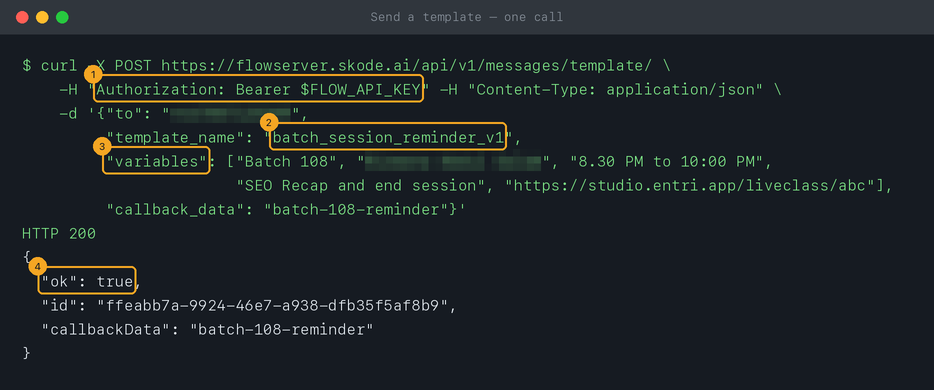
5See it arrive
Within seconds the template arrives in WhatsApp on the phone you sent it to, from your business’s number. Each value in
variables fills a blank, in the order you listed them — here the batch (1), the faculty (2), the time (3), the topic (4) and the class link (5). Your customers get exactly this. Nothing there? See the first question below.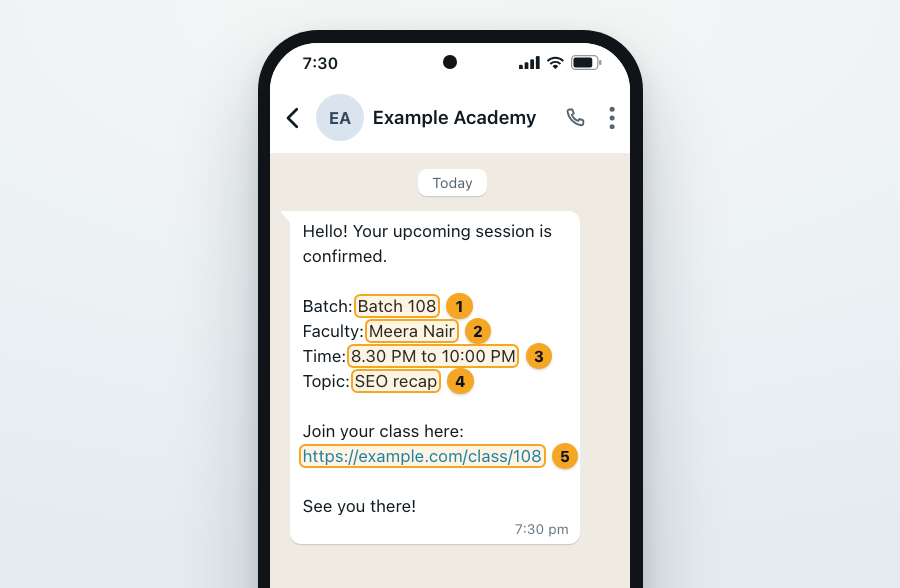
6Make it part of your system
Your code or tool makes the same request: same address, same header, same body. Send a WhatsApp template over the API explains every field. No developer? Let an AI assistant write the code, or use an inbound hook from Zapier or n8n.
© 2026 SkedX · Sample data only · Share and link freely · Copying the product or its design is not allowed · Terms
Common questions
Flow said ok, but nothing arrived. Why?
"ok": true means WhatsApp accepted the message. Open the conversation in Flow’s inbox: if WhatsApp couldn’t deliver it, the message is marked as failed. The usual causes are a number without its country code, or a number that isn’t on WhatsApp.Can one request go to many numbers?
No — one request, one recipient. Send one request per person; each is charged separately.
Do I need to give a language?
Usually not. Leave it out and Flow uses the language the template was approved in.
My template isn’t in the list.
The list shows the templates Flow holds for your workspace. If one you created elsewhere is missing, check Flow’s Templates screen, or message us.
Next in APIs & DevelopersSend a WhatsApp template over the API →
Useful links
- API Keys in Flow — create the key for step 1
- Templates in Flow — each template’s technical name and status
- Flow API reference — try the same request in the browser
Previous: Create an API key · All APIs & Developers guides
Did this guide help?
Still stuck?Chat with support →


