Pick the template once; each person’s own details fill it when the automation runs.
In review: written from the product, not yet walked through live.
Part of Send a WhatsApp template to one person from their record — its video shows the whole feature.
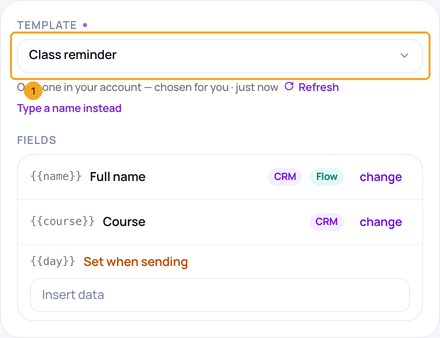
1Pick the template
In a SkedX Flow step that sends a WhatsApp template, choose it under Template (1) from your approved templates. A name typed in an older automation still works — Type a name instead.
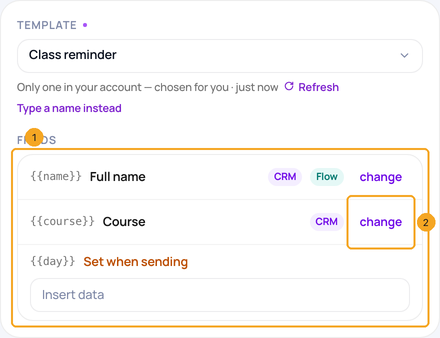
2Check the fields
Under Fields (1), each part shows the field that fills it when it sends, tagged CRM, Flow or both — the person’s CRM record is read first. Click change (2) to give a part this step’s own data instead.
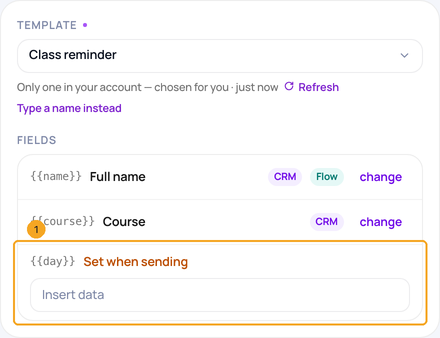
3Fill Set when sending
A part marked Set when sending (1) needs data from this automation: click Insert data and pick it, such as the trigger’s class date.
© 2026 SkedX · Sample data only · Share and link freely · Copying the product or its design is not allowed · Terms
Common questions
Where does a part’s field come from?
It is chosen when the template is made in SkedX Flow. The same field fills it from the CRM, the inbox and automations.
What if the person has no value for it?
The send stops and names the empty part — WhatsApp refuses a template with a blank one. Fill the field on their record, or give the part this step’s own data with change.
Does an automation I built before still work?
Yes. A template name you typed still sends, and values saved by position are read by position.
Next in Getting startedBuild a SkedX CRM automation step by step →
Did this guide help?
Still stuck?Chat with support →


