Send a WhatsApp template to one person from their record
WhatsApp only lets a business start a chat with an approved template.
2 min readFor all rolesUpdated 4 Nov 2026In review
Here is how to send one to one person, filled from their own record.
In review: written from the product, not yet walked through live.
Transcript · 1:05
This WhatsApp message is going to one person, filled in from their own record in SkedX CRM. Here is how to send it. Open the person's record, and click Email at the top right. The New message window opens, with them already in To. Click WhatsApp at the top. If your company has more than one WhatsApp number, pick the one this chat runs on. Then click Choose from approved templates. Search for the template, and click it. Each row says how many of its variables still need you. The panel on the right lists every variable. The first name comes from the record. Offer ends is empty, so Send template stays off. Meta rejects a template with an empty variable. Connect a field fills it from each person's own record, and it is saved for this template. Or type a value for this send only. Now every variable resolves, and the bubble is exactly what goes out. Click Send template. Once they reply, you can write to them freely for twenty four hours.
1Open the New message window
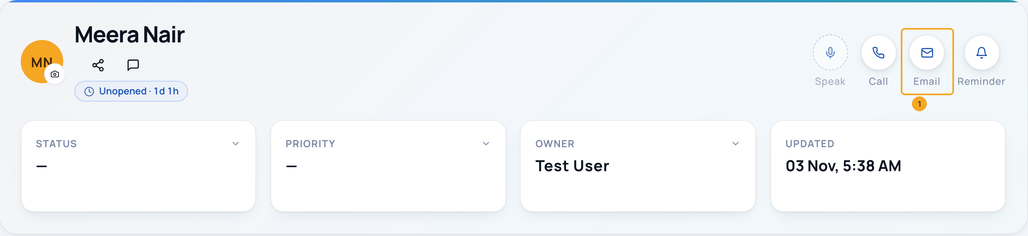
Open the person’s record and click Email (1) at the top right. The New message window opens with them in To.
2Switch to WhatsApp
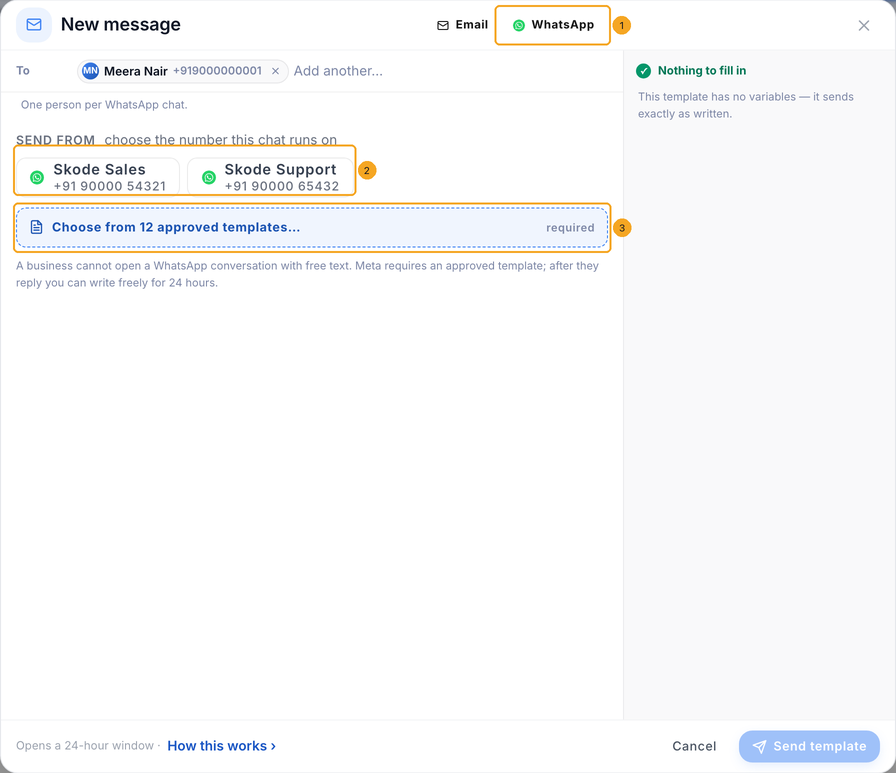
Click WhatsApp (1) at the top of the window. If your company has more than one WhatsApp number, pick the one this chat runs on under Send from (2). Then click Choose from approved templates (3).
3Pick a template
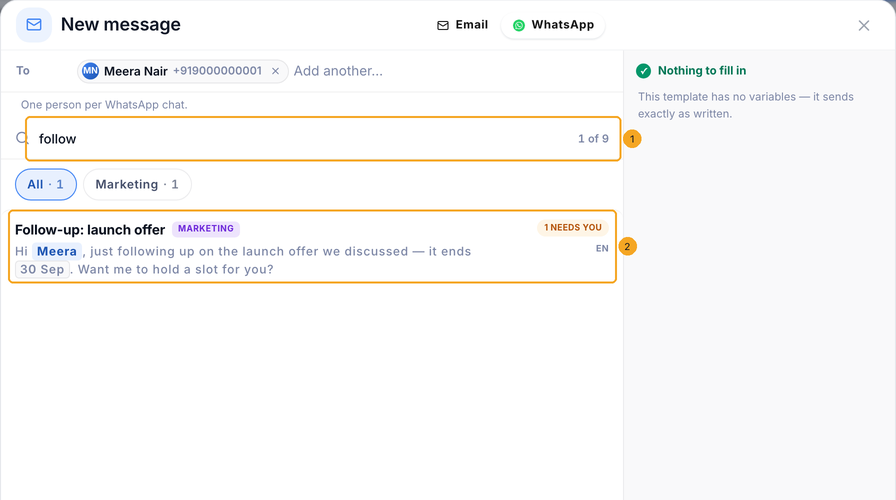
Type part of its name in the search (1) and click the template (2). Its line shows the message filled for this person, and needs you counts the variables still empty.
4Fill every variable
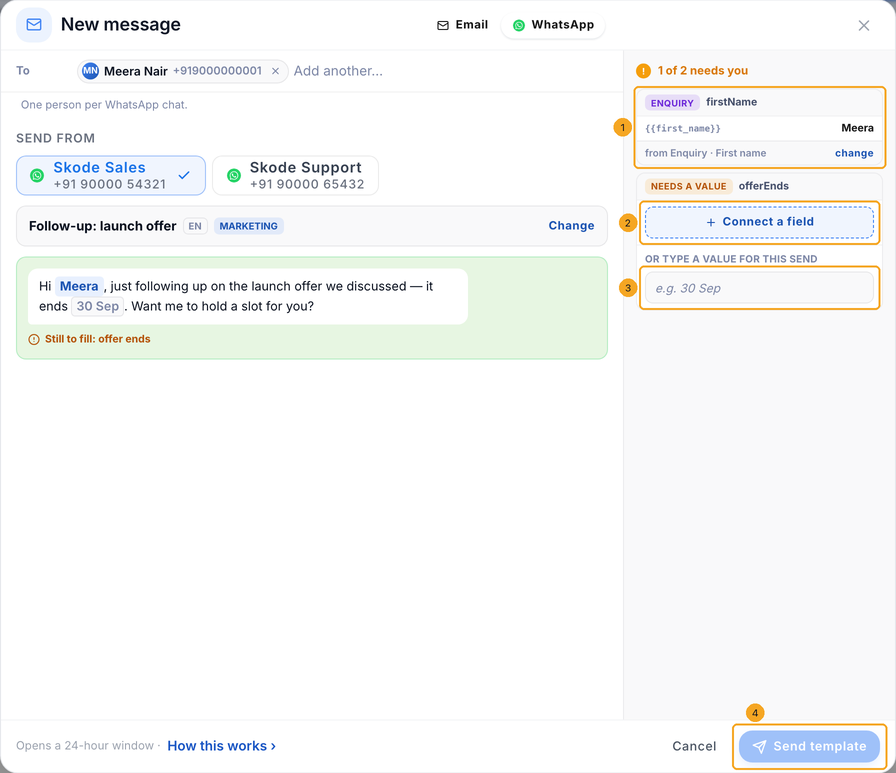
The panel on the right lists each variable. One filled from the record names its field (1). For an empty one, Connect a field (2) to fill it from each person’s record, or type a value for this send only (3). Send template (4) stays off until every variable has a value.
5Connect a field (optional)
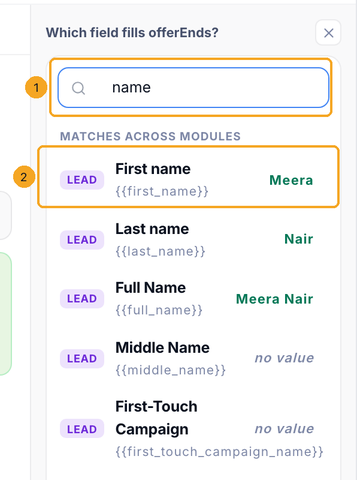
Connect a field opens a list of the record’s fields, each with this person’s value. Search (1) and pick one (2). The link is saved for this template, for your whole company; each person gets their own value.
6Send the template
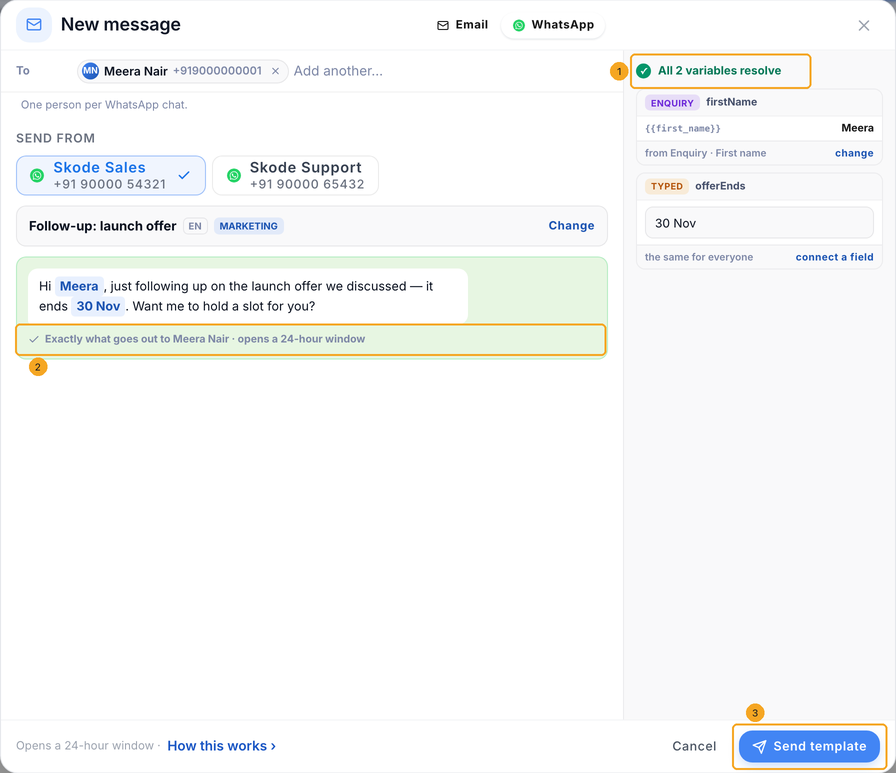
When the panel says every variable resolves (1), the bubble is exactly what goes out (2). Click Send template (3). The chat opens a 24-hour window; once they reply, write to them freely from the Inbox.
Hover it to read why. Usually a variable is still empty — the line under the bubble names it; fill it or connect a field. It is also off when the person has no phone number, or when your company has two numbers and none is picked under Send from.
Why can’t I just type a message?
WhatsApp lets a business start a chat only with a template Meta approved. Once the person replies you have 24 hours to write freely; after that you send a template again.
Does a connected field change other messages?
Only this template’s variable. The link is saved for your company, so the next person who sends this template finds it filled from each recipient’s record. Click disconnect beside it to remove the link.
It sends their full name. Can it say just the first name?
Yes. A template linked to Contact full name in SkedX Flow sends the whole name, the same from Flow and from the CRM. Click change beside it and pick First name; that is saved for this template, for your whole company. To change it for every sender, pick First name in the template in SkedX Flow.
Where does a filled variable come from?
The panel names it: from Enquiry · Full Name means it is read from that field of this person’s record. It may have been linked when the template was made in SkedX Flow, or connected here — either way change picks another field.
Does Send template in the Inbox fill the variables too?
Yes. In the Inbox, the floating chat and Start chat, choosing a template fills its variables the same way: a connected field first, then the field linked in SkedX Flow, read from the person’s record. Someone not in the CRM gets the chat’s own name and number. Anything you type wins.
It says NOT A FIELD HERE.
The template was made in SkedX Flow to fill that part from a field your company does not have, such as Course. Click Pick your field and choose yours — it is saved on the template, so the inbox and automations fill it the same way. Or type a value for this send.
It says Open WhatsApp thread with them.
You already have a WhatsApp chat with this person. Click it to reply there — inside the 24-hour window you can write freely, with no template. Or carry on here to send a template.