Pick them for that person once, from your own login, and Analytics opens with just those on every device.
In review: written from the product, not yet walked through live.
1Open Customize on Analytics
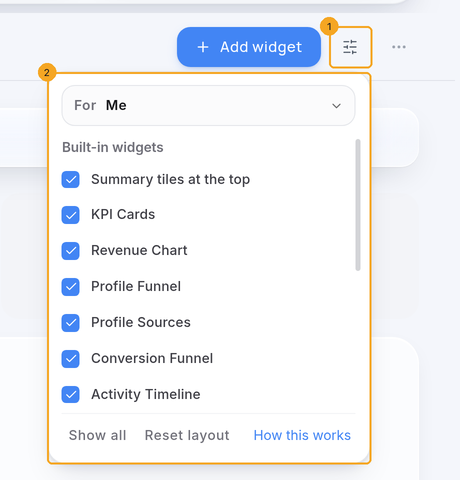
On Analytics, click the sliders button (1) beside Add widget. Customize opens below it (2), showing what you see today.
2Pick the person
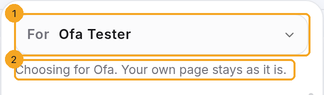
Under For (1), choose the teammate. Their own choice loads, and a line (2) says your own page stays as it is. Only the account’s owner and admins see For.
3Tick only what they should see
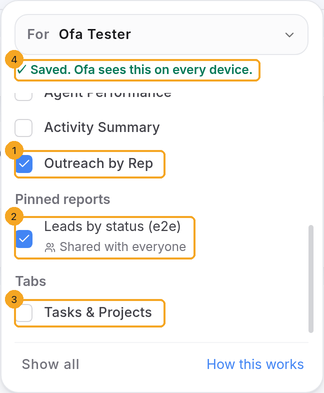
Untick what they don’t need. Here only Outreach by Rep (1) and one pinned report (2) stay ticked, and the Tasks & Projects tab (3) is off. The summary tiles at the top can be hidden the same way. Each tick saves at once, and the line under their name confirms it (4).
4A pinned report only you can see
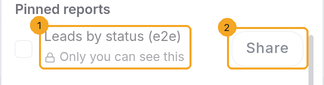
A report you pinned for yourself says Only you can see this (1) and can’t be ticked for someone else. Click Share (2) first. See Share a pinned report.
5What they see
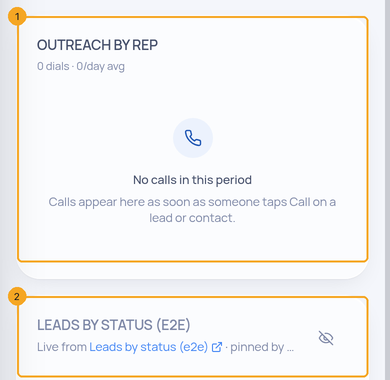
Their Analytics opens with just Outreach by Rep (1) and the pinned report (2), on their laptop and their phone. Their own Customize list says who chose it, and they can still change it.
6On a phone
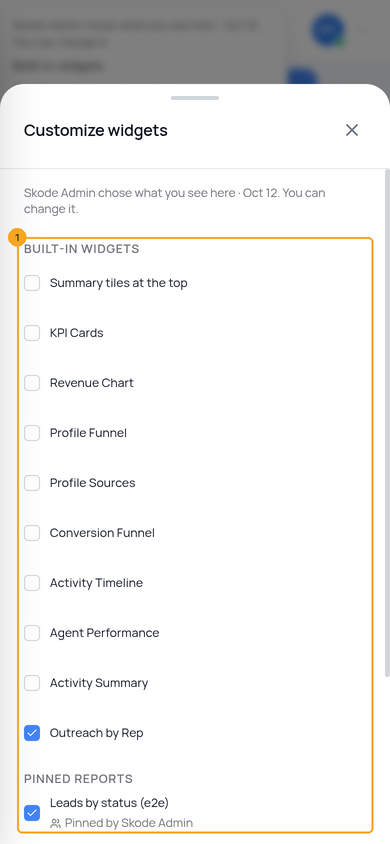
On a phone, tap ⋯ then Customize widgets. The same lists open as a sheet (1).
© 2026 SkedX · Sample data only · Share and link freely · Copying the product or its design is not allowed · Terms
Common questions
Who can choose for someone else?
The account’s owner and admins. Everyone can choose for themselves with the same button.
Does it change my own Analytics?
No. While you choose for someone, your own page stays as it is.
Does hiding a widget hide the data from them?
No. It only chooses which boxes show. What anyone can see inside a widget still follows their own access.
Can they change it back?
Yes. Their Customize list says who chose it, and they can tick anything back.
Do the order and size of the boxes follow them too?
Not yet. Which boxes show follows them to every device; order and size are kept by each browser.
Next in AnalyticsShare a pinned report on Analytics with your team →
Previous: See what you did and what moved — My Work · All Analytics guides
Did this guide help?
Still stuck?Chat with support →


