When you change it, SkedX asks whether the change is for them too, or only for you.
In review: written from the product, not yet walked through live.
1Change the view
Sort, filter or move columns on a saved view. A bar says what changed (1) and offers Update view (2), Save as new and Reset.

2On a shared view, choose who gets it
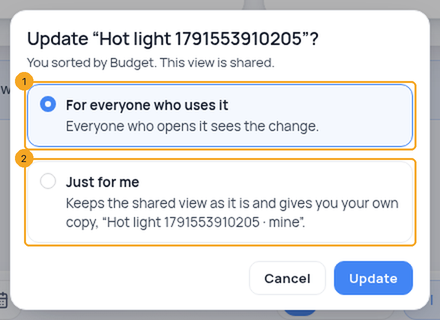
Update view on a shared view asks first, and says what you did. For everyone who uses it (1) names the people who will see the change. Just for me (2) keeps the shared view as it is and saves your change as your own copy, “‹view› · mine”.
3On a phone
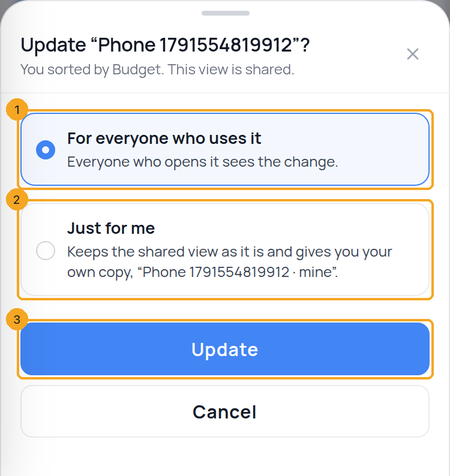
The same question comes up as a sheet: For everyone who uses it (1) or Just for me (2), then Update (3) across the bottom, with Cancel under it.
4Your own view just updates
On a view only you use, Update view saves straight away — there is nobody else to ask about.
© 2026 SkedX · Sample data only · Share and link freely · Copying the product or its design is not allowed · Terms
Common questions
Why can’t I choose For everyone?
Only the person who made a shared view, or an admin, can change it for everyone. The question says who made it; Just for me keeps your change as your own copy.
I chose Just for me twice. Do I get two copies?
No — the second time, your “· mine” copy is updated.
Does a view keep how it is grouped?
Yes — by status, owner, priority, source or any field you group by, on Enquiries and on every profile.
What if I don’t click Update view?
The saved view stays as it was, and your change is kept on your own list. Reset discards it.
Next in ProfilesAssign profiles to your team →
Previous: Pin a column to the left · All Profiles guides
Did this guide help?
Still stuck?Chat with support →


