Your website, a partner tool or an AI assistant books into the same calendar your team uses — never a time that is taken, never a stranger’s record.
In review: written from the product, not yet walked through live.
1Find the Calendar card
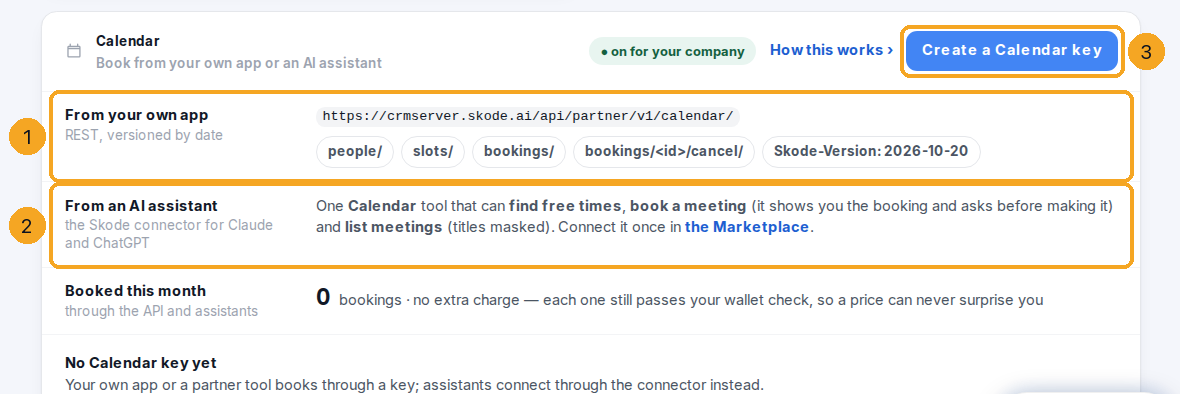
Open Settings › Integrations, then Developer. The Calendar card shows the address for your own app (1), the AI connector’s Calendar tool (2), how many bookings came in this month, and your Calendar keys. Create a Calendar key (3) makes one.
2Make a key for your app
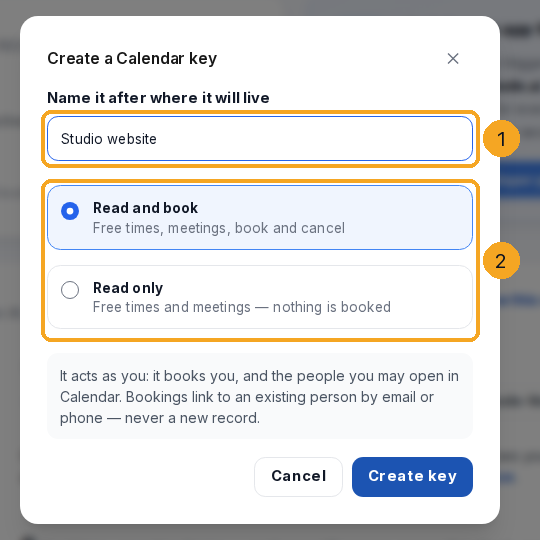
Name the key after where it will live (1) and choose what it can do (2): Read and book, or Read only. It acts as you — it books you and the people you may open in Calendar. Copy it straight away: it is shown once.
3Ask for free times, then book one
Send
GET …/calendar/slots/?from=…&to=…&duration=30 with Authorization: Bearer <key>, then POST …/calendar/bookings/ with one of the times as start and an Idempotency-Key. A time taken a moment ago answers 409 just_taken with the next free times.4Or ask your AI assistant
With the SkedX connector in Claude or ChatGPT, ask “When is Meera free on Thursday? Book the first slot for Anita.” The assistant shows the booking it is about to make and books only after you say yes.
© 2026 SkedX · Sample data only · Share and link freely · Copying the product or its design is not allowed · Terms
Common questions
Can it create a new person?
No. An email or phone only links the meeting to a record that already exists — a person is added to the CRM only by your own rules.
What does a booking cost?
Nothing on the basic plan. Each one is still counted as a calendar booking and passes your wallet check, so a price can never arrive as a surprise.
Can a key see a colleague’s private meetings?
No. A colleague’s meeting from Outlook or Google comes back as Busy with its times — exactly what Calendar shows you.
Why was my cancel refused?
A meeting a visitor booked through your link is cancelled from Calendar, so they are told; a meeting from Outlook or Google is changed in that calendar.
Next in CalendarYour company’s one address — and where it leads →
Previous: See which booking link — and which ad — brings meetings · All Calendar guides
Did this guide help?
Still stuck?Chat with support →


