This shows where people drop off — and which ad or chat actually books.
In review: written from the product, not yet walked through live.
1Read the line under each link
In Calendar settings, open Booking links. Under each link that is on: opened, picked a time and booked in the last 7 days (1). Tap the line for that link’s numbers.

2See the drop-off and where they came from
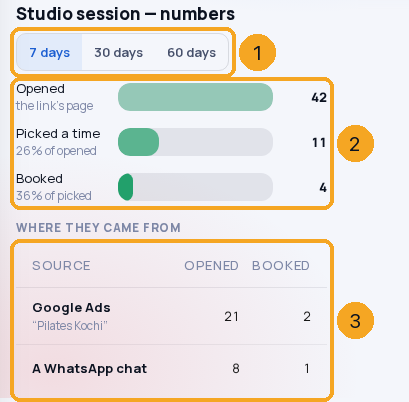
Choose 7, 30 or 60 days (1). The three bars (2) show how many went on to each step; the table (3) splits them by where they came from — the ad and its campaign, a chat, a QR code, your website, or opened directly.
© 2026 SkedX · Sample data only · Share and link freely · Copying the product or its design is not allowed · Terms
Common questions
Why not 90 days?
Opened and picked a time are anonymous visits, and Signal keeps those for 60 days — a longer period would quietly count fewer than happened.
Does this show who opened my link?
No — counts only. Who booked is on each meeting and on the person’s record, with the path that brought them.
It says to turn on Signal.
Opened, picked and the source come from SkedX Signal, which every plan includes. Set it up once in your account; bookings work without it.
Next in CalendarBook meetings from your own app or an AI assistant →
Previous: Give your booking page its look — or let the brand kit lead · All Calendar guides
Did this guide help?
Still stuck?Chat with support →


